
Freepik (Now Magnific)
Magnific is Freepik’s AI image suite with 25-plus models, a top-tier upscaler and a clean background remover. Strong output, but the credit system is fiddly and its signature upscaler is paywalled.

A deep, polished AI image suite with 25-plus models and a best-in-class background remover, held back by a confusing credit system and a free tier that locks the one tool it is famous for.
Should you use Freepik?
Creators who want many models in one place, plus a strong upscaler and a clean background remover, and will pay for the commercial license.
You want to upscale or sell work for free , or you need images with readable text, where every generator here still struggles.
Images are free to make, but paid plans start at $7.25 a month billed annually on an active promo, and everything runs on a credit meter.
Video burns credits fast , "unlimited" downloads cap at 100 a day, and users report surprise renewals and slow cancellations.
Key features & how they perform
Each feature rated from a free-plan test session blended with aggregated user reviews.
Multi-model generator
One login opens 25-plus image models, Nano Banana, GPT, Seedream, Flux with eleven variants, and Freepik's own. Rare breadth for a free account.
Background remover
The cleanest win of the test. One click returned a transparent PNG that kept flyaway hair strands with no halo, no prompt and no settings.
Text-to-image quality
Lighting, texture and depth come out strong even on free renders. Scenes look professional, as long as the image needs no readable words.
Upscaler
The feature Freepik made its name on, and reviewers still rate the added detail highly. The catch is that it is locked behind a paid plan.
Video generator
Multiple video models are on offer, but a single clip can run thousands of credits, so it is a paid feature sitting behind a free badge.
Text inside images
The honest flaw. Chalkboard menus and newspaper headlines render as gibberish, so any image needing real labels will need a manual fix.
Feature ratings blend a hands-on free-plan session with recurring sentiment from Trustpilot, G2 and user communities.
In-Depth Evaluation of Freepik AI
I stayed on the free plan the whole time, typed my own prompts and saved every result, to see what holds up before anyone pays.
A long list of models in one place
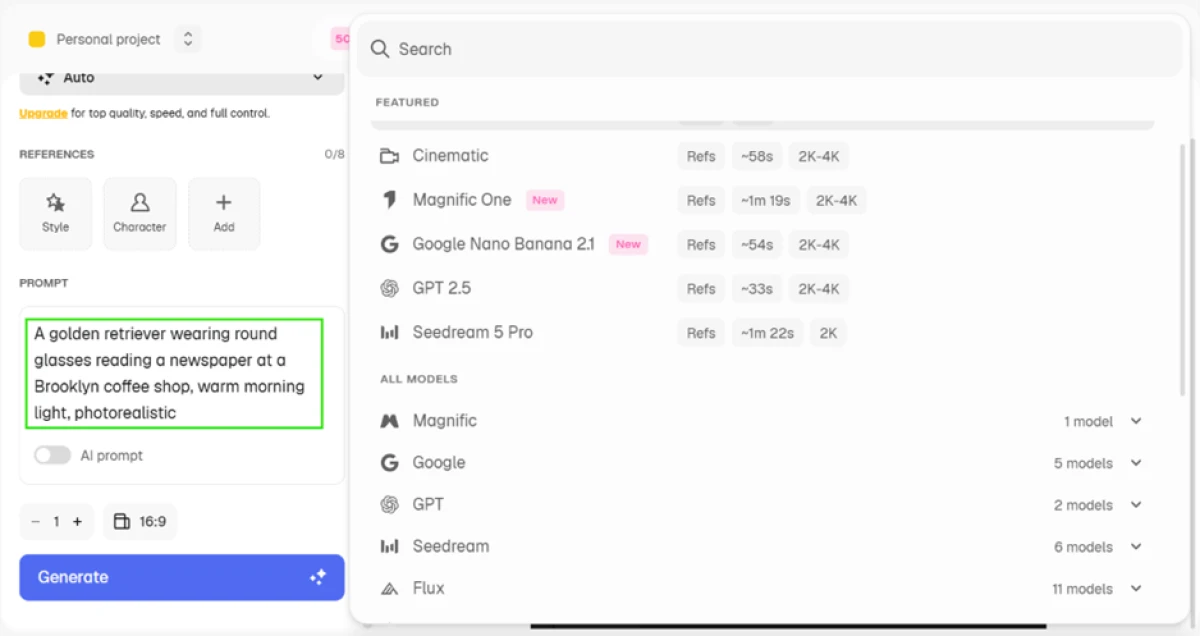
The first thing that stood out was the model menu inside the image generator. One free login gave me Nano Banana from Google, GPT, Seedream, Flux and Freepik's own model, with eleven Flux variants alone.
I counted more than 25 image models before I even scrolled to video. Most rival tools give you a single engine.
Text to image: strong scenes, weak text
I kept the model on Auto and ran a photorealistic scene prompt to judge two things at once: how good the render looks, and whether it can handle written detail in the frame.
"A golden retriever wearing round glasses reading a newspaper at a Brooklyn coffee shop, warm morning light, photorealistic"

Editing a product photo with one line
Next I uploaded a perfume product shot and tried the prompt-based editor with a single plain instruction.
"Change the background to a clean white studio backdrop, keep the product identical"

The result swapped the warm orange background for clean white and kept the bottle, the rock and the "VESPER DUNE" label intact.

Removing a background
The background remover was the cleanest win of the session. I ran a portrait with loose, flyaway hair, which is usually where these tools smear the edges.
Before

After

Where the free plan stops: the upscaler
Here is the catch. Freepik built its name on upscaling, and that is the one tool I could not use for free. The Upscale button sits right there with a gold crown on it, locked behind a paid plan.

Commercial use needs a paid plan
When I went to download, the export panel let me save a PNG, but the fine print was clear: free downloads are for personal use only, and a commercial AI license needs a plan. The SVG option carried a crown too.
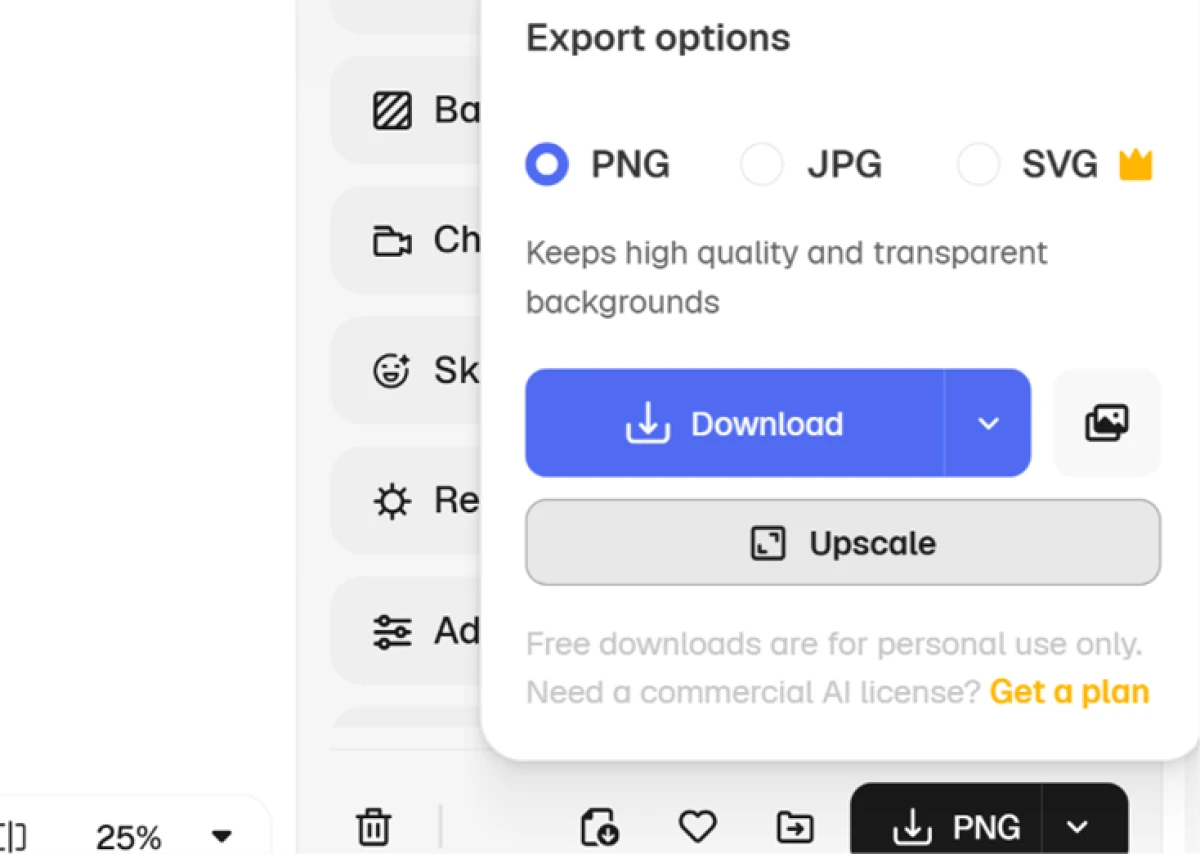
For anyone doing client work or selling products, this matters. Free output is fine for testing, not for a paid project.

Video burns through credits fast
I also tried the video generator to see how far a free allowance stretches.
"Create a cinematic 10-second video with stunning visuals, smooth camera movements, realistic lighting, and high-quality details."
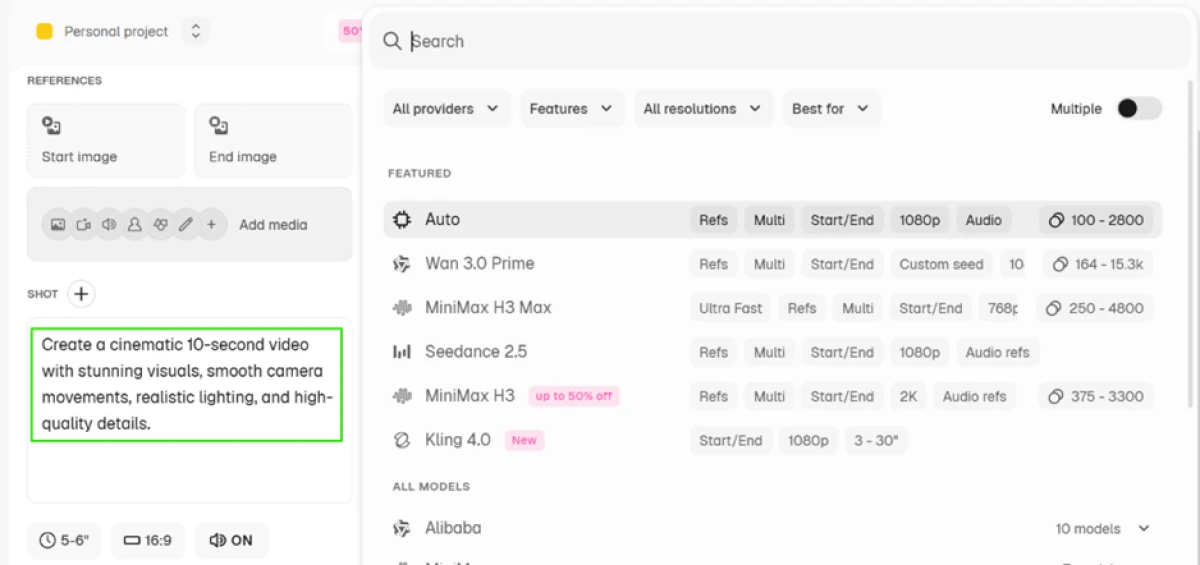
Each video model shows a credit range, and the numbers are steep. Auto runs 100 to 2,800 credits, MiniMax H3 Max climbs to 4,800, and others sit in the thousands. A single clip can eat more credits than a free day allows.

Freepik pricing
Individual plans, shown at the annual-billed rate with the current promo applied.
| Plan | Price | What's included |
|---|---|---|
| Premium | $7.25 /mo billed annually | 240K credits a year, Spaces and 250M-plus premium assets, commercial license, no model training on your data. Regular rate $20, shown with an Extra 50% off promo |
| Premium+ Unlimited | $33.75 /mo billed annually | Unlimited generations, 600K credits a year, Nano Banana 2 (1K), commercial license, no model training. Regular rate $45 |
| Pro Starter | $82.50 /mo billed annually | Everything in Premium+, 1.5M to 4M credits a year, Nano Banana 2 (2K) and Nano Banana Pro, commercial license. Regular rate $110 |
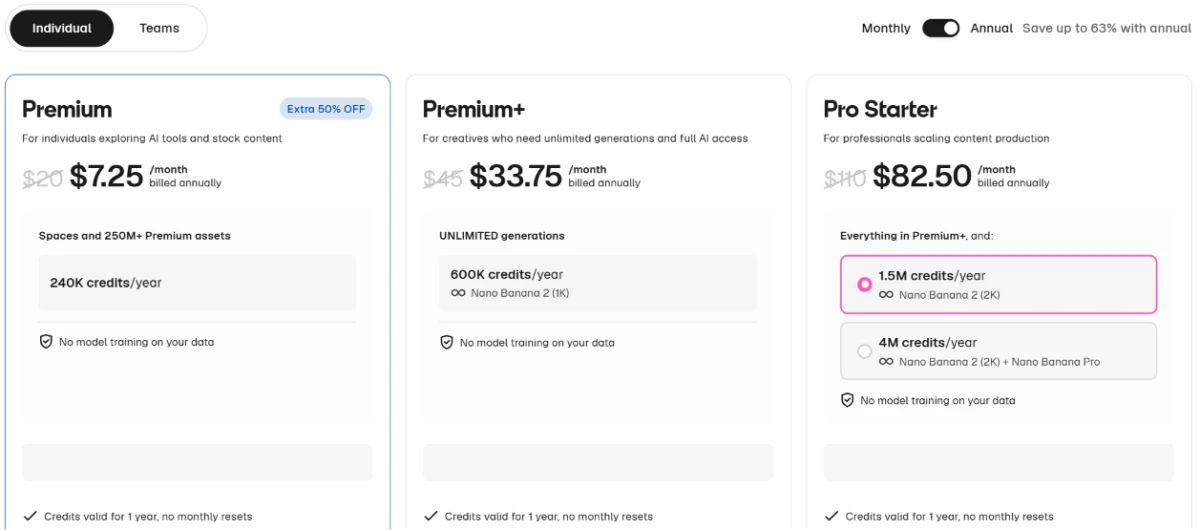
Pricing is accurate as of 26 October 2026 and was captured from the official Freepik website. Prices shown reflect annual billing with an active discount, and a Teams option exists alongside these Individual plans, so check the official Freepik pricing page for the current figures before you subscribe.
Pros & cons
Drawn from real user reviews, not from our own test run.
✅ Pros
- One account opens image, video and audio models side by side
- Model switching lets you match an engine to each project's style
- High-resolution output and strong photorealism draw repeat praise
- Clean, intuitive interface that newcomers pick up quickly
- Credits stay valid for a full year with no monthly resets
⛔ Cons
- The credit system confuses users, and trial-and-error drains it
- Video is the costliest feature, thousands of credits per short clip
- "Unlimited" downloads are quietly capped near 100 per day
- Reports of surprise renewals and charges after a believed cancellation
- Support replies run slow, templated, and sometimes miss the question
- Some accounts closed for "fraudulent activity" with no appeal route
Synthesized from real reviews on Trustpilot (4.0 from 3,200-plus ratings) and G2, plus recurring user-community sentiment · paraphrased, not quoted
Freepik alternatives
| FreepikReviewed | MeiGen AI | Perchance AI | Frosting AI | |
|---|---|---|---|---|
| Our Score | 7.2/10 | 7.5/10 | 7.0/10 | 6.0/10 |
| What it is | Full image, video & upscale suite | Free image generator with prompt gallery | Free no-signup image generator | Art and anime image generator |
| Model choice | 25-plus models in one place | Curated set | General, single pipeline | Art and anime styles |
| Free tier | Images and background removal free | Free with limits | Free, no account needed | Free with daily limits |
| Upscaling | Yes, paid only | No | No | No |
| Best for | Pros wanting many models and upscaling | Quick, gallery-driven image making | Zero-friction free generation | Stylized art and anime |
| Main weakness | Credit and billing friction, weak text | Fewer pro editing tools | Basic controls and quality | Narrow, style-first focus |
Who Should Use Freepik, and Who Should Avoid It?
Freepik is a strong paid suite with a usable free sampler, best for people who will pay for the models and the license and can live with a fiddly credit meter.
Who Should Use Freepik?
Best suited for these workflows
Creators Who Test Across Models
Running one prompt through Flux, Nano Banana, GPT and Seedream in a single tab is where the platform genuinely beats single-engine rivals.
Product and E-commerce Shooters
The one-line background edit and the clean background remover turn a raw product photo into a catalog-ready base in a couple of clicks.
Anyone Who Needs Serious Upscaling
The upscaler that made Freepik's name still draws strong marks for added detail, worth the subscription if enlargement is your core need.
Freelancers Selling Their Output
The commercial license comes on every paid tier, so client work is covered from the cheapest plan up, not just the expensive ones.
Who Should Avoid Freepik?
Consider an alternative if you need
Free Upscaling or Free Selling
The upscaler and the commercial license are both paywalled, so a free account cannot enlarge images or use its output in paid work.
Images With Real Text
Signs, menus and labels come out as gibberish, so posters, packaging and anything type-heavy will need manual fixing afterward.
Heavy Video on a Budget
A single clip can cost thousands of credits, so video-first users will burn through an annual allowance far quicker than they expect.
Set-and-Forget Billing
Users report surprise renewals and slow cancellations, so this is not a tool to subscribe to and stop watching.
Our Recommendation
Freepik is one of the deepest AI image suites around, and the free plan is a genuinely useful way to judge the models, the editor and the background remover before paying. Treat the free tier as a sampler, not the product: the upscaler, commercial rights and real video all sit behind a plan. If you will use several models, need the upscaler and want selling rights, a paid tier earns its place, as long as you watch the credit meter and switch off auto-renew when you are done.
Freepik scorecard
Rated against what a multi-model AI image and video platform is built to do.
| Dimension | Verdict | Score |
|---|---|---|
| Model choice & variety Number and range of engines | Excellent |
9.0
|
| Editing & background removal One-line edits and cutouts | Excellent |
8.5
|
| Image scene quality Lighting, texture and realism | Good |
8.0
|
| Upscaling quality Detail added when enlarging | Good |
8.0
|
| Ease of use Interface, onboarding, speed | Good |
8.0
|
| Licensing & data privacy Commercial rights and training policy | Good |
7.0
|
| Free plan usefulness What you can do without paying | Average |
6.5
|
| Credit system & value Clarity and fairness of the meter | Average |
6.5
|
| Video generation Quality against credit cost | Average |
6.0
|
| In-image text accuracy Readable words inside a render | Weak |
4.5
|
| Scrutool Score Equal-weight average of all 10 dimensions |
7.2
|
A deep image suite worth trying free, worth watching once you pay
Freepik packs more into one login than almost any rival: 25-plus image models, a product editor that follows a one-line instruction, and a background remover that handled flyaway hair in a single click. The scene quality is strong even on free renders, and the upscaler that built the brand still earns its reputation. The weaknesses are just as clear. Text inside images comes out as gibberish, the upscaler and commercial license are both locked away from free users, and video drains credits so fast it is really a paid feature. Beyond the test, real users flag a confusing credit meter, "unlimited" downloads that cap near 100 a day, and billing that can renew or resist cancellation. Use the free plan to judge the models and the editing tools, which are the best things here, then pay only once you know you will use the upscaler, the extra models and the selling rights. If you mostly need images with real text, cheap video, or a tool you never have to babysit on billing, look elsewhere.
Discussion
Join the discussion and share your perspective.