
LongHair AI
LongHair AI previews long hairstyles on your photo for free in the browser. Great realism, but the color changer and affiliate clutter let it down.

A hairstyle try-on that nails realism and keeps your face intact across nine variations, then falls apart on color accuracy, affiliate clutter and a popup pushing you to a second site.
Should you use LongHair AI?
Trying long hairstyles before a salon visit , where keeping your real face and outfit intact matters more than exact color.
You need an accurate hair color preview . The color changer ignored the shade I picked and painted on a flat, textureless fill.
Free to use with daily limits. There is no published pricing , and the HD download is an upgrade the site never puts a number on.
A second upload triggers a popup steering you to a separate site , RightHair, and styling cards carry unrelated Shein shopping links.
Key features & how they perform
Each feature rated from hands-on testing and aggregated review sentiment.
AI Hair Design grid
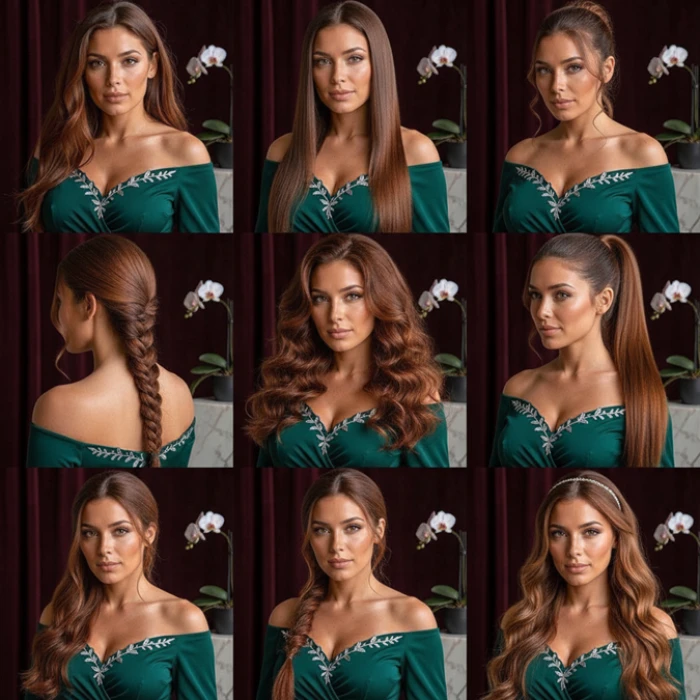
Returns nine variations at once, waves, braid, ponytail, headband, on the same face and outfit. Holding identity across all nine is the hardest trick here, and it lands it.
Single-style try-on
Pick one look from the grid and the curls render like real hair rather than a flat overlay, with the face, earrings and clothing carried over cleanly.
Filtered style grid
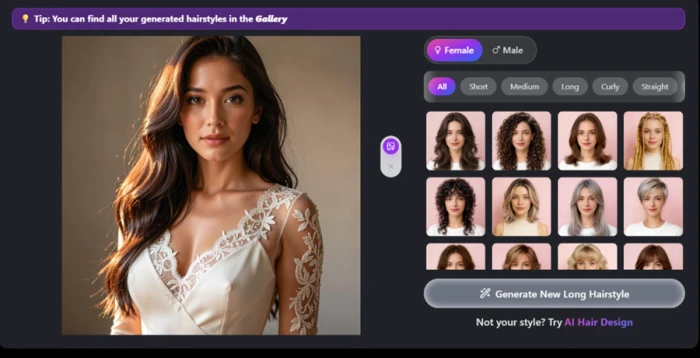
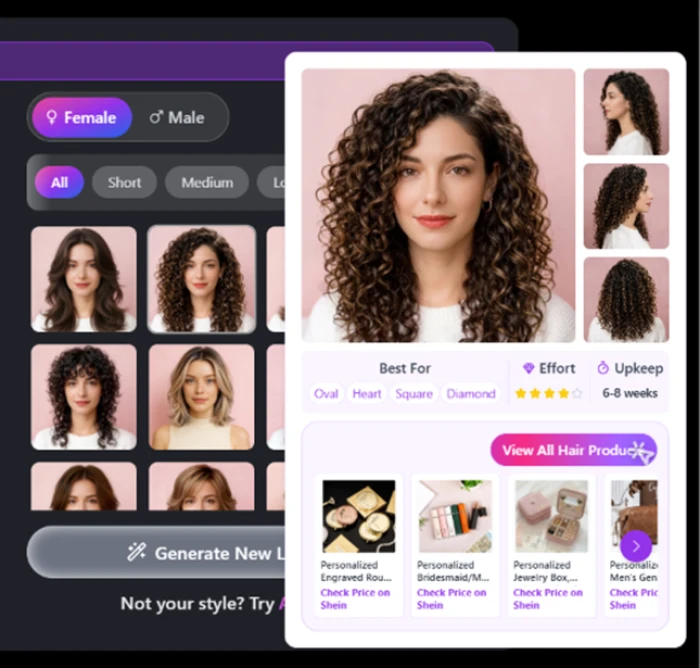
A Female and Male toggle plus Short, Medium, Long, Curly and Straight filters. Hover cards add face-shape fit, upkeep windows and effort level.
Pre-upload cropping
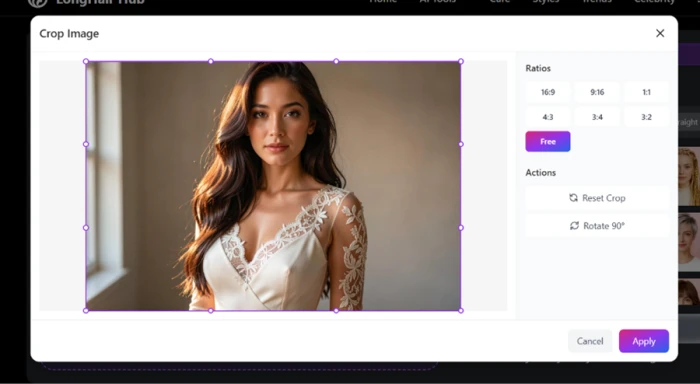
Preset ratios like 16:9 and 1:1, a free-form option and a 90-degree rotate let you frame the face tightly before anything is generated.
Hair color changer
The weakest tool by far. A selected pink generated as flat yellow that sat on the strands like paint, with no texture or light underneath.
Monetization & flow
Styling cards double as Shein affiliate rows, and a second upload redirects toward a sister site. The commerce competes with the tool.
Feature ratings blended from the Apple App Store, Product Hunt & competitor hands-on reviews + testing.
Walking Through LongHair AI Step by Step
I moved through the tool the way a first-time user would, from crop panel to color changer, capturing each screen as I went.
Setting the aspect ratio before upload
The first screen after I selected my photo was a crop panel, not a generation button. It offered preset ratios such as 16:9 and 1:1 next to a free-form option, along with a 90-degree rotate.
I used it to frame the face more tightly before anything was generated.
The uploaded photo and the style grid
Once the photo was in, the layout settled into two halves. My image sat on the left while the hairstyle thumbnails filled the right.
The grid is organized by a Female and Male toggle and category filters for Short, Medium, Long, Curly and Straight. Picking a direction took one click, and the grid refreshed to match.
Hovering for style details, and the product push
Hovering over any thumbnail opened a detail card that told me more than I expected. It named the face shapes a style flatters, gave an effort level, an upkeep window of 6 to 8 weeks and a star rating.
That same card then undercut itself. Below the styling data sat a row of shopping links for jewelry boxes and personalized gifts on Shein, items with no connection to hair.
The first result
The first generated look was the high point of the whole test. I picked a long curly style, and the output held up to a close look.
The curls behaved like real hair instead of a flat overlay, and my face stayed recognizable while the lace dress and earrings carried over without damage.

Trying a second photo, and the redirect
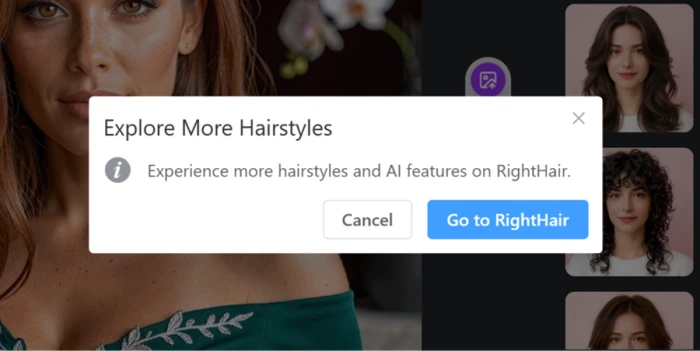
Switching to a second photo is where the flow cracked. Instead of generating, a popup headed Explore More Hairstyles appeared and asked me to move to a separate site called RightHair for additional styles and AI features.
I could cancel out of it, but the prompt made clear that part of the experience lives on another property rather than here.
AI Hair Design and its nine variations
The AI Hair Design mode runs as its own step. The screen split into my photo generating on the left and a preview panel on the right while the model worked.
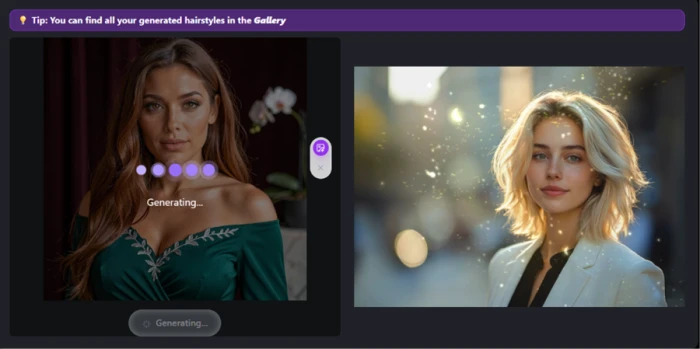
The finished output came back as a grid of nine variations built on the same face and the same green dress. Loose waves, a sleek straight look, a braid, a high ponytail and a headband style all appeared without the face drifting or the outfit changing between tiles.
The hair color changer, where it fell apart
The color changer closed out my session, and it stacked two faults into one result. I selected a soft pink from the swatch grid, and the checkmark confirmed the pink was active.
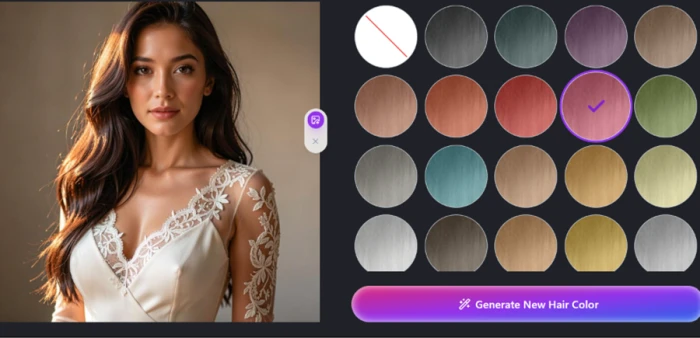
What generated was a bright, flat yellow. The shade had no relationship to the pink I chose, and the color itself sat on the strands like paint, with no texture underneath and no light moving across the surface.

LongHair AI pricing
What the tool costs, and what it refuses to tell you up front.
LongHair AI runs on a free-to-use model with daily generation limits, and there is no published pricing anywhere on the site. The homepage pushes phrases like "Start Now For Free" and a "Claim Free Credits" button, but never states how many credits you get or what a credit is worth. An HD download is offered as an upgrade for printing or social media, yet no price, plan or subscription tier appears on the pricing page, which simply reads "Redirecting to pricing" and shows nothing. Uploads in the standard flow come out without a watermark, so the paid upgrade buys resolution rather than removing branding.
Pros & cons
Specific conclusions from real user reviews, not generic filler.
✅ Pros
- Runs fully in the browser, no app download or sign-in wall
- Users say hairlines and hair shape read as natural, not pasted on
- Original face shape survives better than in rival try-on apps
- Generations return in seconds, fast enough to compare many looks
- Daily free cap was raised to around 20 images after early complaints
- Photos are deleted from servers within 24 hours per the policy
⛔ Cons
- Faces near the frame edge get subtly reshaped during generation
- Coily and dreadlocked hair turns wavy after a color change
- Face-editing extras (lips, bone structure, slimming) feel underbuilt
- No multiple uploads, no offline mode and no GIF support
- Users report no in-app cancel, forcing an email to support
- Style catalog is thinner than the marketing's "200+" claim suggests
Synthesized from real reviews on the Apple App Store, Product Hunt & Trustpilot covering LongHair AI and its RightHair sibling · paraphrased, not quoted
LongHair AI alternatives
| LongHair AIReviewed | CutoutPro AI | Remaker AI | Muke AI | |
|---|---|---|---|---|
| Our Score | 6.3/10 | 6.4/10 | 6.3/10 | 5.2/10 |
| Focus | Hairstyle and hair-color try-on on a face | Automated photo and video editing suite | Face swap plus image generation and edits | Object removal and background swaps |
| Access model | Free, browser, daily caps | Credit-based, web | Credit-based, web | Free browser tool, limited |
| Identity handling | Strong, face held across nine tiles | Edits the photo, not identity-focused | Swaps the face by design | Leaves the subject, edits around it |
| Main weakness | Color accuracy and a redirect popup | Results vary by photo and tool | Credits drain fast on heavy use | Lowest-rated of this set, uneven output |
| Best for | Previewing a new cut before the salon | Batch cleanup and quick photo fixes | Face-swap projects and composites | One-off background or object removal |
Who Should Use LongHair AI, and Who Should Avoid It?
LongHair AI is a strong style previewer wrapped in a shaky color tool and an affiliate-heavy flow, so the fit depends on what you came for.
Who Should Use LongHair AI?
Best suited for these cases
Pre-Salon Previewers
Anyone weighing a longer cut can see it on their own face first, with the shape and texture rendering convincingly.
People Who Want Many Looks Fast
AI Hair Design returns nine styles in one pass, all on the same face and outfit, which is quick side-by-side comparison.
No-Download Users
It runs entirely in the browser with no app and no account wall, so a single try-on costs nothing but a photo upload.
Face-Preservation Sticklers
Reviewers and testing agree identity holds up better here than in rival apps that reshape or swap the face.
Who Should Avoid LongHair AI?
Consider an alternative if you need
An Accurate Color Preview
The color changer returned a shade unrelated to the one picked and rendered it as a flat, textureless fill.
Faithful Textured-Hair Results
Users report coily and dreadlocked hair being smoothed into waves once a color change is applied.
A Clean, Ad-Free Workspace
Styling cards carry unrelated Shein shopping links, and a second upload steers you toward the separate RightHair site.
Transparent Pricing
There is no published price, no credit balance and an unpriced HD upgrade, so the real cost of heavy use is hidden.
Our Recommendation
Use LongHair AI for exactly one job: previewing a long hairstyle on your own face before a cut, where it genuinely excels and costs nothing to try. Skip it if you are counting on the color changer or editing textured hair, since both let the tool down in testing. Before you lean on it, run your own photo through the style grid once, ignore the Shein links and the RightHair popup, and judge it only on the hair.
LongHair AI scorecard
Rated against what an AI hairstyle try-on tool is actually built to do.
| Dimension | Verdict | Score |
|---|---|---|
| Consistency across tiles Identity steady over nine variations | Excellent |
8.5
|
| Face preservation Keeping the real face intact | Good |
8.0
|
| Hairstyle realism Curls and texture vs flat overlay | Good |
8.0
|
| Input & cropping controls Ratios, free-form, rotate before upload | Good |
7.5
|
| Ease of use Upload, filter, one-click try-on | Good |
7.5
|
| Style range & filters Catalog breadth and hover detail | Good |
7.5
|
| Value & access Free use against hidden pricing | Average |
6.0
|
| Workflow coherence Staying in one tool, no redirects | Weak |
4.0
|
| Ad experience Affiliate clutter in the interface | Weak |
3.5
|
| Hair color accuracy Does the output match the swatch | Weak |
2.5
|
| Scrutool Score Equal-weight average of all 10 dimensions |
6.3
|
A brilliant style previewer trapped in a cluttered, half-finished product
LongHair AI has a genuinely good engine at its center. The first curly result kept my face, earrings and dress untouched, and AI Hair Design held identity steady across nine variations at once, which is the hardest thing to pull off in this category. If the whole tool worked like those two moments, it would score well into the sevens. It does not. The hair color changer turned a selected pink into flat, paint-like yellow, textured hair gets smoothed out, styling cards are stuffed with unrelated Shein links, and a second upload shoves you toward a separate RightHair site. Pricing is invisible, free credits have no stated value, and the HD upgrade carries no number. Use it for one thing, previewing a long cut on your own face before the salon, where it is quietly excellent. For color work, textured hair or anything resembling a clean, transparent tool, look elsewhere.
Discussion
Join the discussion and share your perspective.