
Swishy AI
Swishy is an AI motion design tool that turns a one-line prompt into editable kinetic typography, logo reveals, and social animations in about 30 seconds.

A fast, genuinely editable AI animator for text and templates, held back by an image upload that ignores your file and a transparency export locked behind payment.
Should you use Swishy?
Text and logo animators who want kinetic typography and short social clips in seconds, with real control over fonts and colours after generation.
You need your own uploaded image to appear in the animation. In testing the tool swapped it for one it generated itself.
Free runs the Mini model and MP4 to 1080p. Usable tiers start at Beginner, $12/mo billed yearly , with 4K and every model on Pro at $25/mo.
Transparent export is MOV and GIF only , and MOV sits behind the paid tier, so a see-through overlay is not a free feature.
Key features & how they perform
Each feature rated from hands-on testing and the tool's documented behaviour.
Prompt to animation in about 30 seconds
You describe the scene in one line and the Mini model builds it. A typewriter text scene landed in roughly half a minute, matching the advertised figure.
Full post-generation editing
Every scene opens in a Scene Settings panel where text, font, and exact hex values for background and text are all adjustable. You are not locked into the AI's first choice.
Device frames and duration control
Toggles flip the canvas between phone, square, desktop, and fullscreen, and a slider sets scene length to a tenth of a second. Handy for checking how a clip reads per platform.
Multi-scene timeline
You can stack scenes in one project and they drop onto the timeline cleanly as Scene 2 and beyond. This is how short multi-step animations and launch videos get built.
Template library across many categories
Ready-made animations cover Logos, Text, Graphics, Overlays, Social Media, Charts and Data, Money, App and Website, UI Elements, and Launch Videos. Browsing costs no credits.
Image upload (currently unreliable)
The tool accepts an uploaded image, but in testing it discarded the file and generated its own background instead. The feature exists on paper but did not use my input.
Feature ratings from hands-on testing of the free Mini model plus the tool's published feature set.
My first project inside Swishy, prompt to export
A dark typewriter scene taken from a one-line prompt all the way to a downloaded file.
The first prompt, and the model options
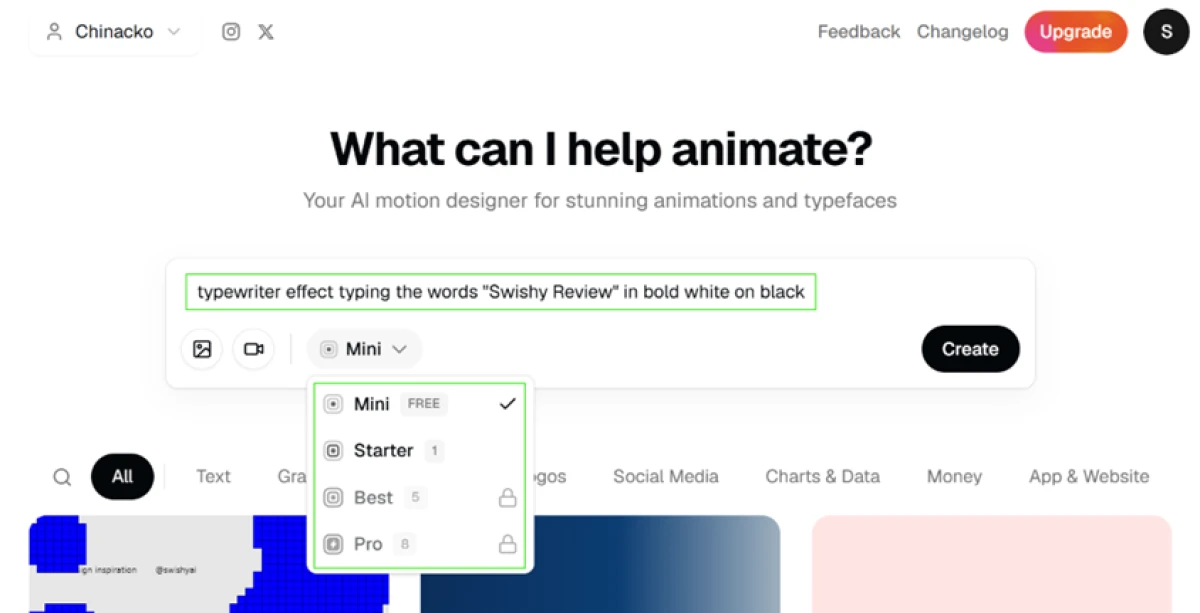
I started on the home screen with a single instruction and nothing else, then opened the model dropdown before hitting Create.
This is where the free limits show up immediately. Only Mini carries a FREE tag. Starter costs 1 credit, Best costs 5, and Pro costs 8, with a padlock sitting next to the two heavier models.
"typewriter effect typing the words "Swishy Review" in bold white on black"
The result, and how much you can edit
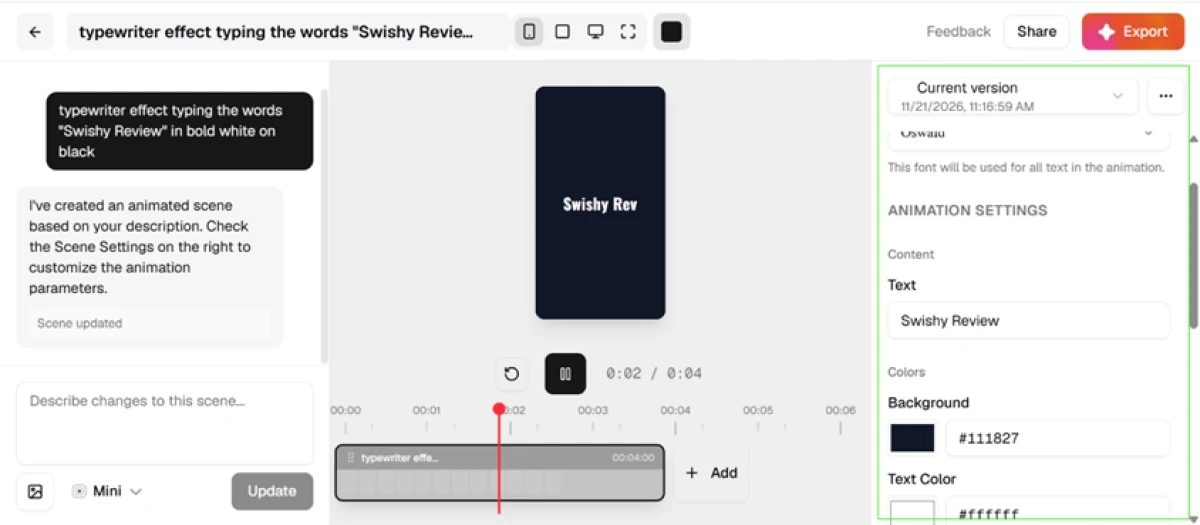
Mini generated the scene in about half a minute, a dark card with the title typing in. The output matched the prompt.
The real surprise sat in the right-hand panel. Every part of the animation is editable after generation: the text itself, the font (it landed on Oswald), and exact hex values for the background and the text colour.
Adding a scene, device frames, and duration
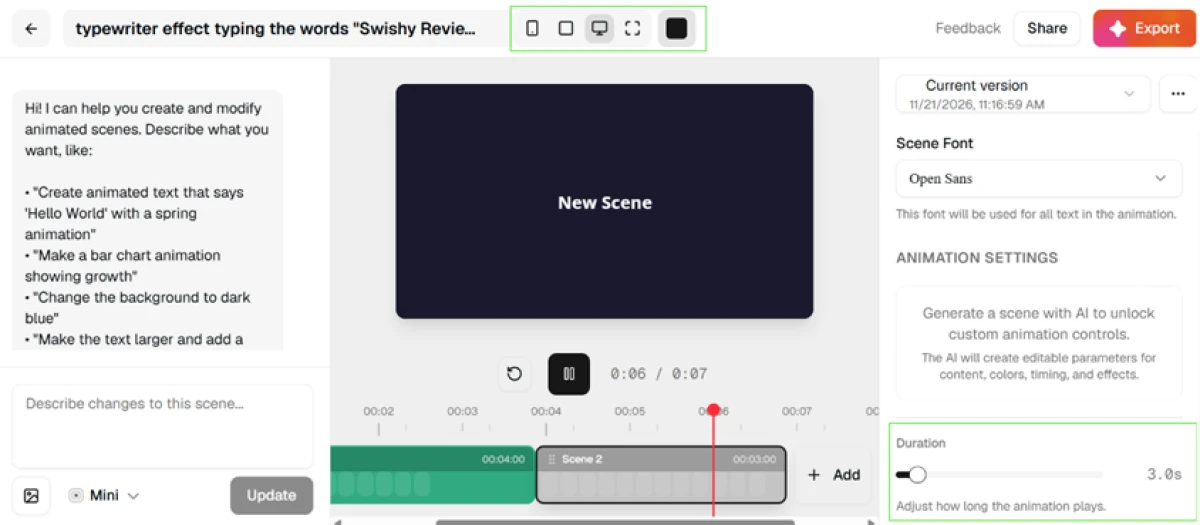
I added a second scene to the same project to see how multi-scene editing behaves. It dropped in cleanly on the timeline as Scene 2.
Across the top sit the device frames, so I could flip the canvas between phone, square, desktop, and fullscreen to check how the animation reads at each size. The duration slider gave me direct control too, which I pulled to 3.0 seconds.
Export options, and where the paywall sits
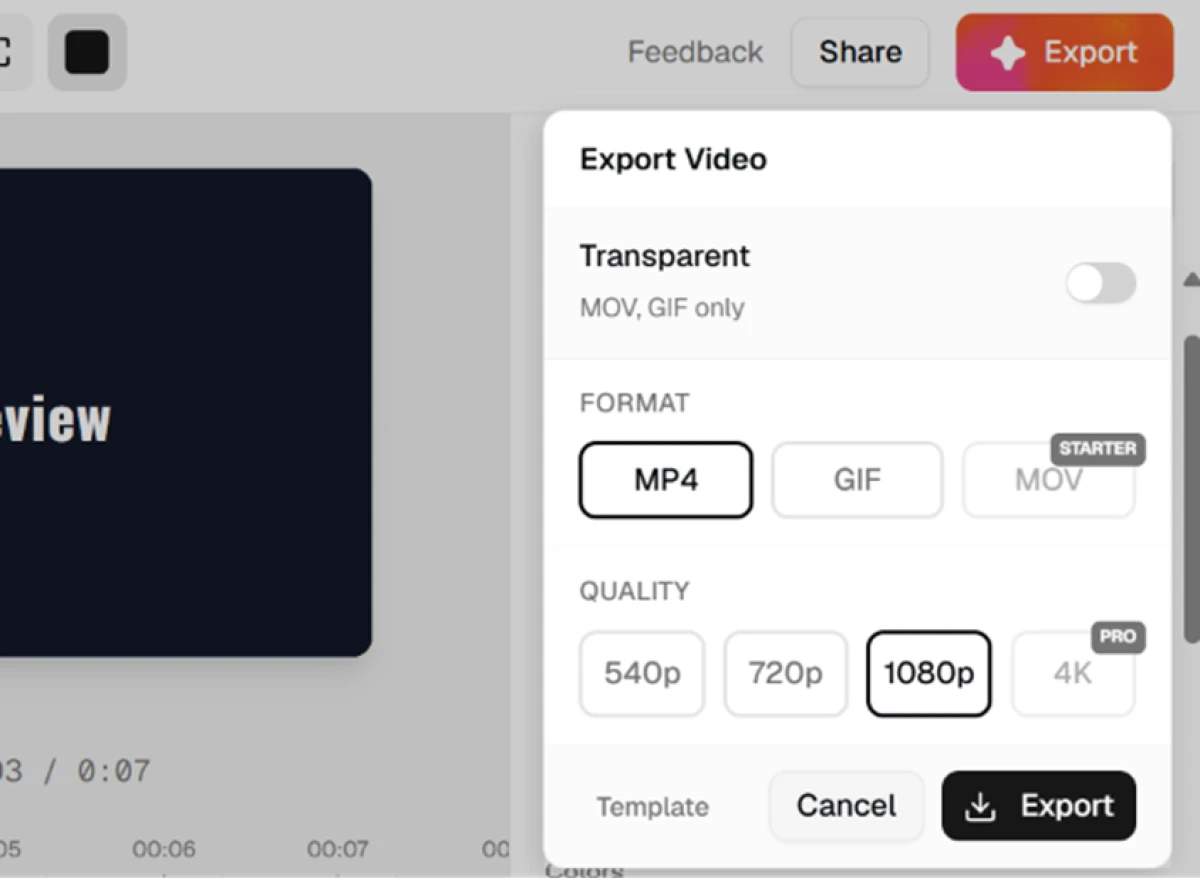
The export dialog is where the free ceiling becomes clear. Transparent background is switched off and labelled MOV and GIF only, and MOV itself carries a STARTER badge.
On quality, 540p, 720p, and 1080p are open, while 4K wears a PRO badge. A see-through export pushes you onto a paid plan.
The image upload test, and where it broke
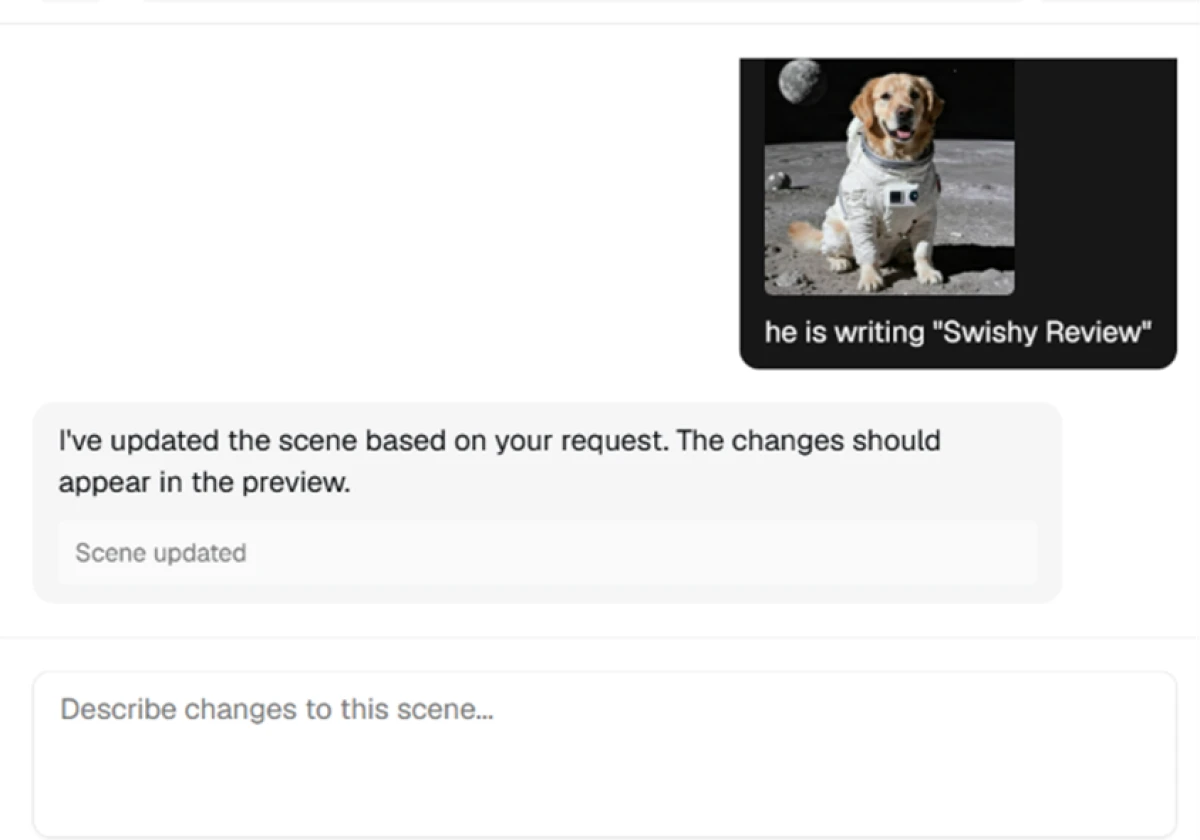
This is the test that exposed the biggest gap. I uploaded my own image, a dog in an astronaut suit on the moon, with a prompt asking it to hold my text.
I expected my moon-dog to appear in the animation with the text on it.
"he is writing "Swishy Review""
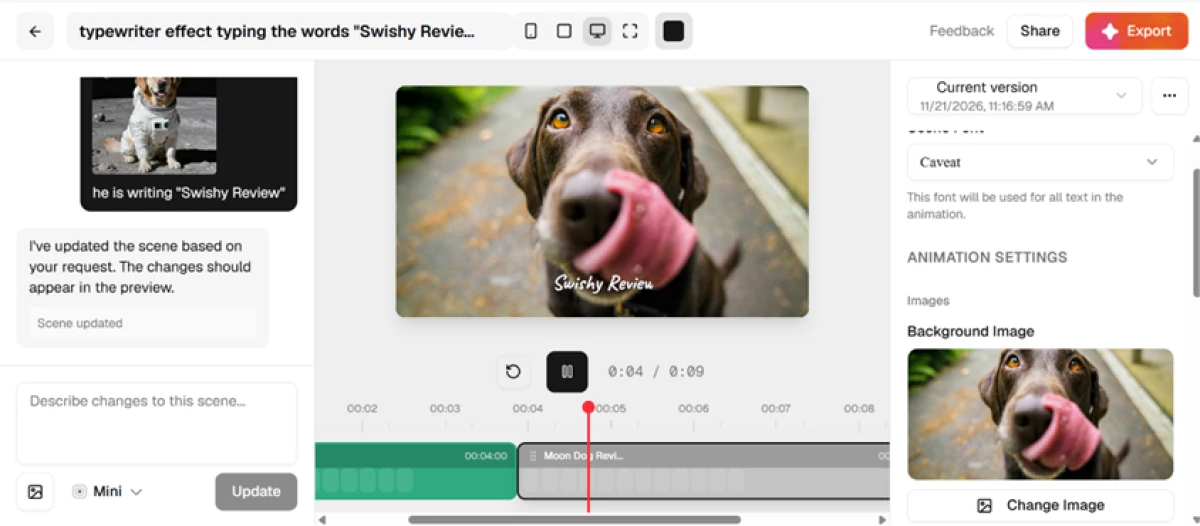
Instead, Swishy ignored the file completely and generated an unrelated stock-style AI dog licking its nose on a pavement, then wrote the text across that. The right panel confirmed it had chosen its own Background Image rather than using what I handed it.
Browsing the template library
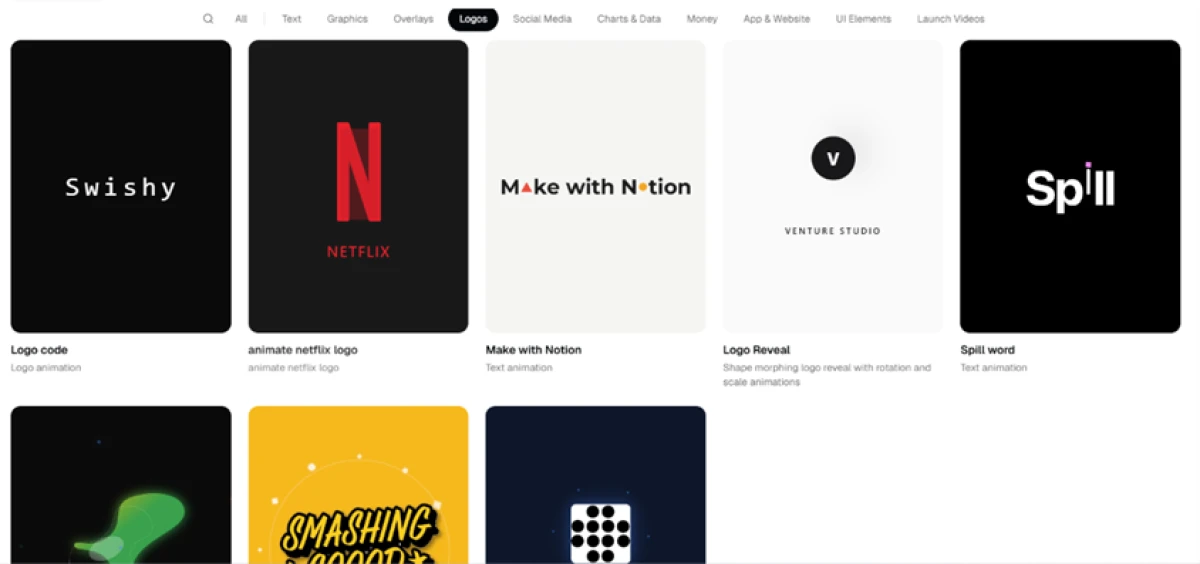
Away from generation, the template library is a genuine strength, and it costs no credits to browse.
The Logos category alone gave me animated starters for well-known brand reveals, a shape-morphing Logo Reveal, and more, spread across a filter row that also covers Text, Graphics, Overlays, Social Media, Charts and Data, Money, App and Website, UI Elements, and Launch Videos.
Editing a template, and the transparency catch again
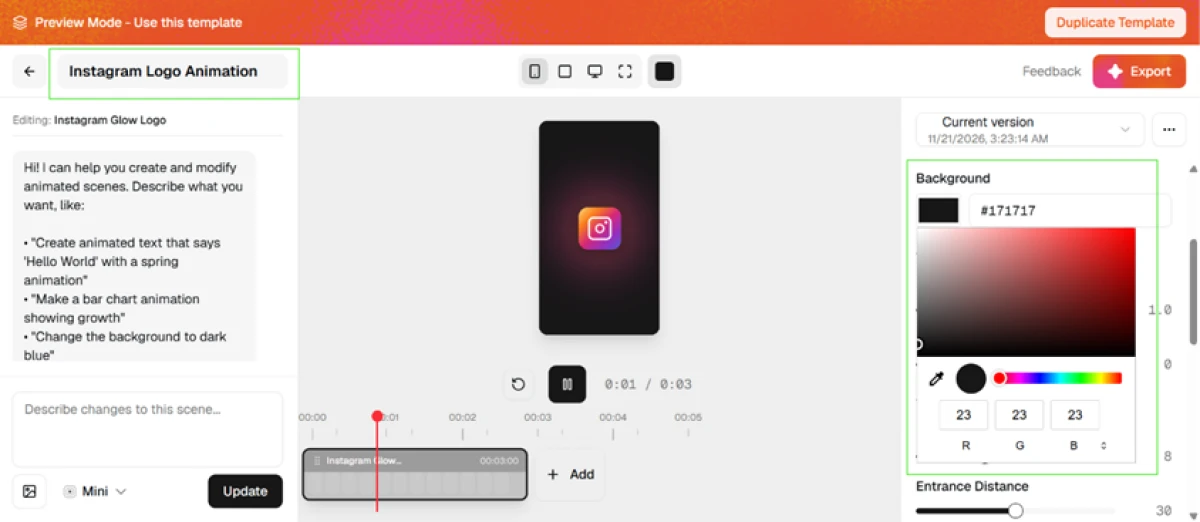
I opened the Instagram Logo Animation template to test how editable these are. It loads in Preview Mode with a Duplicate Template option, so you work on a copy rather than the original.
Editing was full, with a complete RGB background picker and sliders like Entrance Distance.
Why Swishy's image upload cannot be trusted yet
Most of Swishy's rough edges are the usual free-plan gating. This one is different, because it changes what the tool is capable of rather than what it costs.
The upload button works. The file goes up. What fails is the step after that: the AI does not treat your image as the subject it should animate around. In my run it swapped a specific uploaded photo for a generated one that shared only the loose idea of a dog, then applied the text to its own version. There was no error and no warning. The Background Image field in the right panel had quietly been set to something I never chose.
That matters because an image-to-animation workflow is exactly the reason a creator would upload a product shot, a logo lockup, or a headshot. If the engine substitutes its own picture, the upload field is decorative. Until this is fixed, treat Swishy as a text-and-template animator, not an image-driven one, and verify the output against your source before you export anything client-facing.
Swishy pricing
Figures captured from the official Swishy pricing page, billed yearly.
| Plan | Price | What's included |
|---|---|---|
| Free | $0 | Mini model only · MP4 export up to 1080p · solid background only · no transparent export · no 4K |
| Beginner Popular | $12 /mo | 150 AI credits/mo · Mini, Starter & Best models · unlimited projects and exports · all quality levels · MP4, GIF, MOV · transparent export · all aspect ratios |
| Pro | $25 /mo | 400 AI credits/mo · all models including Pro · all quality levels plus 4K · custom fonts · team collaboration · early access · priority support |
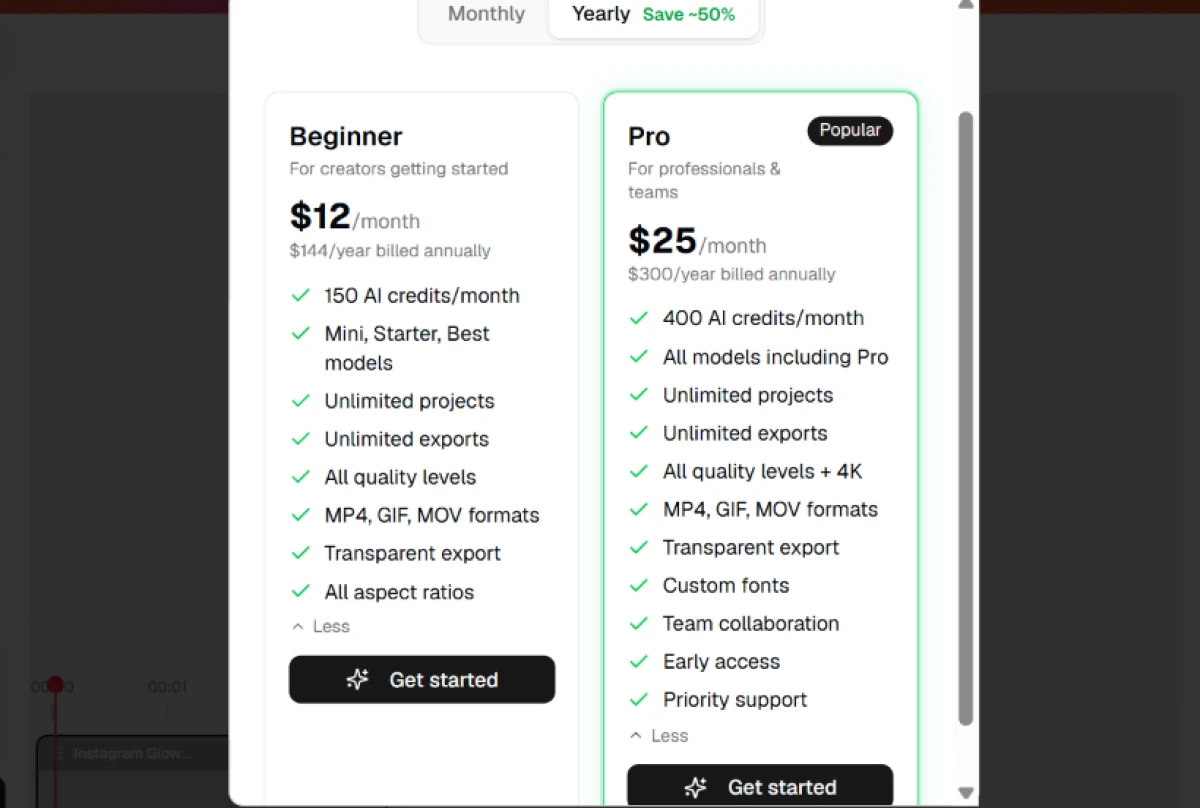
Pricing is accurate as of November 21, 2026 and was captured from the official Swishy website. Plans, prices and credit limits change often, so check the official Swishy pricing page for the current figures before you subscribe.
Pros & cons
Patterns from public user sentiment and third-party listings, not generic filler.
✅ Pros
- Positioned as a real After Effects alternative with no learning curve
- Natural-language prompts produce usable kinetic typography quickly
- Template categories span logos, infographics, UI, and launch videos
- Exports to MP4, MOV, and GIF for most social destinations
- Browser-based, so no heavy desktop install is required
⛔ Cons
- Very thin independent review footprint for a tool claiming 10K creators
- Name clashes with unrelated tools, making reputation hard to verify
- Best experience needs desktop, with mobile pushed to an emailed link
- No published detail on which underlying AI model powers generations
Synthesized from public sentiment on Product Hunt and third-party AI tool directories · paraphrased, not quoted. Swishy.ai currently has limited verified reviews on G2, Trustpilot and the app stores, partly because several unrelated products share the Swish and Swishy name.
Swishy alternatives
| SwishyReviewed | Pika AI | ImagineArt AI | A2E AI | |
|---|---|---|---|---|
| Our Score | 6.7/10 | 6.3/10 | 6.6/10 | 6.2/10 |
| Built for | Motion graphics and kinetic typography | Text and image to video clips | AI images and video generation | Avatar and talking-head video |
| Entry paid plan | $12 / mo, billed yearly | $8 / mo, billed yearly | $9 / mo, billed yearly | $14.90 one-time, 1 month |
| Free tier | Mini model, 1080p MP4 | No monthly credits | 100 credits per day | 100 credits plus 30 daily |
| Watermark on free | None | None | None | Yes on free exports |
| Top resolution | 4K on Pro | Up to 4K | Not stated | 4K on Ultra |
Who Should Use Swishy, and Who Should Avoid It?
Swishy splits cleanly between text-driven creators who will love the editor and asset-driven creators who will hit its upload problem.
Who Should Use Swishy?
Best suited for these workflows
Social creators who need fast kinetic typography
Prompt-to-animation in about 30 seconds plus per-platform device frames make short text clips quick to produce.
People who want to tweak, not just accept
The post-generation editor exposes font, hex colours, duration and entrance sliders, so the AI's first draft is a starting point.
Template-first users on a budget
Browsing and editing the template library costs no credits, which is enough for a lot of logo and text work before you ever pay.
Who Should Avoid Swishy?
Consider an alternative if you need
Anyone animating their own uploaded images
The upload step substituted a generated image for the real file in testing, which breaks product, logo or headshot workflows.
Free users who need transparent overlays
Transparent export is limited to MOV and GIF, and MOV sits behind a paid tier, so see-through lower-thirds are not free.
Buyers who want a long track record
Independent reviews are sparse and the name overlaps with unrelated tools, so there is little outside signal to lean on yet.
Our Recommendation
Swishy is a strong pick for creators who live in text and template animation and want real control over the result without touching After Effects. It is the wrong pick if your projects depend on animating your own uploaded images, because that path did not work in testing. Before committing, run a free Mini generation and, if images matter to you, test one upload against your source to confirm the engine keeps it.
Swishy scorecard
Rated against what an AI motion-design tool is actually built to do.
| Dimension | Verdict | Score |
|---|---|---|
| Editing control after generation Font, colour, duration, sliders | Good |
8.0
|
| Template library Range and quality of starters | Good |
8.0
|
| Ease of use Prompt to first animation | Good |
8.0
|
| Device & format presets Phone, square, desktop, fullscreen | Good |
8.0
|
| Generation speed Time from prompt to scene | Good |
8.0
|
| Animation output quality Polish of the finished scene | Good |
7.0
|
| Prompt adherence How closely output matches input | Average |
6.0
|
| Value on the free tier What Mini gets you before paying | Average |
6.0
|
| Export formats & flexibility Transparency and resolution access | Weak |
5.0
|
| Image upload handling Whether your file is actually used | Weak |
3.0
|
| Scrutool Score Equal-weight average of all 10 dimensions |
6.7
|
Swishy gets the animation right and the upload wrong
Swishy delivers on its core promise. A one-line prompt becomes a clean, broadcast-style text animation in about half a minute, and the editor behind it is genuinely deep: fonts, hex colours, duration, device frames and template sliders are all yours to adjust. That combination of speed and control is the reason to try it, and the free Mini model plus a credit-free template library let you prove it to yourself before paying. The holes are real, though. Transparent export is gated behind a paid tier through the MOV and GIF restriction, 4K needs Pro, and the image upload substituted a generated picture for my actual file with no warning. For creators working from prompts and templates, those are manageable trade-offs on a tool worth a try at $12 a month billed yearly. For anyone whose work depends on animating their own uploaded images, wait until that path is fixed, or pick a tool built around your assets instead.
Discussion
Join the discussion and share your perspective.