A2E AI
A2E is a browser-based AI video and image platform with 200-plus models, talking avatars, image-to-video and face swap. Strong breadth and one-time pricing, let down by inconsistent output.

An unusually broad model library at a fair one-time price, let down by slow, inconsistent output and a headline avatar video that no free session can reach.
Should you use A2E?
Creators who want every major image and video model in one account, and who will top up credits for the bigger jobs.
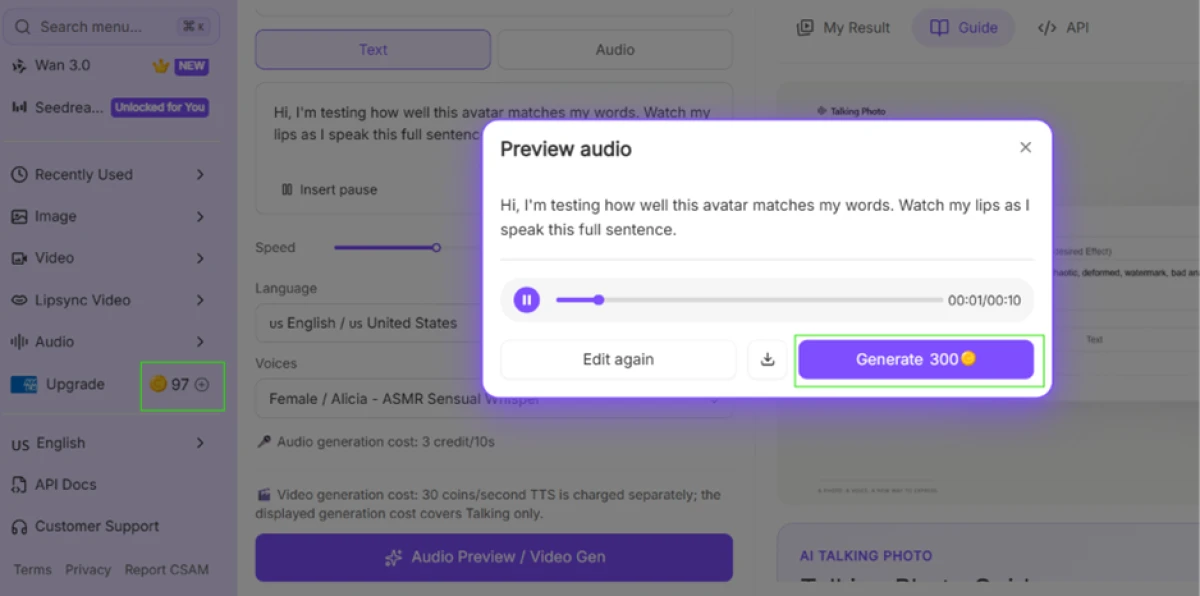
You want a free talking-avatar video . The headline feature needs 300 credits, which a fresh free account cannot reach in one sitting.
Free gives 100 credits at signup plus a daily top-up, with a watermark. Paid starts at $14.90 one-time for a month, with no auto-renewal, and bought credits never expire.
Output is inconsistent . Faces can distort, prompts get ignored, and a short clip can take minutes to render.
Key features & how they perform
Each feature rated from hands-on testing and aggregated review sentiment.
Model library
One account reaches more than 200 third-party engines, from Kling and Veo to Wan and Seedance. No other tool in this review puts this many under one login.
Image to video
Animating a still held together well in testing, with convincing motion and lighting, but the render was slow for the length of clip produced.
Text to image
A reference face carried over accurately, but the scene drifted from the prompt and the free output is watermarked and deleted after a few days.
Talking photo & lip-sync
Users rate the lip-sync as natural, and the voice preview read cleanly in testing, but generating the actual video is priced out of a free account.
Cloth swap & editing
The one tool that ran free in testing. It swaps the garment you pick, but it also quietly edits items you did not select, so every result needs a check.
Pricing model
Paid plans are one-time payments for a set term with no auto-renewal, and any credits you buy on top never expire. Rare in this category.
Feature ratings blended from Trustpilot, G2 & Product Hunt sentiment and hands-on testing.
Running A2E's four headline tools
From 100 signup credits to the end of the session, testing the talking photo, image generator, cloth swap and image-to-video one at a time.
AI Talking Photo, the feature it sells hardest
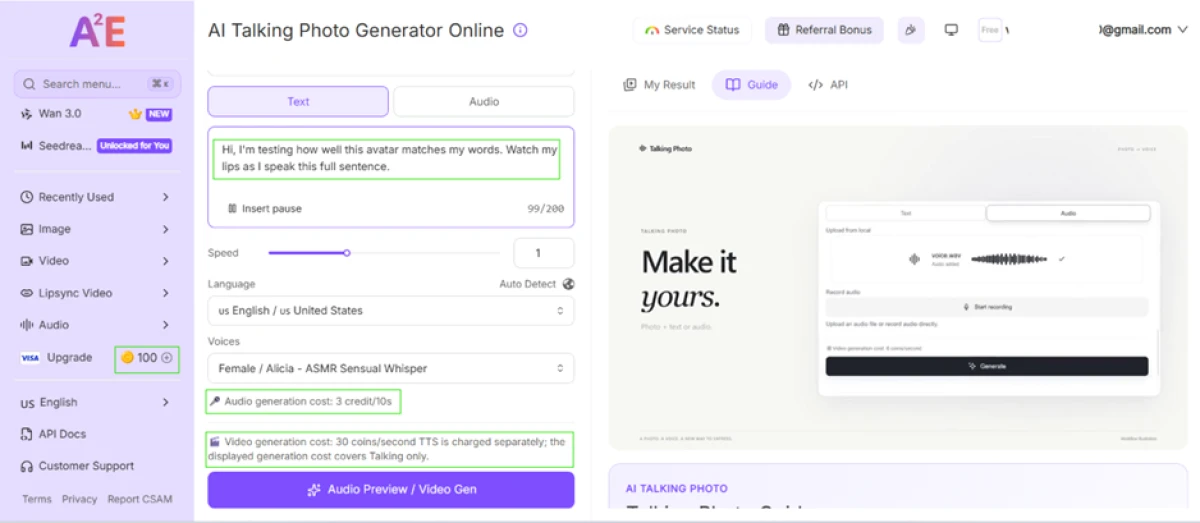
A2E pushes its talking photo tool harder than anything else, so I started there. The idea is simple: give it a photo and a script, and it animates the face to speak your words.
I typed a plain test line as the script to see how the lips would track it.
"Hi, I'm testing how well this avatar matches my words. Watch my lips as I speak this full sentence."
The audio preview worked. The voice read my line cleanly and the timing sounded natural. It also charged 3 credits for that 10-second preview and dropped my balance from 100 to 97. Then I hit the wall.
AI Text to Image, cheap and mostly accurate
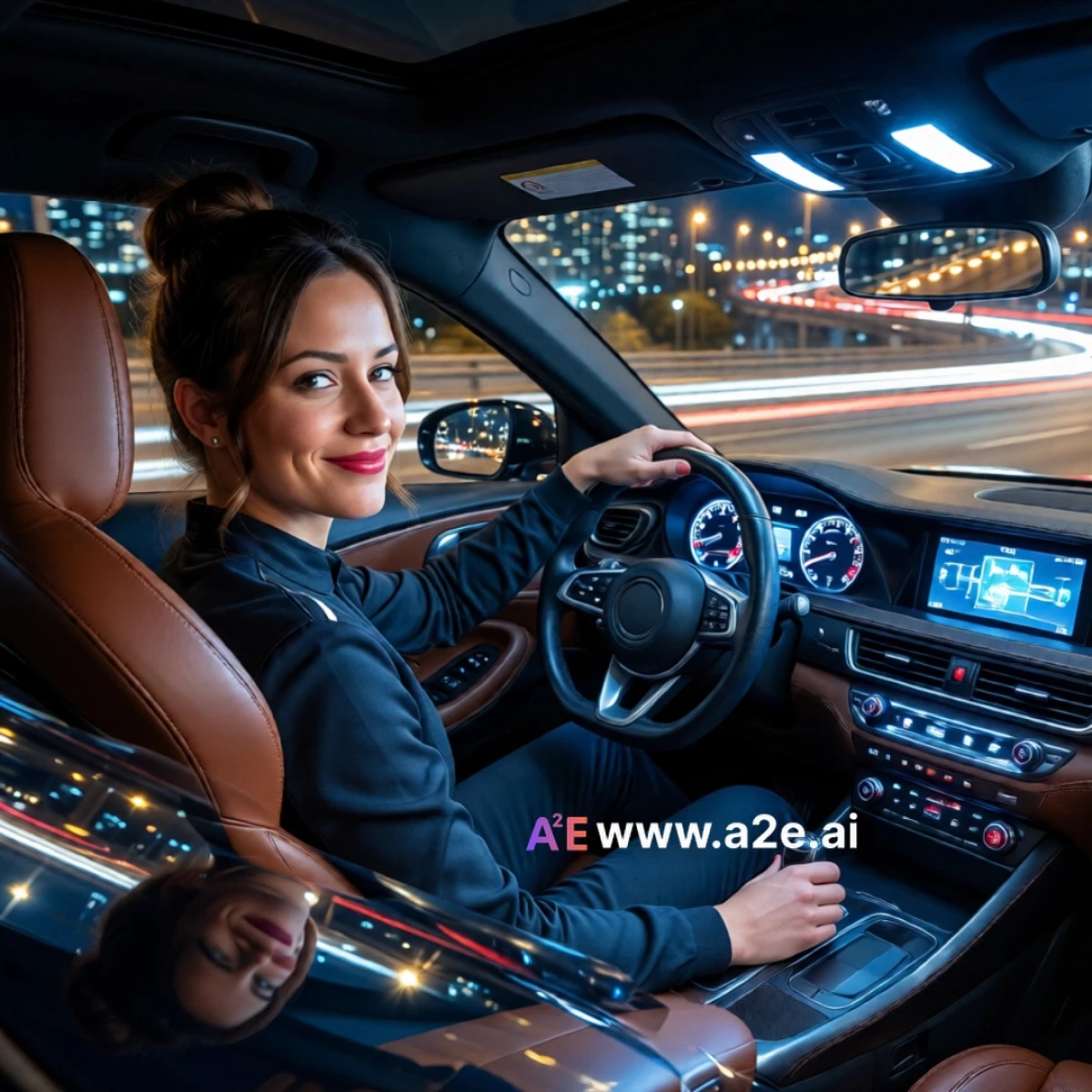
The image generator was the opposite experience on cost. One 1080P image ran me 10 credits, and I added a face as a reference so the tool had something to match.
"Professional race car driver sitting in luxury sports car, night city elevated road background, glowing dashboard, city lights flashing outside window, professional automotive photography, realistic reflection effects, commercial advertising quality."
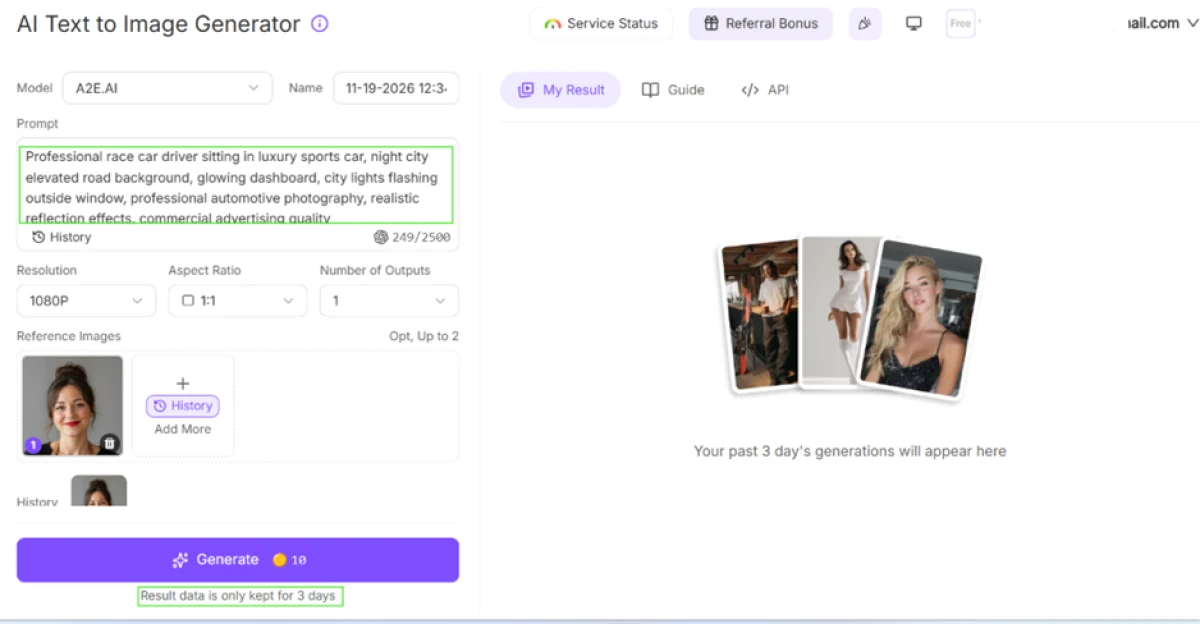
The face from my reference carried over accurately and the night lighting looked clean. Two things let it down.
AI Cloth Swap, free but heavy-handed
Cloth Swap is the one tool I spent nothing on. Every generation showed 0 credits with the standard 10 credit charge waived, so I ran it more than once for free.
I uploaded my own photo as the model. In it I am wearing a black t-shirt with khaki trousers, and I picked a pair of jeans as the single garment to swap in.
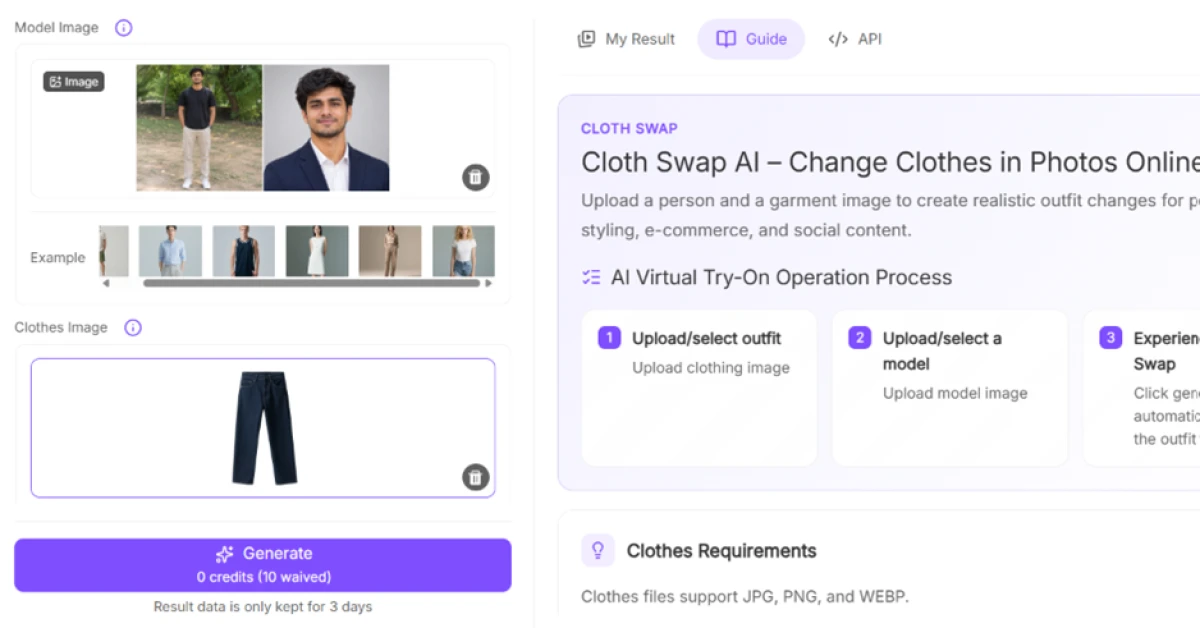
Here is the source photo I gave it, with the black t-shirt and khaki trousers clearly visible.

The jeans came out right. What it did to the rest is the problem.
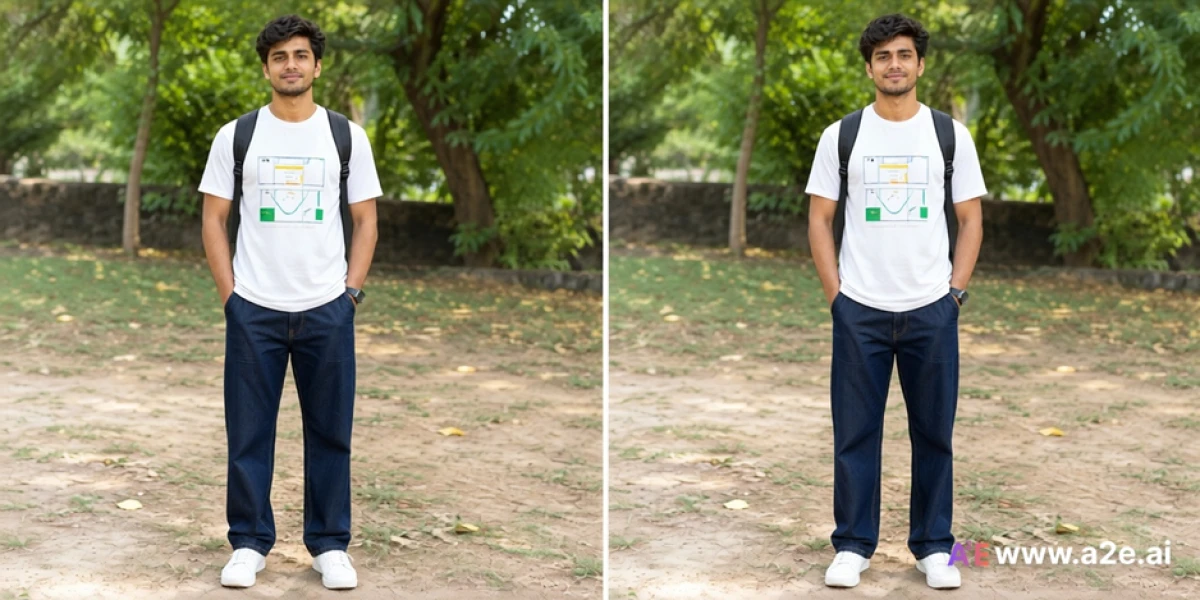
Image to Video, slow but convincing
For video from a still I uploaded a photo of a coffee cup, chose the A2E.AI V2 model and set the clip to 5 seconds. The run cost 40 credits.
"A calm cinematic shot of a coffee cup on a wooden table, steam rising, soft morning light."
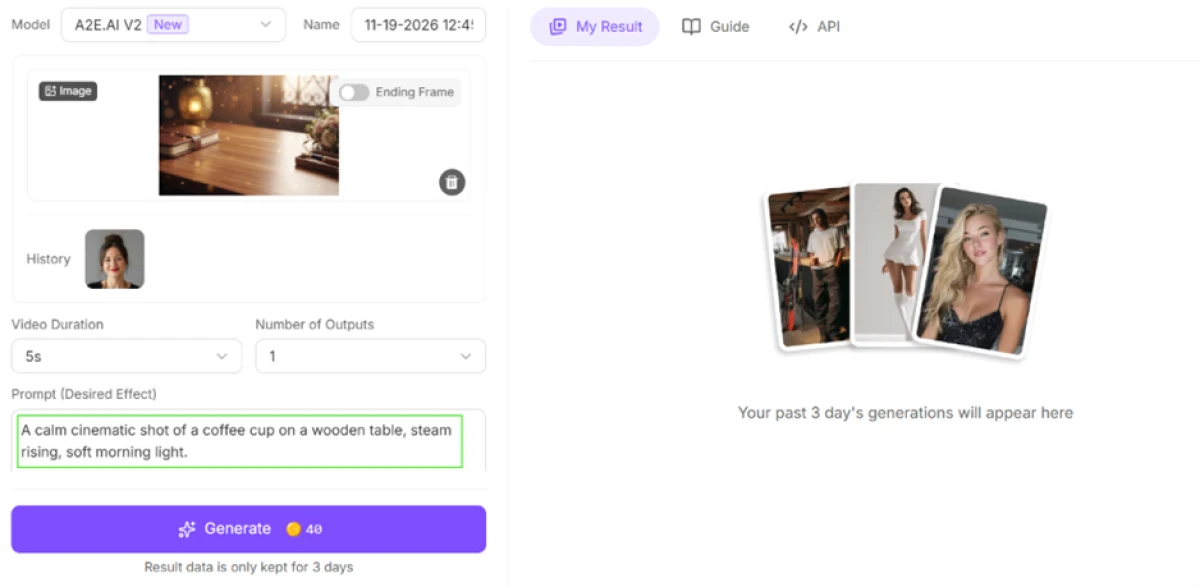
Speed is the weak point. The 5-second clip sat processing with an on-screen estimate of 2 minutes 56 seconds left, which is a long wait for five seconds of footage.
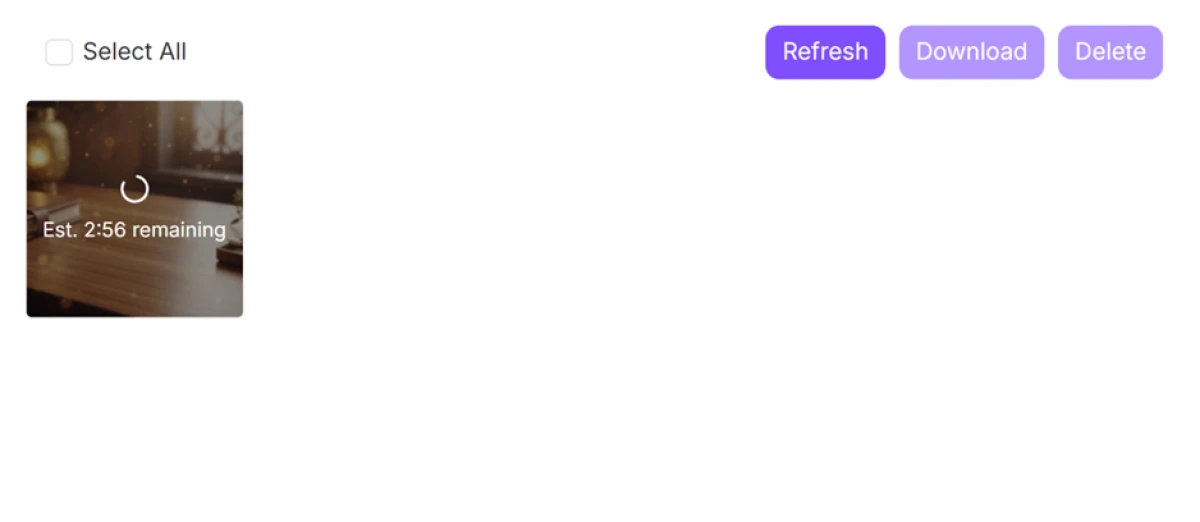
Quality is where A2E pulled its marks back. The finished clip holds together across the full five seconds.

What the free plan actually gets you
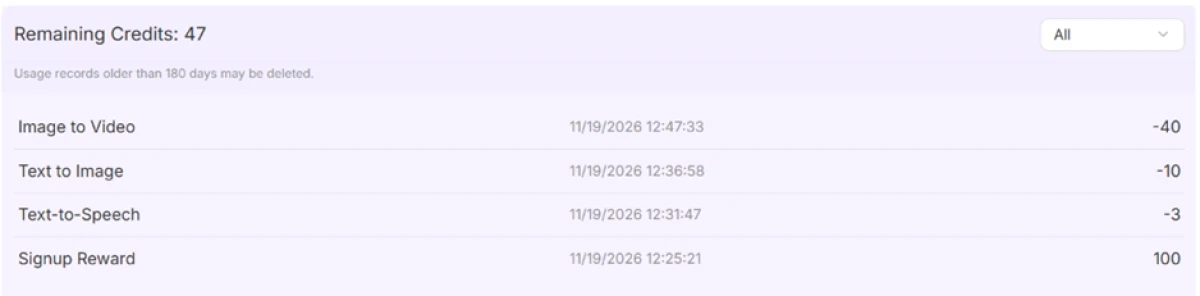
At the end my credit history summed up the session. Signup gave me 100. The voice preview took 3 and the image took 10. The video took 40, which left me on 47 and still without the talking photo video I came to make.
A2E pricing
Figures taken from the official A2E plans screen. Paid tiers are one-time payments for a chosen term, not a recurring subscription.
| Plan | Price | What's included |
|---|---|---|
| Free | $0 | 30 bonus credits per day · watermark · 720p video · low-priority AI · 10 custom avatars · 1 voice clone slot · 100+ community avatars · 30+ languages |
| Pro Popular | $14.90 one-time | 1-month term (3 months 33% off, 1 year 50% off) · 60 bonus credits/day · 1,500 credits/month during term · 3,300 total incl. bonus · about $0.0099 per credit · no watermark · up to 2K video |
| Ultra | $59.90 one-time | 1-month term (3 months 34% off, 1 year 49% off) · 90 bonus credits/day · 9,000 credits/month during term · 11,700 total incl. bonus · about $0.0067 per credit · no watermark · up to 4K video · priority creation |
| Extra Credits | Various one-time | One-time top-up, any amount · credits never expire · valid for all features, including image to video, text to image, image edit, TTS, voice clone and third-party premium models (Wan, Kling, Seedance) |
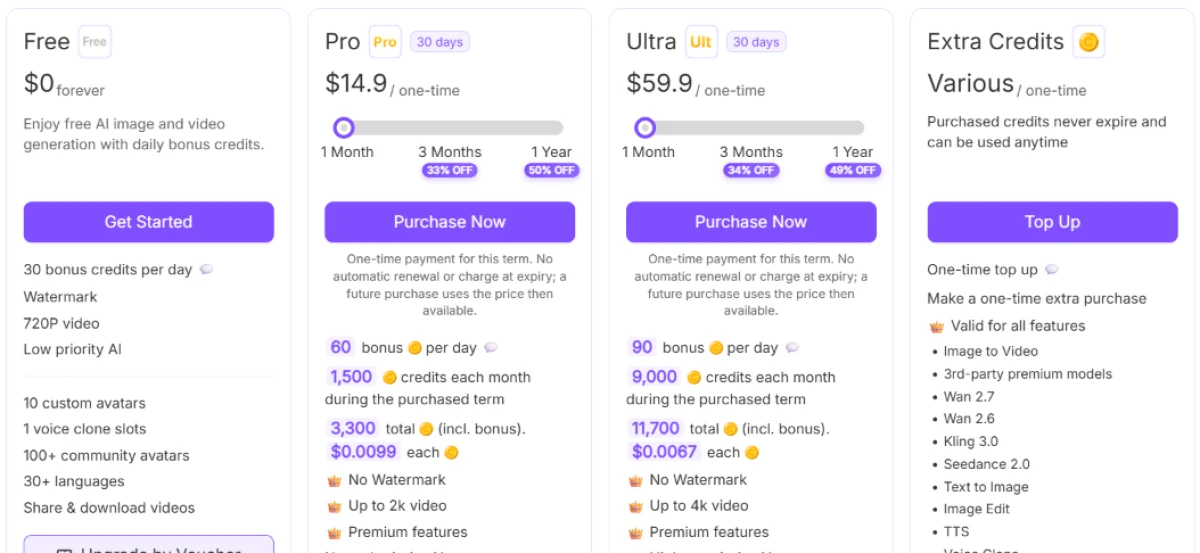
Pricing is accurate as of 19 November 2026 and was captured from the official A2E website. Plans, prices and credit limits change often, so check the official A2E pricing page for the current figures before you subscribe.
Pros & cons
Patterns drawn from real user reviews, not from our own testing.
✅ Pros
- One account reaches many leading image and video models at once
- Lip-sync on talking avatars looks natural and smooth
- Several generations can run in parallel from one login
- Many users rate the output realism highly
⛔ Cons
- Generated faces often come out blurry, distorted or duplicated
- A subject's face can change identity when the camera pans
- Results frequently ignore the prompt
- Individual clips can be slow to render
- Support is slow to respond when a generation goes wrong
Synthesized from real user reviews on Trustpilot, G2 & Product Hunt · paraphrased, not quoted
A2E alternatives
| A2EReviewed | DeeVid AI | Wan AI | ImagineArt AI | |
|---|---|---|---|---|
| Our Score | 6.2/10 | 6.8/10 | 6.6/10 | 6.6/10 |
| Entry paid plan | $14.90 one-time (1 month) | $10 / mo, billed yearly | $5 / mo, billed yearly | $9 / mo, billed yearly |
| Billing model | One-time per term, no auto-renewal | Recurring subscription | Recurring subscription | Recurring subscription |
| Free tier | 100 at signup, 30 a day | 20 one-time credits | Daily check-in credits, 480p | 100 credits a day |
| Models on tap | 200-plus | 15-plus | 6 (Wan family) | 50-plus |
| Watermark on free | Yes | Yes | Yes | No |
| Best for | Every major model plus avatars in one account | Top video models in one place, paid upfront | Budget open-weight video and in-image edits | Many models with a no-watermark free tier |
Who Should Use A2E, and Who Should Avoid It?
A2E's model breadth and one-time pricing are the draw, but inconsistent output, slow renders and a paywalled avatar video make it a poor fit for some users.
Who Should Use A2E?
Best suited for these users
Multi-Tool Creators
If you want Kling, Veo, Wan and Seedance under one login instead of four separate subscriptions, the breadth here is the main reason to sign up.
People Who Will Top Up Credits
The bigger jobs, like a talking-avatar video, only work once you buy credits, so A2E suits users ready to pay for the heavy features.
Anyone Who Hates Subscriptions
Paid tiers are one-time payments with no auto-renewal, which fits people who want to pay once and not watch for a recurring charge.
Patient Experimenters
Output is hit and miss, so it rewards users who are happy to re-run a generation until the model lands the result they want.
Who Should Avoid A2E?
Consider an alternative if you need
A Free Talking-Avatar Video
The headline feature is priced out of a free account, so anyone who wants to try it without paying will not get there in one sitting.
Predictable, Production-Ready Output
Users report distorted faces and ignored prompts, so work that has to be right first time will need a steadier tool or heavy review.
Clean Files Without Paying
Free exports are watermarked and capped at 720p, so a clean, higher-resolution file means moving to Pro or Ultra.
Fast Turnaround and Support
Renders can be slow and users report support being slow to respond, which is a risk for anyone on a deadline.
Our Recommendation
A2E is worth a look for the sheer number of models under one account and a one-time price that beats another monthly subscription. Treat the free plan as a sampler for the cheaper tools like image generation and cloth swap, not the avatar video. Before you pay, run the specific model you need and confirm the quality holds, since output is inconsistent and the heavy tools burn credits fast.
A2E scorecard
Rated against what a multi-model AI video and image platform is actually built to do.
| Dimension | Verdict | Score |
|---|---|---|
| Model library Range of engines in one account | Excellent |
8.5
|
| Ease of use Signup, navigation, running a tool | Good |
7.5
|
| Image-to-video quality Motion, lighting, coherence | Good |
7.0
|
| Pricing & value One-time terms and credit cost | Good |
7.0
|
| Talking avatar & lip-sync Quality versus cost to reach it | Average |
6.5
|
| Image generation quality Detail and reference accuracy | Average |
6.0
|
| Free plan value What a free account can finish | Average |
5.5
|
| Prompt adherence How closely output matches the brief | Weak |
5.0
|
| Generation speed Render time for a short clip | Weak |
4.5
|
| Support & reliability Help response and output consistency | Weak |
4.5
|
| Scrutool Score Equal-weight average of all 10 dimensions |
6.2
|
The widest model library on a budget, if you can live with the misses
A2E's pitch is breadth, and it delivers on that. More than 200 engines sit under one account, the interface is easy to drive, and the one-time pricing with no auto-renewal is a genuine relief in a category built on recurring charges. The image-to-video clip I generated held together well. The trouble is consistency. The image generator drifted from my prompt, cloth swap edited an item I never selected, a five-second clip took almost three minutes, and users report distorted faces and slow support on top of that. The tool A2E sells hardest, the talking avatar video, needs 300 credits that a free account cannot reach in a single session. If you want every major model in one place, you will pay once and not be charged again, and you can tolerate re-running generations until they land, A2E is worth the sign-up. If you need predictable, production-ready output or a free avatar video, this is not the tool.
Discussion
Join the discussion and share your perspective.