
Unlucid AI
Uncensored, browser-based AI for images, edits and animated clips, run on a gem-credit system. Genuinely unfiltered, but a disposable sandbox rather than a studio.

A genuinely uncensored, low-friction creative sandbox undercut by a fast-draining gem system, 24-hour deletion, and thin trust signals.
Should you use Unlucid AI?
Hobbyists and short-form creators who want fast, uncensored images and animated clips for TikTok or Reels and treat it as a disposable sandbox.
You need client-ready output, stored assets, or IP clarity . Quality swings on complex scenes and everything is deleted after 24 hours.
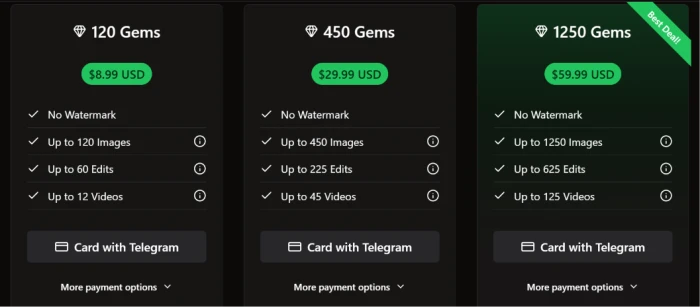
Daily free gems test the tools but run out fast. Regular use means buying packs, starting at $8.99 for 120 gems .
Independent scanners flag low trust and anonymous ownership , and some users report account suspensions while holding paid gems.
What is Unlucid AI?
What Unlucid sells is the absence of a filter. Most image tools block edgy or adult prompts outright; Unlucid ships a "Show Mature Content" switch and lets you generate, edit and animate material that Midjourney, DALL-E or Canva would refuse. That single design choice is the whole pitch, and it is what pulls hobbyists, meme makers and NSFW experimenters to a browser tab instead of a local Stable Diffusion rig.
Around that sits a four-part suite: a text-to-image generator, an image editor with remove, replace and clothing-swap modes, a preset Effects animator, and general Video AI. It runs entirely in the browser on a gem-based credit model with a small daily free allowance, and it is built for quick social clips rather than production work. Reviewers consistently land on the same line: a creative sketchpad, not a studio.
Key features & how they perform
Each feature rated from hands-on testing and aggregated review sentiment.
Text-to-image generator
Holds together on simple prompts but drifts into distorted anatomy and melting detail once a scene gets crowded. Output quality tracks prompt specificity.
Effects AI animator
The most reliable part of the suite. Preset motions like Dance, Squish and 360 Microwave turn a still into a smooth 3 to 5 second clip tuned for social.
AI image editing
Four modes: remove, add or replace objects, change clothing and remove clothing. Fast and intuitive, though nowhere near Photoshop-level precision.
Uncensored content mode
A single settings toggle unlocks mature generation and editing. Genuinely less filtered than mainstream tools, which is the reason most users are here.
Facial Reference technology
Uploads a face to generate a likeness, fenced to your own face or one with written consent. Powerful and squarely the platform's biggest misuse risk.
Gem credit system
Every action spends gems, with a small daily free drip. Costs climb quickly when a usable result takes several attempts, which it often does.
Feature ratings blended from Trustpilot, Reddit, Scamadviser & GeniusFirms review patterns + hands-on testing.
What six gems bought me on Unlucid
One prompt, an unexpected content gate, and the moment the gem math becomes obvious.
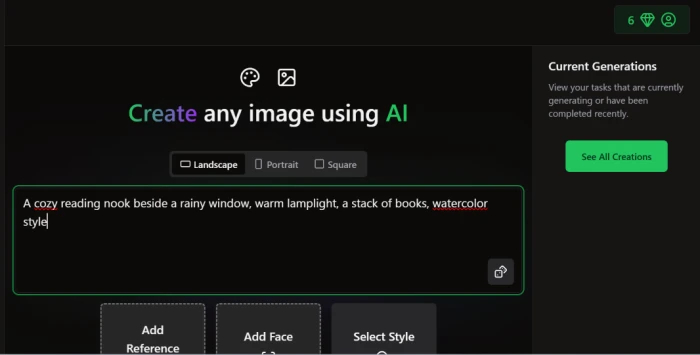
Open the image generator and set a prompt
The create screen is the calmest part of the product. A ratio selector, a prompt box, and optional slots for a reference image, a face and a style.
Nothing is buried and nothing is demanded up front. I picked a Landscape ratio and typed one plain scene to see how the model handles an easy request.
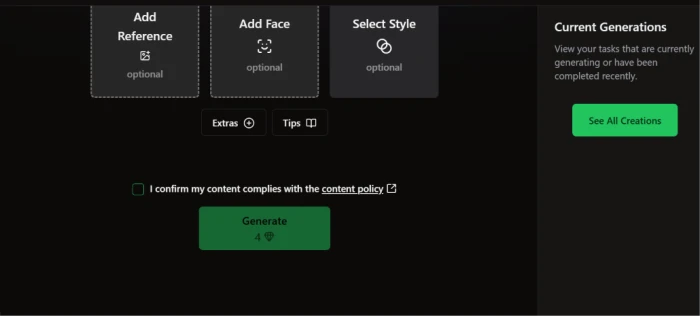
The price for a run sits directly on the Generate button, which is a rare bit of honesty in a credit-based tool.
"A cozy reading nook beside a rainy window, warm lamplight, a stack of books, watercolor style."
The Generate button stays dead until you tick a box confirming the content follows the content policy. Only then does the price become clickable.
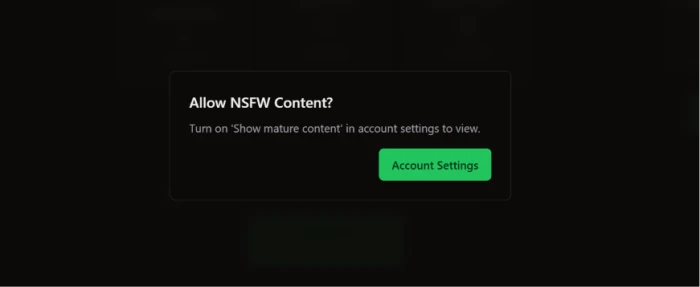
Hit an unexpected mature-content gate
Here is where Unlucid surprised me. A watercolor reading nook is about as harmless as a prompt gets, yet the platform paused before showing anything.
It asked whether I wanted to allow mature content first, which says something about how loosely the classifier is tuned in either direction.
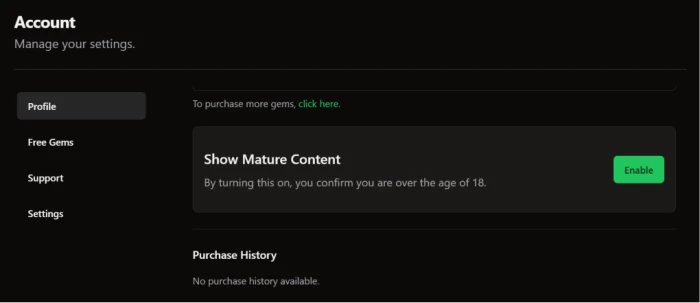
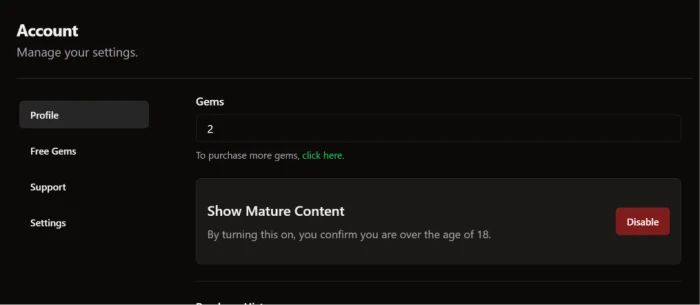
Flip the "Show Mature Content" switch
The switch lives under Account settings, and flipping it on is the entire age-verification process.
You click a button confirming you are over 18 and that is the end of it. No ID upload, no second step, no real check.
For a tool whose whole reputation rests on producing edgier material, this one checkbox is where the gate sits.
Get four images, then watch the gems drain
With the switch on, the batch finally ran and returned four variations of the nook.
On a scene this simple the model held together, all four reading as the same warm, rainy-day room with only small differences. That matches the wider pattern: steady on easy prompts, wobblier on crowded ones.
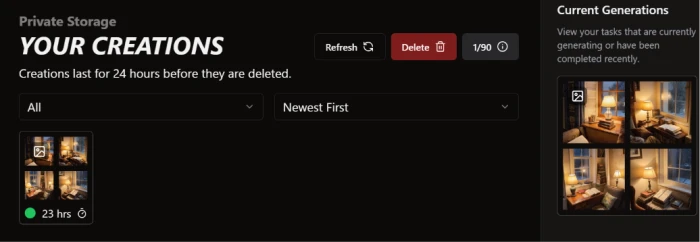
Then the cost caught up with me. I opened with 6 gems, one batch of four images cost 4, and I was left with 2. Not enough for another full run.
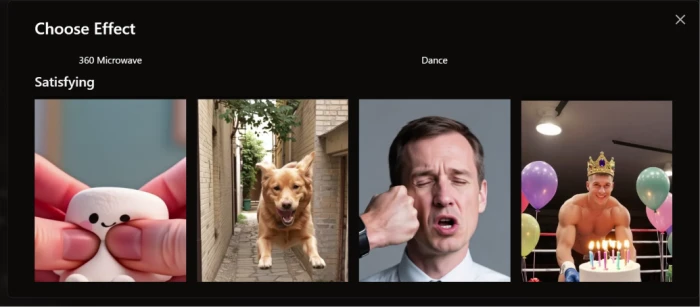
Try Effects, then read where the real limits are
The Effects tool animates a still using preset motions instead of a written prompt. The picker is a grid of ready-made effects with labels like 360 Microwave and Dance, plus a whole category filed under Satisfying.
They are good fun and clearly built for short social clips. What you give up is control, since you pick motion off a menu rather than describing it.
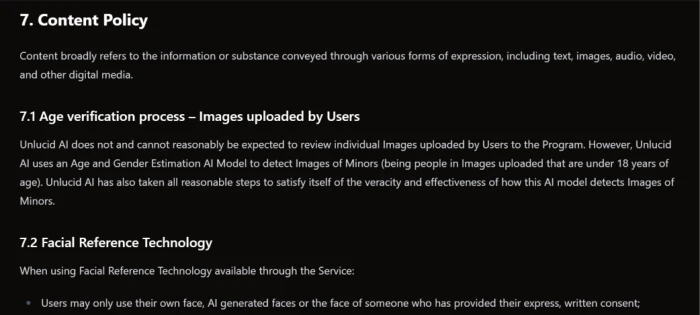
Last, I read the Content Policy, because an "uncensored" label makes you want to find the actual line. Section 7 is where it sits. Unlucid says it runs an Age and Gender Estimation model to flag images of minors in uploads, while admitting it cannot review those uploads by hand.
Unlucid AI pricing
Figures taken from the official Unlucid gems page.
| Plan | Price | What's included |
|---|---|---|
| Free (daily) | $0 | Small daily free gem claim · all tools · watermark on output · creations deleted after 24 hours |
| 120 Gems | $8.99 | No watermark · up to 120 images · up to 60 edits · up to 12 videos |
| 450 Gems Best Deal | $29.99 | No watermark · up to 450 images · up to 225 edits · up to 45 videos |
| 1250 Gems | $59.99 | No watermark · up to 1250 images · up to 625 edits · up to 125 videos |
Pros & cons
Specific conclusions from testing and real user reviews, not generic filler.
✅ Pros
- Genuinely uncensored: passes prompts Midjourney and DALL-E reject
- Effects presets produce smooth 3 to 5 second social clips reliably
- No sign-up needed to try the Effects tools
- Gem price shown on the Generate button before you commit
- Card, Telegram Pay and crypto all accepted at checkout
- Uncluttered create screen, near-zero learning curve
⛔ Cons
- Every creation is deleted after 24 hours
- A usable image often takes 3 to 5 gem-costing attempts
- Complex scenes produce distorted anatomy and melting detail
- Age gate is a self-declared checkbox, not real verification
- Free tier watermarks output and puts you in a slow queue
- Scamadviser flags low trust and anonymous ownership
- Users report account suspensions while holding paid gems
Synthesized from real reviews on Reddit, Scamadviser, G2, Trustpilot & GeniusFirms · paraphrased, not quoted
Unlucid AI scorecard
Rated against what an uncensored image and video generator is actually built to do.
| Dimension | Verdict | Score |
|---|---|---|
| Content freedom How uncensored it really is | Excellent |
8.5
|
| Ease of use Signup, layout, first run | Good |
8.0
|
| Video & effects quality Preset animation output | Good |
7.0
|
| Editing tools Remove, replace, clothing swap | Average |
6.5
|
| Image generation quality Fidelity across prompt types | Average |
6.0
|
| Prompt adherence Matching the written request | Average |
6.0
|
| Safety & age gating Verification and misuse controls | Weak |
5.0
|
| Value vs gem cost Output per dollar with retries | Weak |
5.0
|
| Storage & export Keeping what you make | Weak |
4.0
|
| Trust & transparency Ownership, safety signals, support | Weak |
4.0
|
| Scrutool Score Equal-weight average of all 10 dimensions |
6.0
|
What users say about Unlucid AI
The themes reviewers raise most often, by share of analysed reviews.
% = share of analysed reviews mentioning each theme (Reddit, Scamadviser, Trustpilot, GeniusFirms)
An honest creative sandbox that never pretends to be a studio
Unlucid delivers exactly the one thing it advertises: fewer filters. The Effects animator is genuinely fun and reliable for short social clips, the create screen is refreshingly uncluttered, and the gem price on the Generate button is more upfront than most credit systems. The problems are structural, not cosmetic. Image quality swings from solid on simple prompts to melting and distorted on busy ones, a usable result can burn several gems worth of retries, every creation is wiped after 24 hours, and the age gate is a single checkbox. Layer on the low trust scores, anonymous ownership and reports of suspensions while users held paid gems, and the picture is clear. Hobbyists, meme makers and curiosity-driven creators who want a disposable playground will enjoy it, especially on the free daily gems. Anyone doing client work, storing assets, or spending real money should keep balances small and expectations lower.
Discussion
Join the discussion and share your perspective.