
DeeVid AI
DeeVid AI is an all-in-one AI video studio that routes your prompt to one of 15+ engines like Sora, Veo and Kling, and adds avatars, voice and music. Deep feature set, but billing and export reliability are a real concern.

A model-rich, all-in-one AI video studio with a genuinely capable feature set, undercut by credits that burn fast, a signup bonus that sometimes never lands.
Should you use DeeVid?
Creators and marketers who want many top video models in one place and will pay for a plan rather than test on the free tier.
You want to trial it for free before paying . The signup credits often show as zero, so the free run can stall before your first clip.
Paid plans start at Lite, $10/mo billed yearly , and a single 5-second clip at the lowest quality costs 20 credits.
Subscriptions auto-renew with no refunds , users report credits vanishing early, and my own export failed on every attempt.
Key features & how they perform
Each feature rated from hands-on testing and aggregated review sentiment.
One account, many models
DeeVid routes your task to a best-fit engine from a roster that names Sora 2, Veo 3.1, Kling, Runway, Hailuo and more. Rare range for a single subscription.
Image, text and video inputs
Animate a photo, write a scene, or restyle an existing clip. The agent plans and iterates on its own, which suits quick social output.
Viral Studio trend cloning
Paste a TikTok, YouTube, Instagram or Facebook link and DeeVid rebuilds that style around your footage. A 60-second direct upload works too.
Built-in track editor
A real timeline with separate rows for assets, video, audio and subtitles, so trimming and layering stay inside the same tool that made the clip.
Avatars, voice and music
Turn one photo into on-camera talent, add text-to-speech and copyright-free tracks. Lip sync handles dubs, though quality draws mixed reviews.
Export & delivery
The last step is the shakiest. My export failed repeatedly on a local proxy error, and users report renders freezing or crashing before finishing.
Feature ratings blended from Trustpilot, G2, App Store, Product Hunt & hands-on testing.
What happened when I tried to make one video in DeeVid
From a free signup to a failed export, here is exactly how my session went, start to finish.
Signing up on the free promise
I started the way any first-time user would, through the black Start For Free button in the top right of the DeeVid homepage. The pitch is plain: try the tool, pay nothing.
DeeVid advertises 20 free credits for every new account, roughly four short videos. That button set my expectations for the whole session.

A fresh account holding zero credits
After the account was created, I opened Settings and went to the Subscription tab to see what I had to work with. The plan correctly showed as Free.
The credits line was the problem. It read 0 / 0, with 0 credits remaining printed below it. I had not run a single generation, so nothing had been used. The balance was empty from the first second I logged in.

Blocked by a paywall on the first clip
I tried to generate a video anyway. I typed a plain prompt into the AI Video box and left the settings on their cheapest option: Master V4.0 at 480p for a 5-second clip, priced at 20 credits.
"Slow cinematic drone shot flying over a misty California redwood forest at sunrise, soft light"

I clicked Create, and a paywall came back instead of a video. The popup read Upgrade to Generate, with a line underneath: you have run out of credits, upgrade to keep creating. Yearly and monthly billing toggles sat below it.

Asking support, and going in a circle
I opened the in-app chat to flag the missing credits. An assistant named AssistAI replied inside a minute and confirmed the marketing claim: new accounts receive 20 free credits, issued once at registration.
Then it guessed at the cause. Maybe I was in the wrong account, maybe I used Apple's private relay email, maybe my email case was off, maybe the page needed a refresh. None of that fit a brand new signup done minutes earlier.

The features that do look capable
The credit wall aside, DeeVid packs a wide feature set, and parts of it would clearly serve marketers and creators well. I explored the ones I could reach without spending credits.
The Skills library sorts ready-made workflows into three columns by goal. Options like Product Photography, Cinematic Film, UGC Ad and Talking Head sit inside, ready to pick without writing a prompt from scratch.
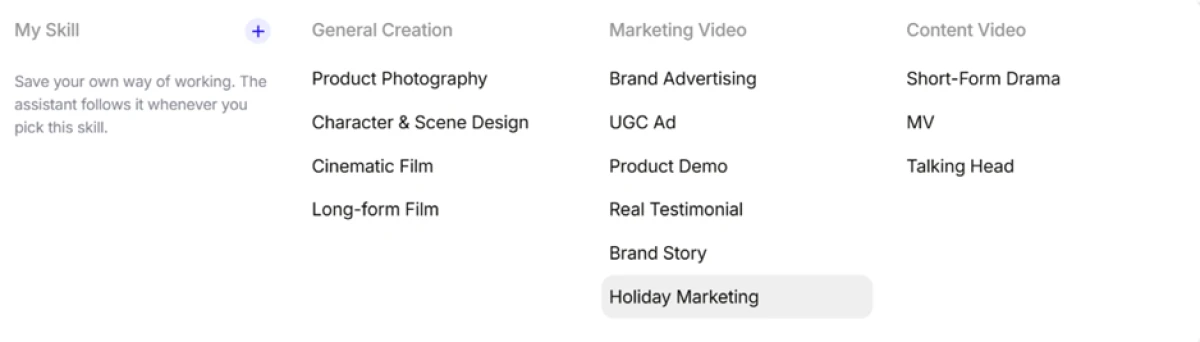
DeeVid also lets me save a persona, which it labels style preferences. I name the style, then describe how I want the assistant to speak and work. A note says these settings shape tone only, with no control over billing or safety behaviour.

Viral Studio was the most original feature I found. You paste a link to a trending clip from TikTok, YouTube, Instagram or Facebook, and DeeVid rebuilds that style around your own footage. A direct upload of up to 60 seconds works as well.

There is a real editor built in too. Add Asset, Add Video, Add Audio and Add Subtitle buttons run across the top, the timeline holds a separate row for each track, and the aspect ratio sits at 16:9.

Export failed on every attempt
Then I tried to get a finished video out, and this is where the session ended for good. After trimming an 11-second cut, I clicked Export. The job ran all the way to 100%, then dropped a red error: Failed to fetch http://localhost:3000/proxy.
I ran it again and got the same result. I ran it a third time, and nothing moved at all.

DeeVid pricing
Figures taken from the official DeeVid pricing page, billed yearly.
| Plan | Price | What's included |
|---|---|---|
| Free | $0 | 20 one-time signup credits (about 4 videos) · watermarked output · no commercial use · credits do not renew |
| Lite | $10 /mo | 200 credits/mo (about 40 videos) · 720p output · no watermark · full commercial use · fast generation mode |
| Pro Popular | $25 /mo | 600 credits/mo (about 120 videos) · 1080p output · no watermark · private creation · full commercial use |
| Premium | $119 /mo | 3,000 credits/mo (about 600 videos) · 1080p output · priority support · all Pro benefits |
| Credit packs | Add-on | Buy extra credits on any paid plan when the monthly pool runs out · valid 1 year from purchase · Lite plan and above only |

Pricing is accurate as of 27 October 2026 and was captured from the official DeeVid website. Plans, prices and credit limits change often, so check the official DeeVid pricing page for the current figures before you subscribe.
Pros & cons
Specific conclusions from real user reviews, not generic filler.
✅ Pros
- Users praise the cinematic look when a generation lands cleanly
- One subscription reaches many named engines like Sora, Veo and Kling
- Image generator returns four options per prompt to choose from
- Same account and credit balance works across web, iOS and Android
- Reviewers rate it strong value among tools in its price band
- Video-to-video restyling handles anime and stylized conversions well
⛔ Cons
- Auto-renewal charges hit after trial, often as a surprise annual bill
- Prepaid credits reported vanishing from balances without warning
- Cancellation flows repeatedly fail to actually stop the subscription
- The agent ignores clear prompts, then charges credits for each retry
- Refund requests are refused and answered only with more credits
- Videos freeze or crash mid-render; sign-in frequently fails
- A single generation can swallow 36 credits or more unexpectedly
Synthesized from real reviews on Trustpilot, G2, Apple App Store, Google Play & Product Hunt · paraphrased, not quoted
DeeVid AI alternatives
| DeeVid AIReviewed | Clipfly AI | Syntx AI | Creen AI | Focal AI | |
|---|---|---|---|---|---|
| Our Score | 6.8/10 | 6.6/10 | 6.4/10 | 5.7/10 | 4.3/10 |
| Entry paid plan | $10 / mo, billed yearly | $10.99 / mo, billed yearly | $29 / mo | $14.50 / mo, billed yearly | Paid tiers above free |
| Free tier | 20 one-time credits, often shows 0 | 10 credits on signup, no card | Free trial tokens, never expire | Free to use, no signup needed | Free plan, up to 55 seconds |
| Model access | 15+ engines, auto-matched per task | In-house AI across video and image | 90+ AI tools behind one plan | 40+ engines (Sora, VEO, Kling) | Multiple models for scenes and sound |
| Credit rules | Metered, 1-year validity, no refunds | Monthly cap plus pay-as-you-go packs | Tokens do not expire | Credits accumulate, never expire | Monthly plus 50 daily credits |
| Best for | Multi-model video on one paid plan | All-in-one clips with a built-in editor | Mixed content across many formats | Free image and video experiments | Agentic script-to-scenes video |
| Standout strength | Engine range plus Viral Studio cloning | Free editor with watermark-free paid export | One login for 90+ creative tools | No login and non-expiring credits | Story-driven multi-model scene builder |
Who Should Use DeeVid AI, and Who Should Avoid It?
DeeVid gives you a deep model roster and a full creation suite, but its billing practices, credit burn and export reliability make it a poor fit for some users.
Who Should Use DeeVid AI?
Best suited for these workflows
Creators Who Want Many Models in One Place
Reaching Sora, Veo, Kling, Runway and more through a single login saves juggling several subscriptions for different looks.
Marketers Making UGC and Product Ads
The Skills library and AI Ads flow turn a product shot into platform-ready ad variants, which suits fast social output.
Trend Chasers Using Viral Studio
Pasting a trending link and rebuilding its style around your footage is genuinely useful for creators racing a moment.
Buyers Ready to Pay From Day One
Those who skip the free tier and start on a paid plan dodge the zero-credit wall and get watermark-free, commercial output.
Who Should Avoid DeeVid AI?
Consider an alternative if you need
A Genuine Free Trial First
The 20 promised credits often never land, and support cannot add them, so the free run can stall before a single clip.
Predictable, Refundable Billing
Plans auto-renew with no refunds, and users report surprise annual charges and credits erased from balances without warning.
Reliable Exports and Renders
My export failed every time on an internal error, and reviewers describe renders freezing or crashing before they finish.
Cheap, High-Volume Output
Credits drain fast, retries on a poor result cost more each time, and a single generation can swallow 36 credits or more.
Our Recommendation
DeeVid is worth a look if you value model range and plan to pay for a tier rather than lean on the free credits. If you want to test before buying, or you need dependable exports and clean billing, the pattern of complaints is hard to ignore. Before you subscribe, confirm your free credits actually appear, run one real clip end to end including the export, and read the no-refund, auto-renewal terms in full.
DeeVid scorecard
Rated against what an all-in-one AI video generator is actually built to do.
| Dimension | Verdict | Score |
|---|---|---|
| Model access & matching Range of engines and task routing | Excellent |
8.5
|
| Feature breadth Video, image, avatar, voice, music | Good |
8.0
|
| Templates & effects library Skills, trends and ready workflows | Good |
7.5
|
| Built-in editor & media Timeline, tracks, subtitles, embeds | Good |
7.5
|
| Ease of use Signup, navigation, first steps | Good |
7.0
|
| Output quality Look and prompt adherence of clips | Good |
7.0
|
| Commercial terms Watermark removal and usage rights | Average |
6.5
|
| Value for credits Cost per clip and credit burn rate | Average |
6.0
|
| Support & refund handling Help channels and dispute outcomes | Average |
5.5
|
| Export & billing reliability Finished downloads and clean renewals | Weak |
4.5
|
| Scrutool Score Equal-weight average of all 10 dimensions |
6.8
|
A strong creation engine wrapped in a billing experience users keep warning about
DeeVid gets the hard part right. The model roster is deep, the Skills library and Viral Studio are genuinely useful, and the built-in editor keeps generation and trimming in one place. When a clip lands, reviewers like the cinematic result. The trouble sits around the creation, not inside it. The free credits DeeVid advertises never appeared on my account, support could not fix it, and my export failed on every attempt with an internal error. Those are not one-off glitches: Trustpilot and the app stores are full of the same themes, auto-renewal charges, credits erased without warning, cancellations that do not take and refunds refused in favour of more credits. Creators who want model range and will commit to a paid plan can get real work done here. Anyone who needs to trial it first, or who values dependable exports and clean, refundable billing, should test it carefully or choose a tool with a steadier track record.
Discussion
Join the discussion and share your perspective.