
Gamma AI
Gamma is an AI presentation and website maker that turns one prompt into a polished, card-based deck in minutes. Fast to draft, but exports and credits need watching.

The fastest way to a good-looking first draft, undercut by shaky PowerPoint exports, a one-time credit pool and a locked free-tier badge.
Should you use Gamma?
Founders, consultants and marketers who need a sharp first draft fast and will present it as a live Gamma link rather than a PowerPoint file.
Your deck has to land as a clean .pptx for a client or stakeholder. Export breaks dividers and layout, so you edit by hand anyway.
The 400 free credits never refresh and run out in roughly 14 to 15 decks . Regular use means Plus at $9/seat/mo or Pro at $18.
The AI image model garbles text , the free badge is locked on, and Trustpilot is full of billing and refund complaints.
Key features & how they perform
Each feature rated from hands-on testing and aggregated review sentiment.
Prompt-to-deck generation
One sentence produces a structured outline then a full deck in two to three minutes. The agent asks who the deck is for before it drafts, which sharpens the angle.
Design & themes
Output looks finished out of the box, but the preset themes share the same bones, so decks start to look alike after a few builds.
Card editor & freeform mode
A thumbnail rail makes reordering sections a drag instead of a copy-paste chore. Dropping to manual block editing works, but the AI stops driving the moment you do.
AI image generation
Built into the card, which many rivals still do not offer. The basic free model garbles on-image text and leans clipart, so most users swap in stock photos.
Export & import
PDF, PPTX, PNG and Google Slides out, PowerPoint and PDF in. The card-to-slide conversion shifts layout, so PPTX files need cleanup before they are client-ready.
Integrations & API
Pulls content from Slack, Notion, Dropbox and 25+ tools, and starts from ChatGPT or Claude. The public API is gated to Pro and above.
Feature ratings blended from Trustpilot, G2, Capterra & Reddit review patterns + hands-on testing.
Building a go-to-market deck in Gamma from one prompt
A real US business brief, from the first prompt to the broken export.
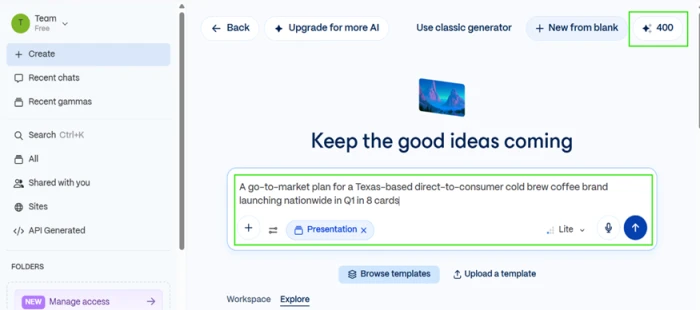
Write the prompt and set the card count inline
Gamma has no separate slider for the number of cards, so the count goes straight into the prompt sentence. It reads it without complaint.
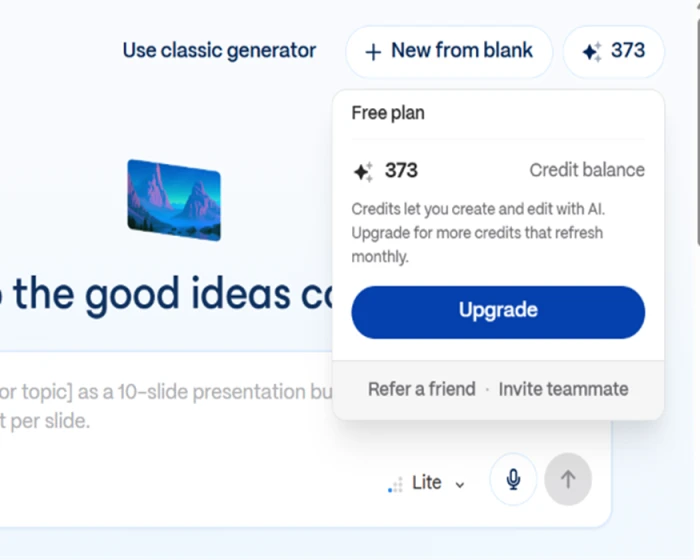
The balance in the top-right corner is the number that actually governs the free tier. My account opened with 400 one-time credits, and that pool is the whole free plan.
"Create an 8-card go-to-market plan for a Texas-born cold brew coffee brand launching nationwide in Q1."
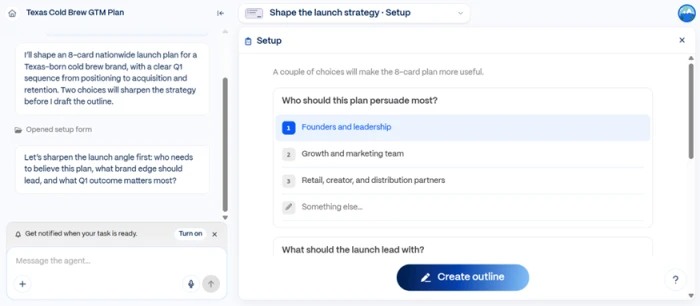
Answer the framing question before it drafts
Before writing a word, Gamma opened a short setup form asking who the plan should persuade and what the launch should lead with.
This is the opposite of what a speed-first tool usually does. It is not formatting text blindly, it is asking the question a strategist asks first. For a product sold on speed, slowing down to get the angle right is a point in its favor.
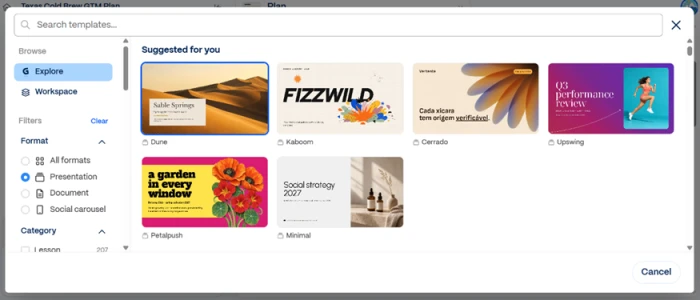
Pick a theme and shape the outline
The template picker on the free plan offers a decent spread, filterable by format. This is also where the first ceiling shows: every option is a preset.
You are choosing from Gamma's shelf, with no way to load a locked brand kit at this tier. That is the root of the sameness reviewers mention: the themes draw from one visual family.
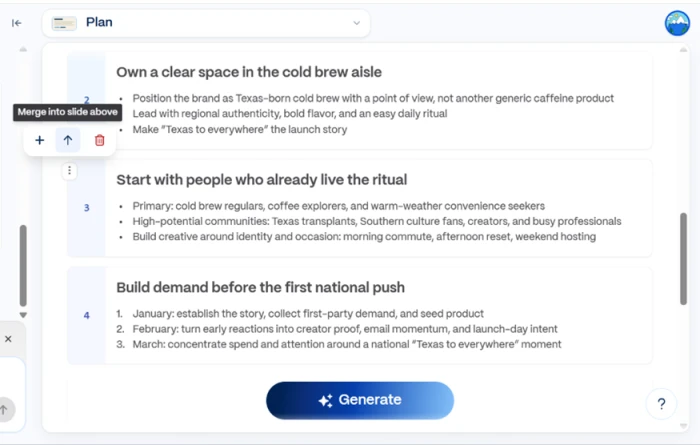
The outline stage is where the real control sits. I could reorder cards, merge one into the slide above it, delete or add, all before spending a single credit on generation.
Edit the generated deck and add blocks by hand
Generation produced a full 8-card deck that looked finished. The editor uses a card model with a thumbnail rail down the left, so moving a whole section is a drag, not a rebuild.
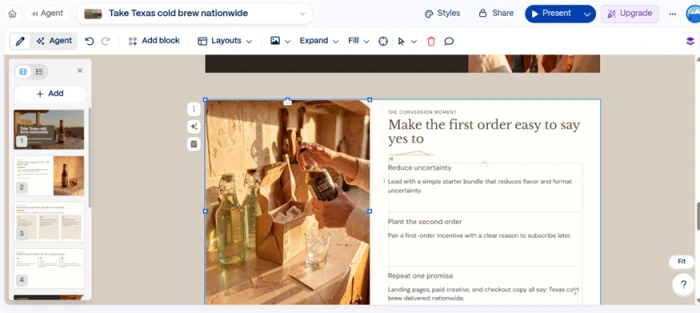
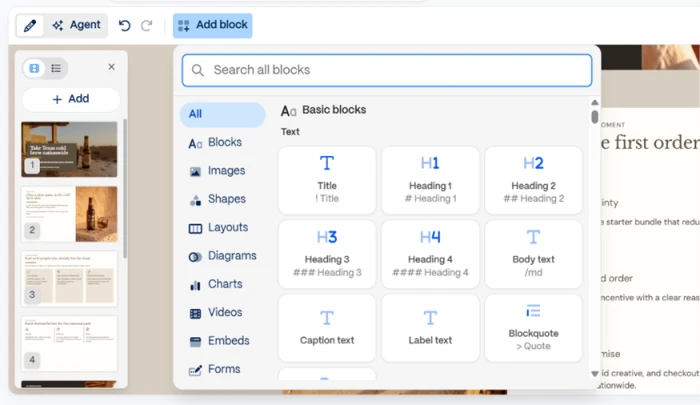
When I wanted something the AI had not included, the Add block panel covered headings, body text, images, charts and embeds. The catch is that this is manual mode.
The moment you step out of the AI chat to place a block or fix one word, you are doing ordinary document editing and the AI is no longer driving. You switch between the two modes more than the "60 seconds" pitch suggests.
Generate an image inside a card
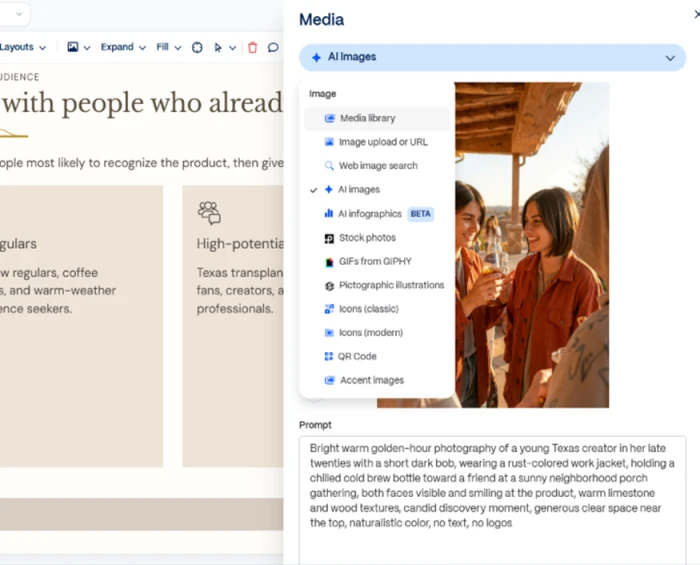
Image generation lives right in the card, which a lot of competitors still do not bundle. On the free plan the model is the basic one.
"a glass bottle of Texas cold brew coffee on a wooden table, golden hour light, condensation on the glass, shallow depth of field"
Export to PowerPoint, and watch it break
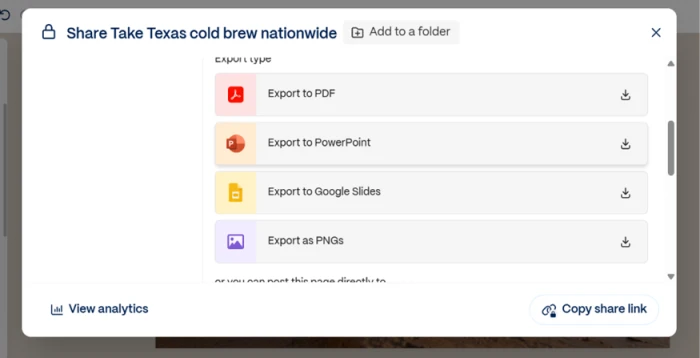
Sharing and export share one panel. You pick a quality level, then a format. Gamma offers PDF, PowerPoint, Google Slides and PNG, a wider set than I expected on free.
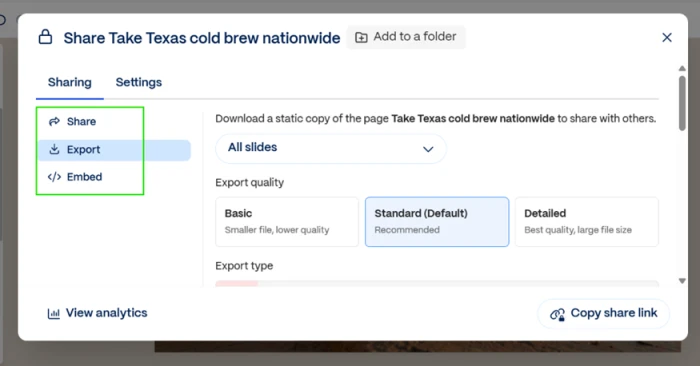
I chose PowerPoint, since any US client or stakeholder is going to ask for a .pptx, and opened the file in PowerPoint.
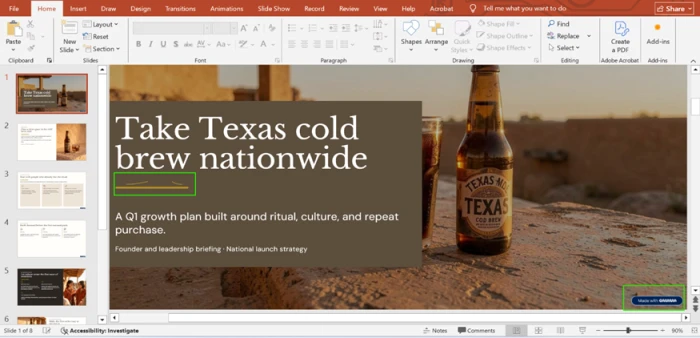
Three problems showed up on the very first slide. A "Made with Gamma" badge is locked into the bottom-right corner with no way to remove it on free. The gold divider under the title, clean inside Gamma, rendered as a broken squiggle. And the bottle label read "TEXAS COD BREW" instead of "COLD BREW", the image model garbling the brand name on the title slide.
Count the credits the run actually cost
After building the deck and generating one image, my balance had dropped from 400 to 373. One full run cost roughly 27 credits.
The balance popup states the part that stings: the free credits do not refresh monthly. That renewal is an upgrade perk, not a feature of the free plan.
Gamma pricing
Figures taken from the official Gamma pricing page. Prices are per seat.
| Plan | Price | What's included |
|---|---|---|
| Free | $0 | 400 one-time credits · up to 10 slides per prompt · PDF, PPTX, PNG & Google Slides export · Gamma badge on all output |
| Plus Popular | $9 /seat/mo | 1,000 monthly credits · removes Gamma branding · up to 100 slides per prompt · advanced AI image models |
| Pro | $18 /seat/mo | 4,000 monthly credits · premium image models · custom branding · analytics · 10 custom domains · API access |
| Ultra | $90 /seat/mo | 20,000 monthly credits · most advanced text, image & video models · 100 custom domains · early access features |
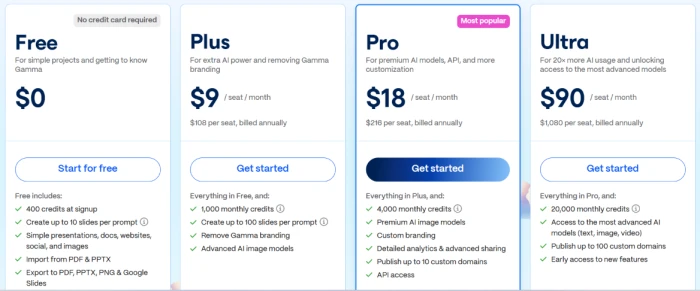
Pricing is accurate as of 15 October 2026 and was captured from the official Gamma website. Per-seat prices are shown billed annually; monthly billing runs higher, and plans and credit limits change often, so check the official Gamma pricing page for the current figures before you subscribe.
Pros & cons
Specific conclusions from testing and real user reviews, not generic filler.
✅ Pros
- Turns one prompt into a structured 8 to 10 card deck in under three minutes
- Agent asks who the deck should persuade before drafting the outline
- Free tier exports to PDF, PPTX, PNG and Google Slides, which most rivals gate
- Imports PowerPoint and PDF files to refine rather than rebuild
- Pulls live content from Slack, Notion, Dropbox and 25+ connectors
- Card thumbnail rail makes reordering whole sections a single drag
⛔ Cons
- PPTX export shifts layout and breaks dividers, forcing manual cleanup
- Preset themes share one visual family, so decks look interchangeable
- Basic image model garbles on-image text and leans clipart quality
- Public API locked to Pro, so lower tiers cannot automate output
- Trustpilot sits near 1.9 out of 5 on support, billing and refunds
- Free and lower plans may be used to train Gamma's AI unless you opt out
Synthesized from real reviews on G2, Capterra, Trustpilot, Reddit & the app stores · paraphrased, not quoted
Gamma alternatives
| Gamma AIReviewed | Pitch AI | Slides AI | Presentations AI | |
|---|---|---|---|---|
| Our Score | 6.4/10 | 7.0/10 | 6.5/10 | 5.3/10 |
| Entry paid plan | $9/seat/mo, billed yearly | $10/mo, billed yearly | $7/mo, billed yearly | $20/mo, billed yearly |
| Free tier | 400 one-time credits, about 14 decks | 100 one-time credits | 200 credits/mo, about 8 decks | 100 credits, up to 20 slides |
| Free export | PDF, PPTX, PNG, Google Slides (branded) | PDF (Pitch-branded) | PPTX, PDF, Google Slides | None, paid plan only |
| Core method | Prompt to card-based deck, docs and sites | Prompt to deck, pick the AI model | Outline then slides, inside Slides & PowerPoint | Prompt, doc or URL into template-locked decks |
| Best for | A fast first draft shared as a live link | Teams building and sharing decks by link | A quick first draft in Slides or PowerPoint | Fast rough drafts with limited design control |
Who Should Use Gamma, and Who Should Avoid It?
Gamma is built for speed and a clean house look when you present on the web. Its shaky PowerPoint export and preset-bound themes make it a weaker fit when the file itself has to be perfect.
Who Should Use Gamma?
Best suited for these workflows
Founders and Consultants in a Hurry
A single prompt becomes a structured 8 to 10 card draft in under three minutes, with the agent framing the angle first.
Link-First Presenters
Gamma's cards are built for the web, so presenting from a shared link rather than a file plays to its strengths.
Marketers and Educators
People who want a polished house look out of the box and care more about speed than pixel-level control.
Teams Pulling From Other Tools
Content imports from Slack, Notion, Dropbox and 25+ connectors, so decks start from material you already have.
Who Should Avoid Gamma?
Consider an alternative if you need
A Clean .pptx to Hand Over
PowerPoint export shifts layout and breaks dividers, so a client-ready file still needs manual cleanup.
Strict Brand Control
Preset themes draw from one visual family, so decks start to look interchangeable after a few builds.
Polished AI Imagery
The basic image model garbles on-image text and leans clipart, so most users swap in stock photos.
Control Over Your Data
Free and lower plans may be used to train Gamma's AI unless you actively opt out.
Our Recommendation
Gamma earns its place for anyone who lives inside the Gamma link and wants a fast, good-looking draft. If the deck has to leave as a clean, on-brand PowerPoint, plan for manual cleanup after export, and check the data and branding limits before you commit to a team plan.
Gamma scorecard
Rated against what an AI presentation and deck platform is actually built to do.
| Dimension | Verdict | Score |
|---|---|---|
| Generation speed & workflow Prompt to finished draft | Excellent |
8.5
|
| Output design quality Polish of the generated deck | Good |
8.0
|
| Prompt & content adherence Understanding the brief | Good |
7.5
|
| Editor & customization Card model and freeform control | Good |
7.5
|
| Template & brand control Range beyond the preset look | Average |
6.0
|
| PowerPoint export fidelity How clean the .pptx lands | Weak |
5.5
|
| AI image generation Quality of in-card images | Weak |
5.5
|
| Credit system & value Free pool and plan pricing | Weak |
5.5
|
| Free-tier usability Watermark and generation limits | Weak |
5.0
|
| Support & billing reliability Refunds, charges, response times | Weak |
4.5
|
| Scrutool Score Equal-weight average of all 10 dimensions |
6.4
|
Brilliant for a first draft on screen, frustrating the moment it has to leave Gamma
Gamma is the fastest route from a blank page to a presentable deck that exists right now, and the agent asking who you are persuading before it drafts is a genuinely smart touch. If you present as a shared link and work in short bursts, it earns its place. The problems cluster at the exit. The PowerPoint export shifts layout and breaks design elements, the basic image model garbles text, the preset themes make decks look interchangeable, and the 400 free credits are a one-time pool that vanishes in roughly fifteen builds. Add a Trustpilot rating weighed down by billing and refund complaints, and the picture sharpens. Founders, marketers and consultants who live inside the Gamma link will get real value. Anyone who needs a clean, on-brand .pptx to hand a client should test it monthly first, and keep PowerPoint open for the cleanup.
Discussion
Join the discussion and share your perspective.