
Presentations AI
Presentations AI turns a prompt, document, or URL into a styled slide deck in about a minute. Fast to draft, but rigid templates and a paywalled export hold it back.

Fast first drafts that fall apart on inspection: duplicated points, white-on-white text, and a PowerPoint export locked behind the paywall.
Should you use Presentations AI?
A fast rough draft when you need deck structure in a minute and plan to rebuild the content yourself afterward.
You need the deck as an editable PowerPoint on a budget, or you have brand colors and hex codes the AI must actually follow.
Free gets 100 credits and no export. A usable workflow means Pro at $20/mo billed annually , which is $240 a year.
Reviewers report auto-renewals and no refunds , and credits drain fast on features like Remix.
Key features & how they perform
Each feature rated from hands-on testing and aggregated review sentiment.
Prompt-to-deck generation
One sentence returns a styled, charted deck in about a minute. The speed is real, but it may overshoot your slide count, building twelve when you asked for ten.
Document & URL import
Pulls figures from PDFs, Word docs, spreadsheets and links, and holds titles, bullets and speaker notes when importing a PowerPoint without hallucinating the numbers.
Locked template layouts
Grouped templates stop text overlapping or misaligning, which protects non-designers. The same lock means you cannot draw a text box or move an image freely.
Edit with AI
Rewrites text, shifts tone and drafts speaker notes. It appears mainly at generation time, so there is no conversational editing once you are in the deck.
Brand Sync & theming
Pulls logo, fonts and colors from a website URL, and a Theme button recolors a deck. Reviewers report it ignoring uploaded style guides and specific hex codes.
Refresh & scale generation
Connects to Salesforce, HubSpot, Sheets and Snowflake to update a master deck on a schedule, and generates bulk personalized decks via API. Both sit on the top tier.
Feature ratings blended from G2, Trustpilot, Capterra review patterns + hands-on testing.
Generating an investor pitch from one sentence in Presentations AI
A real ten-slide brief, from the prompt to the export paywall.
Hand it one prompt and nothing else
I did not want a toy test, so I gave the tool a real assignment: a ten-slide investor pitch for a fictional US direct-to-consumer coffee subscription brand called Daybreak Coffee Co.
I asked for US market sizing and a revenue projection, with a business model section between them. No uploads, no template. This is the exact scenario the product sells itself on, so it felt like the fair way to judge it.
"Create a 10-slide investor pitch for a US-based direct-to-consumer coffee subscription startup called 'Daybreak Coffee Co.' Include market size for the US coffee market, business model, and a revenue projection slide."
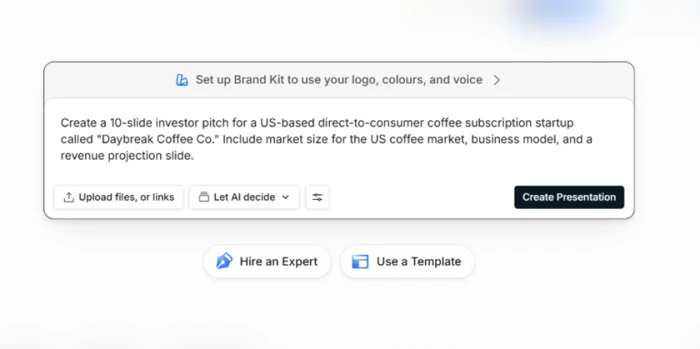
Watch the first draft arrive, then count the slides
Credit where it is due. Within about a minute the platform returned a complete, styled deck with charts and diagrams in a consistent green brand look.
For a cold-start pitch built from one sentence, the speed is the strongest part of the experience.
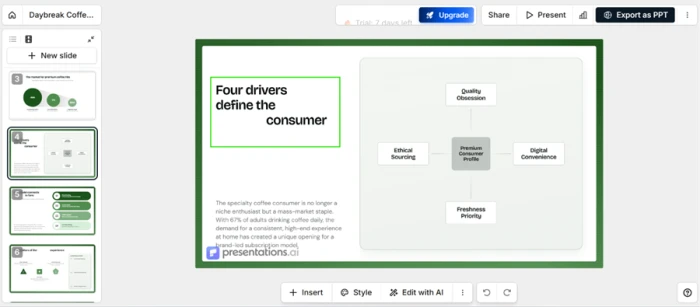
Edit a slide and find the content engine's limit
The editor itself is capable. I could click into any element and rewrite it, and the Add Point control let me extend the list on the mergers and acquisitions slide from three entries to four.
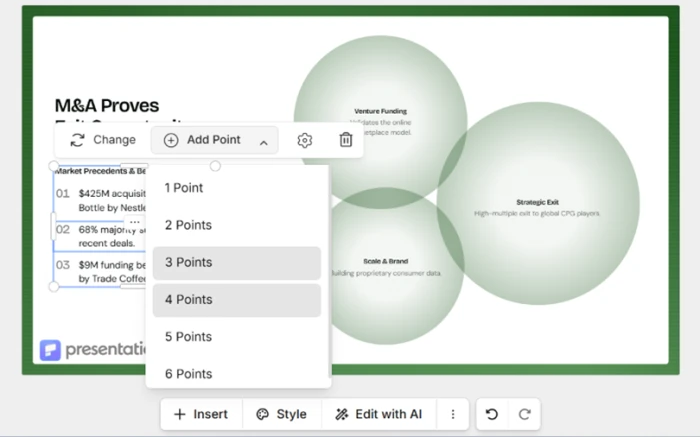
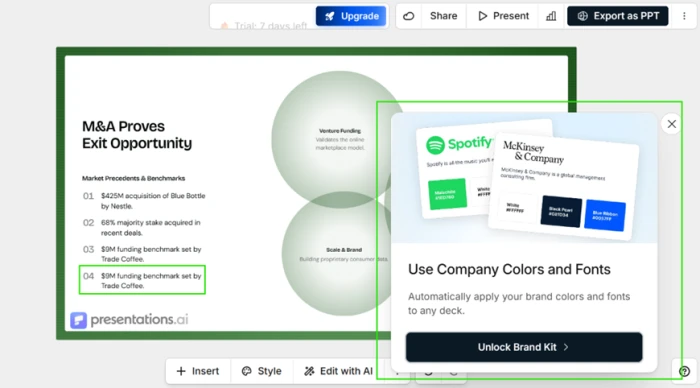
That is where the AI embarrassed itself. When I added a fourth point, it produced point 04 as a word-for-word copy of point 03, printing the same "$9M funding benchmark set by Trade Coffee" line twice.
The same screen fired an Unlock Brand Kit popup mid-edit, pushing the paid upgrade while I was still working.
Read the metrics slide, if you can
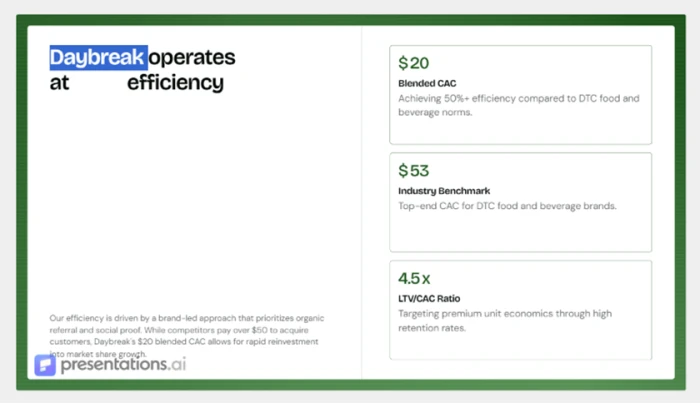
This one is hard to defend. On the metrics slide, the AI set the headline in white type on a white background.
The line is meant to read "Daybreak operates at [X] efficiency," but a full word matches the canvas color and drops out of sight, leaving a broken sentence with a gap in the middle. For a platform whose whole pitch is design automation, shipping invisible text in a default generation is a serious quality miss.
Spot the blank bands the layout left behind
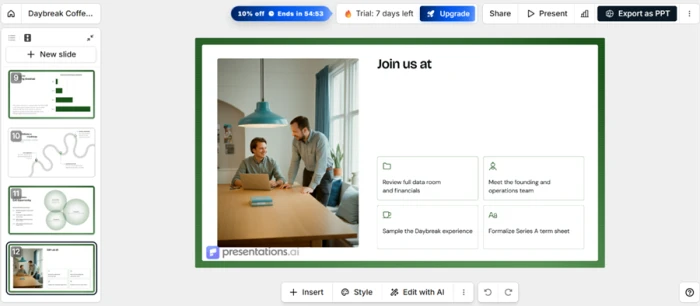
Several slides arrived with large blank zones that read as unfinished. The closing "Join us at" slide is the clearest case, a headline that trails off above a wide empty band.
Do the credit math on what the deck cost
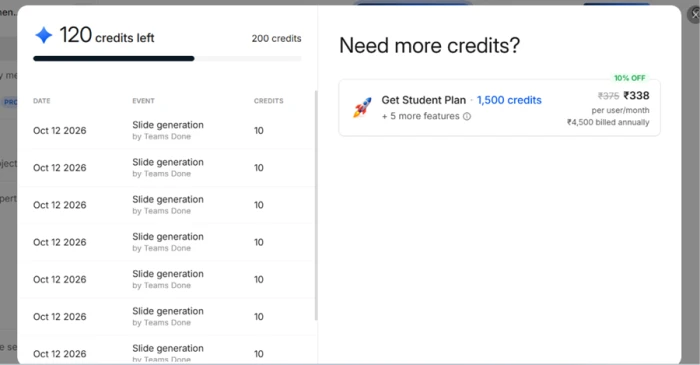
I started the session with 200 credits. After building the deck I had 120 left, so the deck cost 80 credits. The usage ledger logs each charge as "Slide generation, 10 credits," and it shows eight such charges.
Hit the wall at export
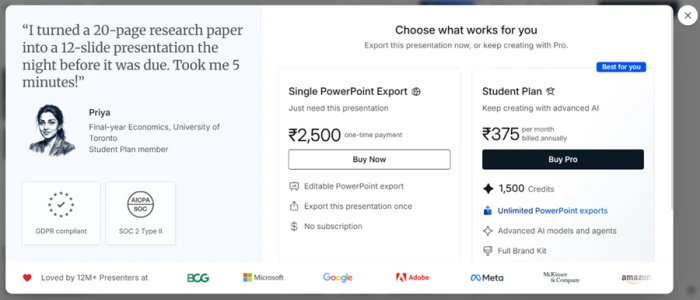
The last wall came at the finish line. Clicking Export as PPT blocked the download behind a paid plan.
Presentations AI pricing
Figures taken from the official Presentations AI pricing page. US prices shown.
| Plan | Price | What's included |
|---|---|---|
| Starter | $0 | 100 credits · Starter AI model and agent · up to 20 slides · up to 5 guests |
| Pro Popular | $20 /mo | 5,000 credits · high-quality PowerPoint export · advanced AI models · presentation tracking & analytics · brand customization |
| Gold | $50 /mo | 25,000 credits · frontier AI models and agents · advanced brand customization · shared knowledge base · presentation refresh · custom templates |
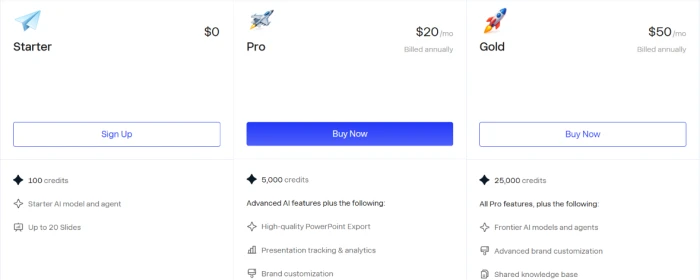
Pricing is accurate as of 15 October 2026 and was captured from the official Presentations AI website. Pro and Gold are per month billed annually, so Pro is $240 a year and Gold is $600, and plans change often, so check the official Presentations AI pricing page for the current figures before you subscribe.
Pros & cons
Specific conclusions from testing and real user reviews, not generic filler.
✅ Pros
- Generates a full styled deck from one prompt in about a minute
- Pulls real figures from PDFs and spreadsheets without hallucinating numbers
- Imports PowerPoint files keeping titles, bullets and speaker notes
- Locked grouped templates stop text overlapping or misaligning
- Reads text, PDF, Word, URL and Excel as source material
- Refresh updates a master deck from Salesforce, HubSpot and Snowflake on a schedule
⛔ Cons
- Ignores uploaded style guides and specific brand hex codes
- Diagrams cap at roughly four points, so many decks look structurally identical
- AI cannot add fresh slides to a generated deck, only manual edits
- No conversational editing once you leave the generation step
- Remix can overwrite imported content with generic placeholder text
- Trustpilot sits near 2.1 out of 5 on refunds, auto-renewal and support
Synthesized from real reviews on G2, Trustpilot, Capterra & Reddit · paraphrased, not quoted
Presentations AI alternatives
| Presentations AIReviewed | Pitch AI | Slides AI | Gamma AI | |
|---|---|---|---|---|
| Our Score | 5.3/10 | 7.0/10 | 6.5/10 | 6.4/10 |
| Entry paid plan | $20/mo, billed yearly | $10/mo, billed yearly | $7/mo, billed yearly | $9/seat/mo, billed yearly |
| Free tier | 100 credits, up to 20 slides | 100 one-time credits | 200 credits/mo, about 8 decks | 400 one-time credits, about 14 decks |
| Free export | None, paid plan only | PDF (Pitch-branded) | PPTX, PDF, Google Slides | PDF, PPTX, PNG, Google Slides (branded) |
| Core method | Prompt, doc or URL into template-locked decks | Prompt to deck, pick the AI model | Outline then slides, inside Slides & PowerPoint | Prompt to card-based deck, docs and sites |
| Best for | Fast rough drafts with limited design control | Teams building and sharing decks by link | A quick first draft in Slides or PowerPoint | A fast first draft shared as a live link |
Who Should Use Presentations AI, and Who Should Avoid It?
Presentations AI is built to turn a brief into deck structure in about a minute. Its locked templates, rigid editing and shaky content quality make it a poor fit when the finished deck has to be polished and on-brand.
Who Should Use Presentations AI?
Best suited for these workflows
Anyone Fighting Blank-Page Paralysis
One sentence returns a full styled, charted deck in about a minute, which is a fast way to get raw structure on screen.
Business Users Importing Data
It pulls real figures from PDFs, Word files, spreadsheets and URLs without inventing the numbers.
Non-Designers
Locked, grouped templates stop text overlapping or misaligning, so a layout is hard to break by accident.
Teams Refreshing Recurring Decks
It connects to Salesforce, HubSpot, Sheets and Snowflake to update a master deck on a schedule.
Who Should Avoid Presentations AI?
Consider an alternative if you need
Strict Brand Control
Reviewers report it ignoring uploaded style guides and specific brand hex codes outright.
Freedom to Restructure
The locked templates that protect layouts also block moving an image or drawing a text box.
Iterative AI Editing
There is no conversational editing once you leave generation, and the AI cannot add fresh slides.
Varied, Polished Output
Diagrams cap at roughly four points, so many decks end up looking structurally identical.
Our Recommendation
Presentations AI suits people who want deck structure fast and expect to rebuild the content themselves. Anyone who needs a polished, on-brand, client-ready deck should plan for a manual cleanup pass, verify the content line by line, or start with a stronger alternative.
Presentations AI scorecard
Rated against what an AI pitch-deck platform is actually built to do.
| Dimension | Verdict | Score |
|---|---|---|
| Generation speed Prompt to finished draft | Good |
8.0
|
| Content accuracy & quality Duplicates, readability, padding | Average |
5.5
|
| Prompt adherence Following slide count and instructions | Weak |
5.0
|
| Template & layout quality Blank space and visual range | Average |
5.5
|
| Editor & customization Freedom to move and restructure | Weak |
5.0
|
| Brand customization Following colors, fonts, style guides | Weak |
5.0
|
| PowerPoint export Access and conversion fidelity | Weak |
4.0
|
| Credit system & transparency Predictability of spend | Weak |
4.5
|
| Free-tier usability Watermark and export lock | Weak |
4.5
|
| Value & pricing clarity Billing, refunds, regional pricing | Average |
5.5
|
| Scrutool Score Equal-weight average of all 10 dimensions |
5.3
|
A minute to a draft, an afternoon to fix what the draft got wrong
Presentations AI is genuinely quick. One sentence returns a styled, charted investor deck in about a minute, and it extracts real figures from documents without inventing them. That speed is the case for it. The case against is everything that happens next. In my test it built twelve slides for a ten-slide ask, duplicated a bullet word for word, shipped a headline in white type on a white background, and left blank bands where content should sit. The templates keep you from breaking a layout but also from fixing one, there is no conversational editing in the deck, and reviewers report it ignoring uploaded brand colors outright. Then export to PowerPoint is locked behind a paid plan, so the free tier cannot hand you a finished file at all. Use it to break blank-page paralysis and generate raw structure fast. Anyone who needs a polished, on-brand, client-ready deck should plan to rebuild the content by hand, or start somewhere else.
Discussion
Join the discussion and share your perspective.