
Pitch AI
Collaborative AI deck platform that lets you pick the model and co-build with your team. Strong at creating, but free exports are branded and locked.

A model-flexible, collaboration-first deck builder with designer-grade output, held back by a free tier that locks the clean export behind payment.
Should you use Pitch?
Sales and marketing teams who build client decks together, send them as tracked links, and see who actually opened them.
You need a clean, unbranded, editable PowerPoint out of the free plan. That exit is locked behind payment.
Free lets you build and admire only. Usable exports start at Plus, $10/mo billed yearly , and credits burn around 100 per deck.
The agent invents every number on the deck, and the free PDF export arrives with a Pitch badge and a tracking link.
Key features & how they perform
Each feature rated from hands-on testing and aggregated review sentiment.
Pick your AI model
Choose from six models, Claude Opus, Sonnet and Haiku or three GPT variants, before generation runs. Rare control for a deck tool.
Real-time collaboration
Co-edit live, assign slides, and leave slide-level comments with mentions. Reviewers name this the strongest part of the product.
Templates & brand detection
150+ templates by category plus brand detection that pulls colours and fonts from a company URL. Quality varies by designer.
Analytics & pitch rooms
Per-recipient links track time spent and slides viewed, and rooms bundle a deck with resources for a single prospect.
Rich media & embeds
Drop in video from YouTube, Vimeo, Loom or any link, plus high-res media. Embeds work even on a free account.
Export & sharing
Link sharing is slick, but PPTX is paid-only and can break media, and free PDFs come out watermarked.
Feature ratings blended from Capterra, G2, Trustpilot & competitor hands-on reviews + testing.
Building a RouteClear investor deck from one prompt
An 8-slide seed deck for a fictional US SaaS startup, taken from prompt to downloaded file.
Picking a model before writing a word
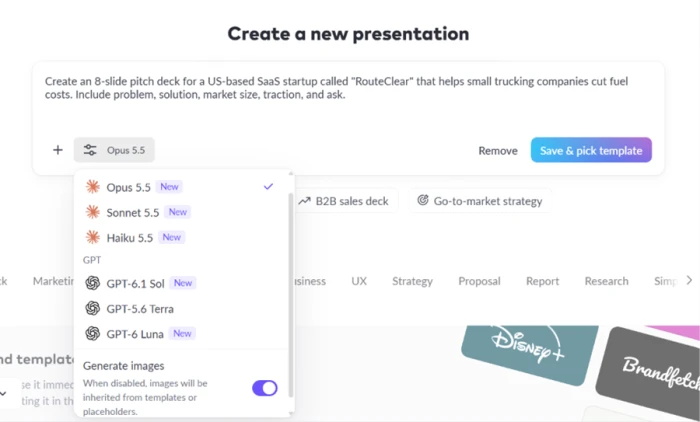
The first surprise came before generation even started. I asked for an 8-slide deck for a US-based SaaS startup called RouteClear, and a model selector sat right next to the input box.
The dropdown carried six options. Three from Claude (Opus 5.5, Sonnet 5.5, Haiku 5.5) and three from OpenAI (GPT-6.1 Sol, GPT-5.6 Terra, GPT-6 Luna), with a Generate images toggle in the same panel.
Choosing a template
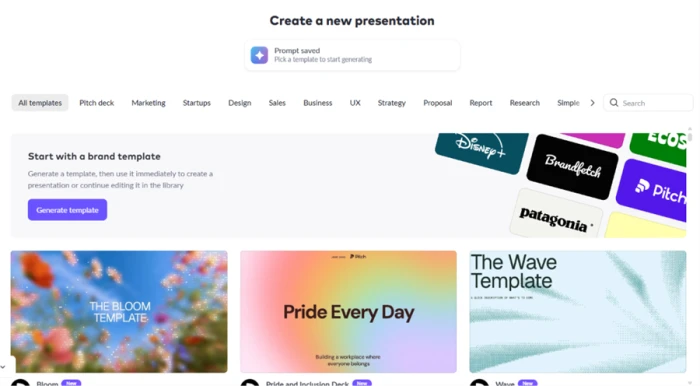
After I saved the prompt, Pitch asked me to pick a template before it would generate anything. A Prompt saved confirmation appeared with a note to choose a template to start.
A row of categories ran across the top, covering pitch decks, marketing and startups, with a grid of ready-made designs below. A Generate template button let the AI build a brand template instead of picking a stock one.
Generation and the deck it produced
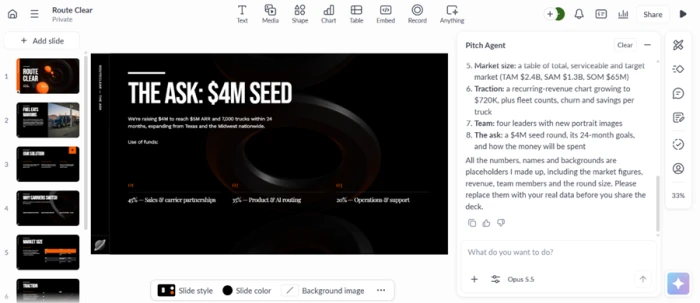
With the template chosen, the Pitch Agent took over. The right-hand panel showed it working through steps like Reading template and Thinking while the first slide sat black and empty. Generation was not instant.
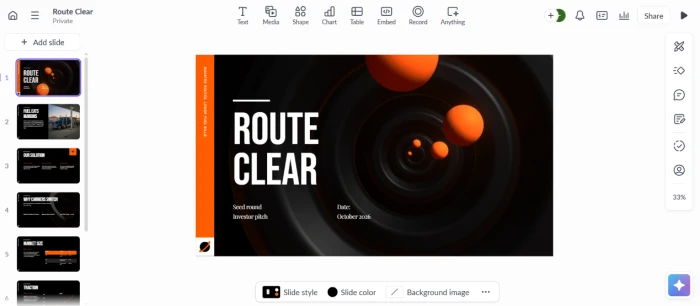
The finished RouteClear deck is what landed next, and it looked like something a designer would hand a founder. Titles such as THE ASK: $4M SEED sat over dark, textured backgrounds with a clean orange accent, consistent across every page.
Embedding video and other media
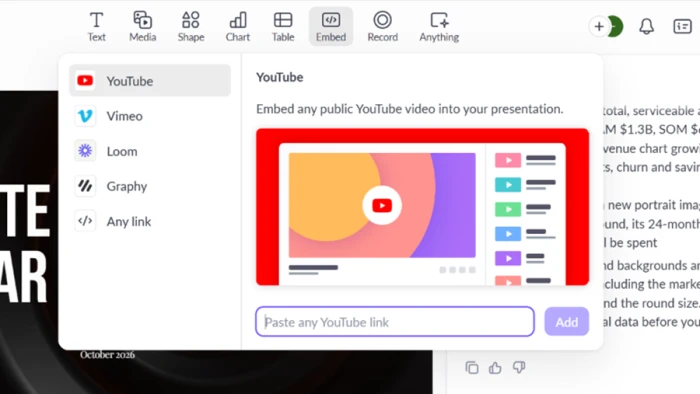
Beyond static slides, the deck supports embedded media. The Embed menu let me drop in a public video by pasting a link, with options for YouTube, Vimeo, Loom and a generic Any link field.
For a product demo or a founder intro clip inside a pitch, that is useful, and it worked on the free account.
Where the free plan draws the line
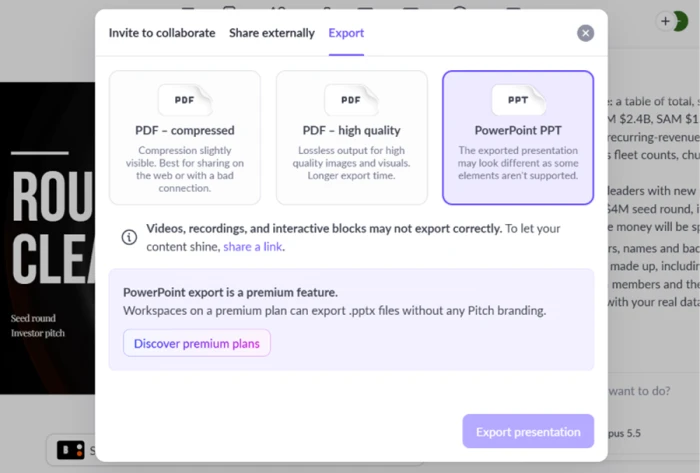
This is where free users hit a wall. The export dialog offered two PDF modes, compressed and high quality, alongside a PowerPoint option. The PowerPoint tile was greyed out and frozen, with a banner noting that PPTX export without Pitch branding is a paid feature.
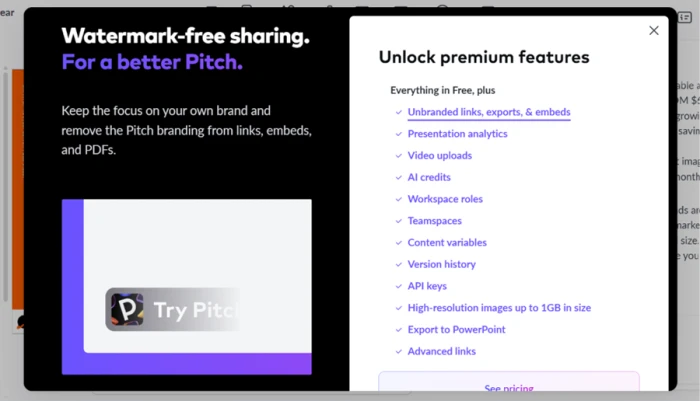
A full premium panel made the split even clearer. Under Unlock premium features sat PowerPoint export again, next to unbranded links, presentation analytics, video uploads, AI credits and version history.
The watermark in the downloaded file
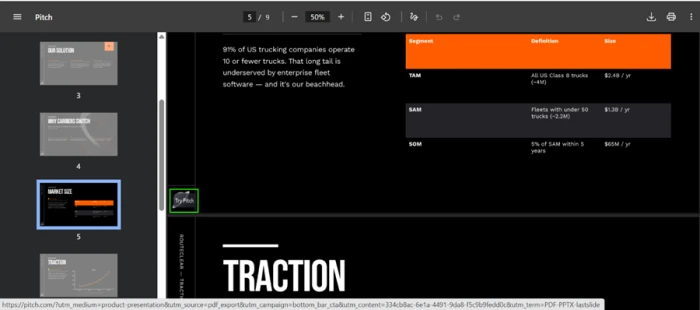
I exported the deck as a PDF, which the free plan does allow, and the downloaded file came back stamped. A Try Pitch badge sat on the slides, and the bottom of the page carried a long Pitch tracking link stuffed with UTM parameters pointing back to pitch.com.
Pitch pricing
Figures taken from the official Pitch pricing page, billed yearly.
| Plan | Price | What's included |
|---|---|---|
| Free | $0 | 100 one-time AI credits · up to 5 members · 2 external guests · branded PDF export · no PPTX, custom fonts or video |
| Plus Popular | $10 /mo | 6,000 AI credits/yr (extra $0.004) · 5 external guests · custom fonts · video uploads · remove Pitch branding |
| Team | $15 /seat/mo | 6,000 credits/seat/yr · 25 external guests · 25 advanced sharing links · 2 shared pitch rooms · 3 teamspaces |
| Business | $20 /seat/mo | 9,000 credits/seat/yr · unlimited external guests, sharing links, pitch rooms and teamspaces |
| Enterprise | Let's talk | SAML-based SSO · SCIM provisioning · dedicated success manager · tailored onboarding · priority support |
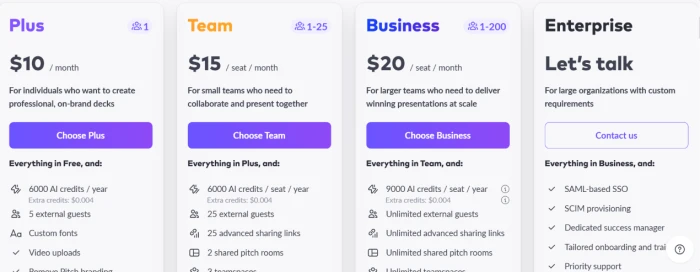
Pricing is accurate as of 13 October 2026 and was captured from the official Pitch website. Plans, prices and credit limits change often, so check the official Pitch pricing page for the current figures before you subscribe.
Pros & cons
Specific conclusions from testing and real user reviews, not generic filler.
✅ Pros
- Choice of six AI models (Claude and GPT) before generating
- Real-time co-editing with slide-level comments and assignment
- Pitch rooms send a deck plus resources with per-recipient tracking
- Viewer analytics show time spent and per-slide engagement
- 150+ templates plus brand detection from a company URL
- Embeds live video from YouTube, Vimeo and Loom in slides
- Imports existing PPTX files into the workspace
⛔ Cons
- AI decks arrive full of invented figures you must rewrite
- No content outline to review, so credits burn before you see the plan
- PPTX export can break content blocks, videos and interactive elements
- Charts have no live link to Excel or Sheets, updated by hand
- Web app runs buggy and slow to load; desktop is steadier
- Reviewers report text misalignment in PDF exports
Synthesized from real reviews on Capterra, G2, Trustpilot, Reddit & competitor hands-on reviews · paraphrased, not quoted
Pitch AI alternatives
| Pitch AIReviewed | Slides AI | Gamma AI | Genspark AI | Presentations AI | |
|---|---|---|---|---|---|
| Our Score | 7.0/10 | 6.5/10 | 6.4/10 | 6.4/10 | 5.3/10 |
| Entry paid plan | $10 / mo, billed yearly | $7 / mo, billed yearly | $9 / mo, billed yearly | $19.99 / mo, billed yearly | $20 / mo, billed yearly |
| Free tier | 100 one-time credits | 200 credits/mo, about 8 decks | 400 one-time credits, about 14 decks | Free to use, but no exports | 100 credits, up to 20 slides |
| Free export | PDF (Pitch-branded) | PPTX, PDF, Google Slides | PDF, PPTX, PNG (branded) | None, paid plan only | None, paid plan only |
| Core method | Prompt to deck, pick the AI model | Outline then slides, inside Slides & PowerPoint | Prompt to deck in a card-based editor | Live research, then routes across 100+ models | Prompt, doc or URL into template-locked decks |
| Best for | Teams building and sharing decks by link | A quick first draft in Slides or PowerPoint | Sharing decks as live links, fast | Slides, research and data in one tool | Fast rough drafts with limited design control |
| Standout strength | Six AI models, plus pitch rooms and analytics | Turns raw numbers into interactive charts | Very fast drafts from an audience-aware agent | Sourced research with working citation links | Generates a full draft in about a minute |
Who Should Use Pitch AI, and Who Should Avoid It?
Pitch is excellent at building and sharing decks as a team, but its export paywall, credit limits and AI data accuracy make it a poor fit for some workflows.
Who Should Use Pitch AI?
Best suited for these workflows
Sales & Marketing Teams
Build client decks together in real time, send them as tracked links, and see which prospect opened which slide.
Startup Founders Who Want a Fast Draft
Go from a one-line prompt to a designer-grade deck, then rewrite the invented numbers with your own figures.
Link-First Presenters
Teams that share decks by URL rather than file get pitch rooms, viewer analytics and live embeds without touching export.
People Who Want Model Choice
Pick from three Claude and three GPT models before generating, a level of control most deck tools never offer.
Who Should Avoid Pitch AI?
Consider an alternative if you need
A Clean, Unbranded File on Free
PowerPoint export is paid-only, and the one free export is a PDF stamped with a Try Pitch badge and a tracking link.
Accurate Data Out of the Box
The agent fabricates every figure it writes, so the deck needs a full fact pass before it goes near an investor.
Heavy AI Use on a Tight Budget
Generation burns roughly 100 credits per deck, and the free pool of 100 never renews once spent.
A Light, Fast Web App
Reviewers report the browser version loading slowly and crashing mid-chat; the desktop app is the steadier option.
Our Recommendation
Pitch is worth it if your team lives inside the platform and shares decks by link. If you are a solo user who just needs an unbranded PowerPoint to email, price in the Plus plan from the start. Before you pay, test it on a real deck, check that the AI content is accurate, and confirm the current credit limits.
Pitch scorecard
Rated against what a collaborative AI deck platform is actually built to do.
| Dimension | Verdict | Score |
|---|---|---|
| Model flexibility Choice of AI engine before generation | Excellent |
8.5
|
| Team collaboration Co-editing, comments, assignment | Excellent |
8.5
|
| Design & template quality Polish and visual consistency | Good |
8.0
|
| Analytics & pitch rooms Viewer tracking and client spaces | Good |
8.0
|
| Media & embeds Video and rich content in slides | Good |
7.5
|
| Ease of use Signup, navigation, first deck | Good |
7.5
|
| AI generation quality Accuracy and structure of output | Average |
6.0
|
| Performance & stability Load speed and web reliability | Average |
6.0
|
| Value for credits Free pool and metered AI cost | Average |
5.5
|
| Export fidelity & freedom Clean, unbranded, editable output | Weak |
4.5
|
| Scrutool Score Equal-weight average of all 10 dimensions |
7.0
|
Great at building a deck, deliberately hard to take one out
Pitch does the creation side better than most. The model picker is a real differentiator, the design output looks hand-built, and collaboration plus pitch rooms make it a strong fit for sales and marketing teams who work on decks together and want to see who opened them. The friction is all at the edges. The AI fills slides with fabricated numbers it admits to inventing, credits drain at roughly 100 per deck, the web app can be slow and buggy, and the free tier is engineered to stop you leaving with a clean file: PowerPoint and unbranded exports are paid, and the one free export brands every page and tracks it. Teams that live inside the platform and share by link will get a lot here. A solo founder who just needs an unbranded PowerPoint to email an investor should price in Plus from the start, or look at a tool built around the file rather than the room.
Discussion
Join the discussion and share your perspective.