
Pica AI
Pica AI is a freemium web and iOS tool for photo and video face swaps and AI headshots, with photo enhance and restore now handled by Artguru. Clean stills, but a watermark you pay to remove.

A fun, fast photo face swapper with clean blends on stills, let down by a watermark you have to pay to remove, a weaker video tool and a headshot generator that charges before you see a thing.
Should you use Pica AI?
Casual and social creators who want quick, clean photo face swaps for fun posts and do not mind a watermark while they are just playing around.
You need a clean, unbranded image or a strong video swap from the free plan. Both are paid, and the video tool trails the photo tool anyway.
Free gives 4 credits a day with a watermark on everything. Removing it starts at Monthly, $9.99 (or $59.99 a year), with a photo swap costing 1 credit and a video swap 2.
Two of the four menu tools hand you to Artguru , and Headshot+ asks you to sign in and pay before it shows a single result.
Key features & how they perform
Each feature rated from hands-on testing and aggregated review sentiment.
Photo face swap
The core tool and the best one. On clean, front-facing stills the blend holds, skin tone and jawline match, and there is no hard seam.
Multi-face swap
Replaces up to three faces at once across a group photo or an entire video clip, keeping expressions roughly in place.
Headshot+ generator
Turns 6 to 12 selfies into HD to 3K portraits across career styles, but makes you pay before any preview and takes 40 minutes to 2 hours.
Video face swap
Swaps faces in clips and exports a GIF or MP4, but faces turn waxy on moving frames and the hair blend loosens.
Template gallery
Ready-made styles, from 90s yearbook shots to movie scenes and memes, let you drop a face in without starting from a blank canvas.
Export & watermark
Every free download carries a Pica AI mark. A clean, unbranded file and faster processing are paid features only.
Feature ratings blended from the Apple App Store, competitor hands-on reviews & testing.
From four free credits to a watermarked download
Running Pica's face swap, Headshot+ and video tools on a free account, from the first swap to the file that lands on your device.
Setting up a photo face swap
I ran everything in a private browser window on the free plan, with no paid account, to see exactly what a new user gets. Face swap does not ask for a typed prompt. It runs on two inputs, a base image and a face.
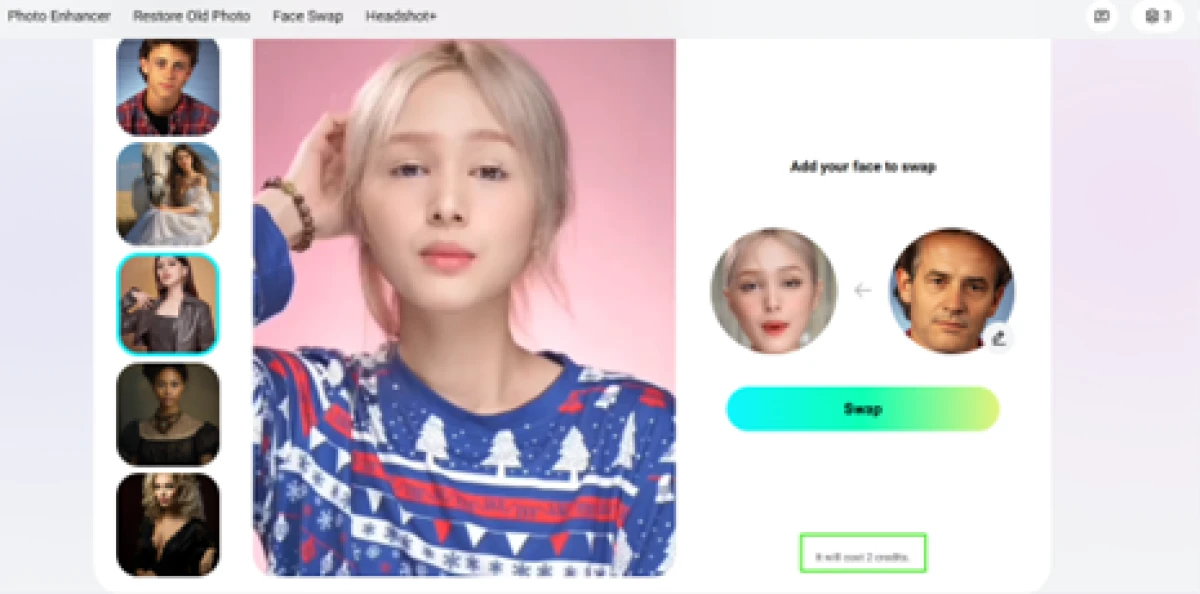
For the base I picked a 1990s yearbook style from Pica's own template gallery, then uploaded an older man's face as the swap target. Pica shows the credit cost before you commit.

The counter sat at 4 and a single photo swap cost 1 credit. The swap itself took only a few seconds, and this is the file that came back.

Two of the four menu tools send you to Artguru
Pica's top menu lists four tools, but two of them are no longer Pica's own. Clicking Photo Enhancer opened a pop-up saying the feature is provided by Artguru, a separate site, with an Explore Artguru button. Restore Old Photo does the same thing.
Pica confirms this on its homepage: Photo Enhancer moved to Artguru at the end of October 2025. So of the four advertised tools, only Face Swap and Headshot+ still run inside Pica.

Headshot+ wants 6 to 12 selfies, then payment
Headshot+ asks for more upfront than the swap tools. I chose a single business-suit style, and the tool asked me to upload between 6 and 12 selfies, with example thumbnails flagging the shots to avoid, such as blurry photos or faces that are partly covered.
After I added my photos and pressed Start, a Sign in to your account to purchase box appeared, offering Google or Facebook login. There is no free preview anywhere in the flow.


Video face swap costs more and gives back less
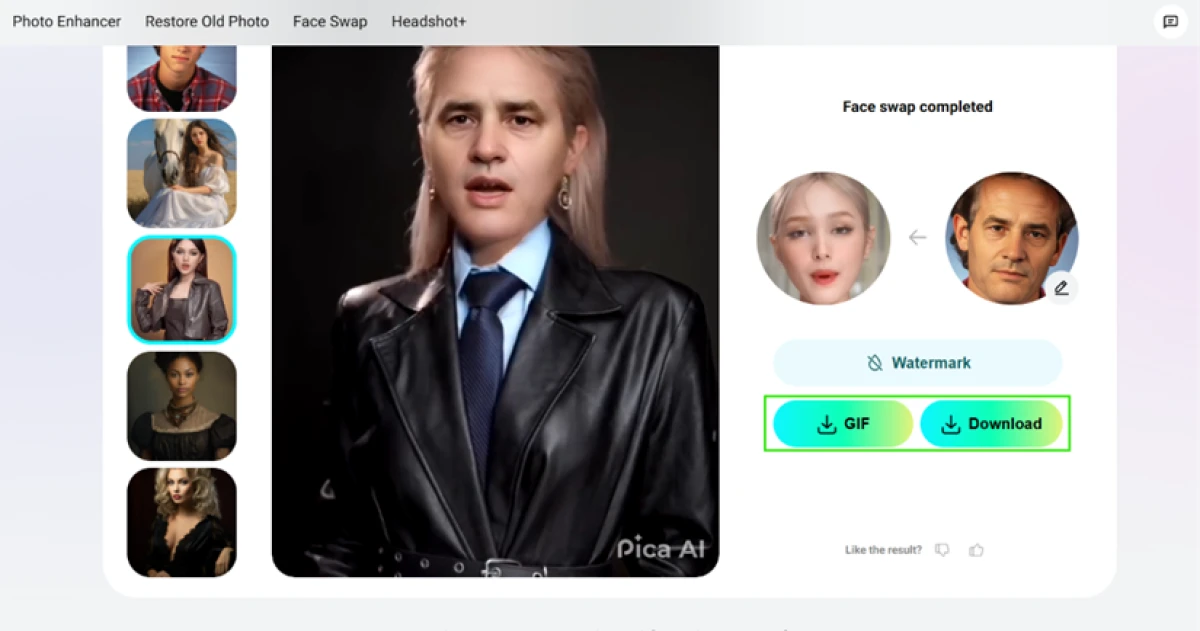
Video is where the free plan strains hardest. I swapped the same man's face onto a short clip. Pica priced this at 2 credits, double the photo swap, which dropped my balance to 3.
After I clicked Swap, the job went into a queue reading Queue #4, within 6 minutes. The real wait ran past 10 minutes, well over the estimate.

The finished clip came back as a GIF or a video download, and side by side with the still photo the quality tells its own story.
One note on transparency
One small thing stood out away from the tools. Pica's open-source licenses page, where most products list the libraries they are built on, carries a single entry: the Montserrat font.

Pica AI pricing
Figures taken from Pica's in-app subscription screen.
| Plan | Price | What's included |
|---|---|---|
| Free | $0 | 4 credits a day (resets) · saves images for 24 hours · watermark on every output · no watermark removal, no faster processing |
| Monthly Popular | $9.99 /mo | 1,000 credits a month · no watermark · faster processing · HD downloads |
| Annual | $59.99 /yr | 8,000 credits a year · 25% off the monthly rate · no watermark · faster processing |
| Artguru | Separate sub | Photo Enhancer, upscale and Restore Old Photo now run on Artguru · Pica's plan covers only Face Swap and Headshot+ |

Pricing is accurate as of 29 October 2026 and was captured from the official Pica AI website. Plans, prices and credit limits change often, so check the official Pica AI site for the current figures before you subscribe.
Pros & cons
Specific conclusions from real user reviews, not generic filler.
✅ Pros
- App Store reviewers rate the photo face swaps realistic, their top praise
- Users enjoy placing their face into celebrity and movie-scene templates
- Multi-face swapping across group photos is a repeatedly liked feature
- Reviewers highlight frequent app updates and developer replies to complaints
- New users report getting a usable swap on the first try, no tutorial needed
⛔ Cons
- Long-time users say a 2025 update made face swaps look more artificial
- Headshot+ portraits often miss the likeness, adding hair or changing age
- Multi-face swap caps at three faces, leaving bigger group photos unfinished
- AI photo and headshot jobs can be slow, with reviewers reporting long waits
- Some edits downscale the whole image, returning a lower-res file than the upload
Synthesized from real user reviews on the Apple App Store · paraphrased, not quoted
Pica AI alternatives
| Pica AIReviewed | Remaker AI | CutoutPro AI | LongHair AI | PicLumen AI | |
|---|---|---|---|---|---|
| Our Score | 6.3/10 | 6.3/10 | 6.4/10 | 6.3/10 | 6.9/10 |
| What it does | Face swap, AI headshots, photo restore | Face swap, image generation and photo edits | Background removal, retouch, enhance, generate | Long-hairstyle try-on from your photo | Multi-model AI image generation plus editing |
| Free tier | 4 credits a day, resets | Signup credits, no card needed | 5 credits once, low-res previews | Free with daily caps, about 20 a day | 10 credits a day plus Relax Mode |
| Free output | Watermarked (Pica branded) | No watermark on export | 612 x 408 preview, HD is paid | No watermark, HD is an upgrade | Watermarked on free |
| Best for | Casual face swaps and AI headshots | Quick social face swaps and generated images | E-commerce batch cutouts and edits | Previewing a long haircut before the salon | Free, high-volume AI image generation |
| Standout strength | Clean photo swaps, up to 3 faces | Natural face-swap blends with no seams | Fast, clean automatic background removal | Holds your real face across nine style tiles | Unlimited free generation in Relax Mode |
Who Should Use Pica AI, and Who Should Avoid It?
Pica is quick and fun for casual photo swaps, but the watermark paywall, the three-face cap and the pay-before-preview headshots make it a poor fit for some jobs.
Who Should Use Pica AI?
Best suited for these workflows
Casual & Social Creators
Drop your face into yearbook, celebrity or meme templates for a quick laugh and a shareable post, where a watermark on a draft does not matter.
Single and Small-Group Swappers
On clean, front-facing photos with up to three faces, the blend holds, the skin tone matches and the result looks natural.
Headshot Buyers Who Will Pay
If you accept paying before any preview, Headshot+ turns 6 to 12 selfies into HD to 3K portraits across a range of career styles.
One-App Dabblers
People who want swap, headshots and, through Artguru, photo enhancement under a single login rather than three separate tools.
Who Should Avoid Pica AI?
Consider an alternative if you need
A Clean, Unbranded File on Free
Every free download carries a Pica AI mark, and removing it means subscribing. There is no free path to a watermark-free image.
A Dependable Professional Headshot
Reviewers report Headshot+ missing the likeness, adding hair or changing age, which makes it risky for a real work profile.
Strong Video Face Swaps
Video trails the photo tool, with faces turning waxy on moving frames, and it burns credits twice as fast as a photo swap.
Large Group Photos
The tool swaps at most three faces in one image or clip, so a full team or class photo cannot be done in a single pass.
Our Recommendation
Pica is worth trying for casual photo face swaps, where the 4 free daily credits let you judge quality before paying anything. If you need an unbranded file, a reliable professional headshot or strong video, price in the Monthly plan from the start or pick a tool built for that one job. Before you pay, run a photo swap on the free credits, check how the watermark looks, and read the Headshot+ terms, since those purchases are non-refundable.
Pica AI scorecard
Rated against what a consumer face-swap and AI headshot tool is actually built to do.
| Dimension | Verdict | Score |
|---|---|---|
| Photo face swap quality Blend, skin tone, seams on stills | Good |
8.0
|
| Templates & creative range Ready styles and scenes to use | Good |
7.5
|
| Ease of use Signup, flow, first swap | Good |
7.5
|
| Multi-face swapping Several faces in one photo or clip | Good |
7.0
|
| Privacy & data handling Upload deletion and stated use | Good |
7.0
|
| AI headshot generation Likeness and output of Headshot+ | Average |
6.0
|
| Speed & turnaround Queue times and generation waits | Average |
6.0
|
| Value for credits Free daily pool and credit burn | Average |
5.5
|
| Video face swap quality Blend and detail on moving frames | Weak |
4.5
|
| Export freedom & watermark Clean, unbranded output on free | Weak |
4.0
|
| Scrutool Score Equal-weight average of all 10 dimensions |
6.3
|
A sharp photo swapper you pay to take the watermark off
Pica does the one thing it is best known for genuinely well. On clean still photos the face swap blends naturally, the skin tone matches along the jaw and there is no hard seam, and the template gallery plus a simple, no-skill flow make it easy to get a shareable result fast. The friction sits around that core. The single free export is watermarked, and a clean file, faster processing and HD all live behind the $9.99 plan. The video tool lags well behind the photo tool, with waxy faces on moving frames and credits draining twice as fast. Headshot+ asks you to sign in and pay before showing a single portrait, and reviewers report those portraits missing the likeness. Two of the four menu tools now hand you to Artguru under a separate subscription, and the multi-face cap stops at three. Casual creators who just want quick swaps for fun, and will judge quality on the 4 free daily credits first, will get real value here. Anyone who needs an unbranded file, a reliable professional headshot or strong video should price in Monthly from the start, or reach for a tool built around that one job.
Discussion
Join the discussion and share your perspective.