
Slidesgo
Slidesgo is a freemium presentation platform with a 30,000+ template library and an AI Presentation Maker. It exports clean, editable PowerPoint and Google Slides files, with premium plans from $3 a month.

A huge template library and genuinely free, watermark-free exports, let down by an AI generator that clips text, miscounts slides and invents unsourced numbers.
Should you use Slidesgo?
Teachers, students and template-led users who need a presentable deck fast from a big library, then edit it themselves.
You need accurate, citation-ready content out of the box. The AI invents figures and leaves text bugs you have to fix.
Free gives 3 AI decks and 3 downloads a month with an attribution slide. Premium is $3/mo billed yearly , ad-free and attribution-free.
Cancellation and surprise-charge complaints fill its Trustpilot page. The plan auto-renews, so cancel well before the date.
Key features & how they perform
Each feature rated from hands-on testing and aggregated review sentiment.
AI Presentation Maker
Turns a one-line prompt into a deck with a length preset, Short at 7 to 9 slides up to 16. Fast, but the text and slide count need checking.
30,000+ template library
The real draw. Thousands of themes filtered by style, industry and colour, with new drops added on a regular schedule.
PowerPoint & Google Slides export
Downloads arrive fully editable with no watermark, even on free. The catch is a credits slide rather than a stamp on every page.
Online editor
Change text, colour and layout in the browser, or open the deck in Canva, Google Slides or PowerPoint to finish it off.
Classroom & education tools
Slidesclass lessons plus lesson-plan, quiz, icebreaker and exit-ticket generators built for teachers, not just slide design.
Built-in Freepik images & icons
Pulls stock images and Flaticon icons straight into the editor, so you rarely leave to source artwork for a slide.
Feature ratings blend hands-on testing with user sentiment from G2, Trustpilot & competitor hands-on reviews.
From one prompt to a downloaded cybersecurity deck
An 8-slide deck for a small-business topic, taken from a single prompt to an edited PowerPoint file, on the free plan.
The prompt and length setup
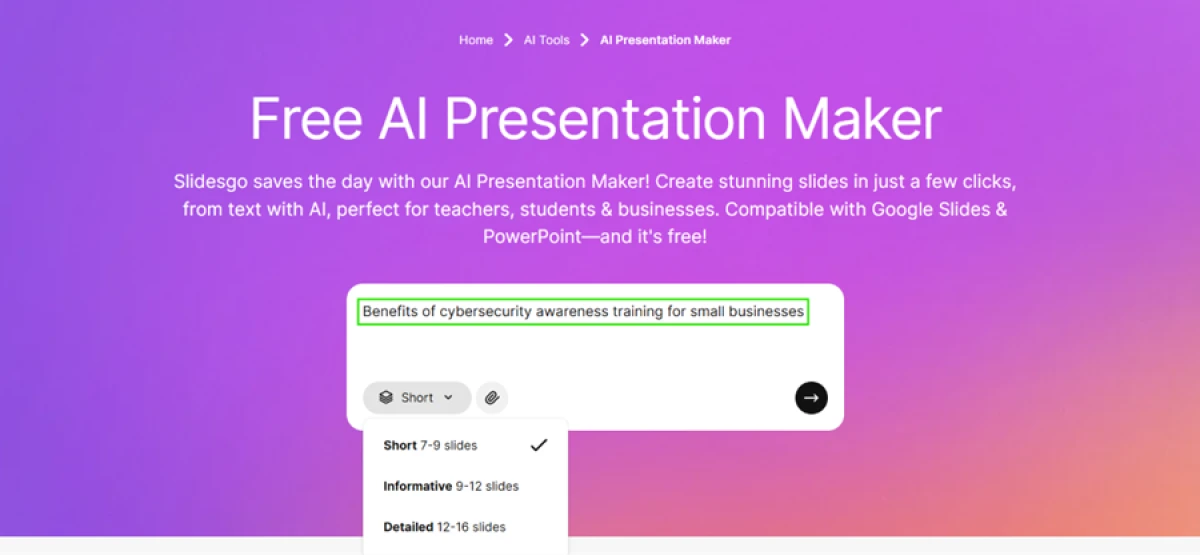
Slidesgo's AI Presentation Maker starts from a single line of text. I opened it and typed one topic as my prompt.
Below the input box, the tool let me choose a length. Short runs 7 to 9 slides, while the longer Informative and Detailed presets go up to 16. I kept it on Short and clicked the arrow.
"Benefits of cybersecurity awareness training for small businesses"
Picking a theme
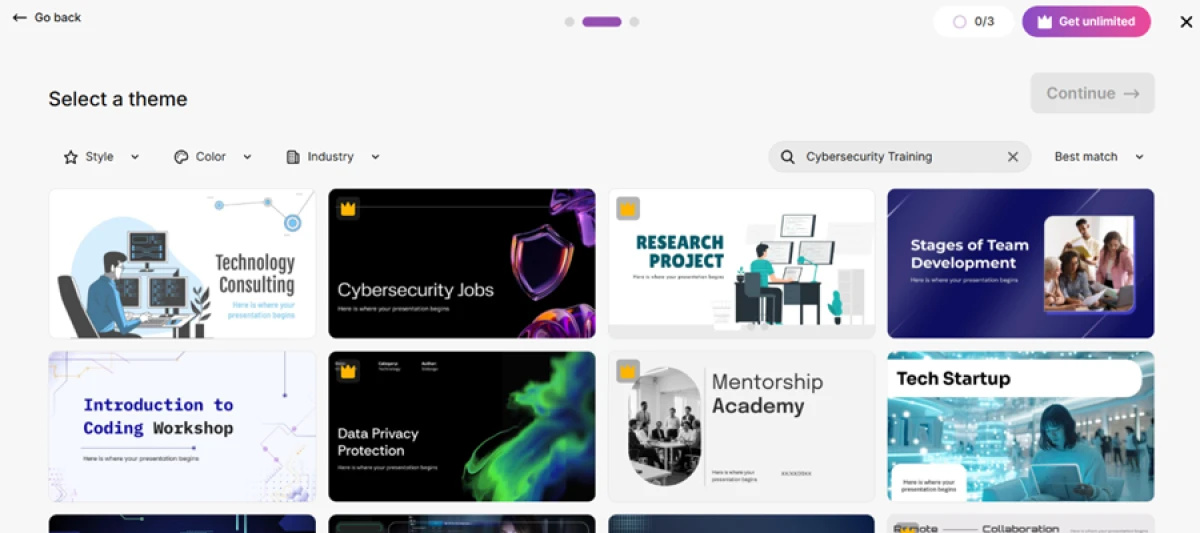
The next screen is a grid of theme designs, with filters for style and industry.
A counter in the top corner tracked my free usage, reading 0 of 3. Several of the stronger designs carried a small crown icon, which marks them Premium and locks them on the free plan. I picked a free dark theme and continued.
Generating the deck
With the theme chosen, the build screen said the presentation was queued and listed 11 slides. Generation was not instant.
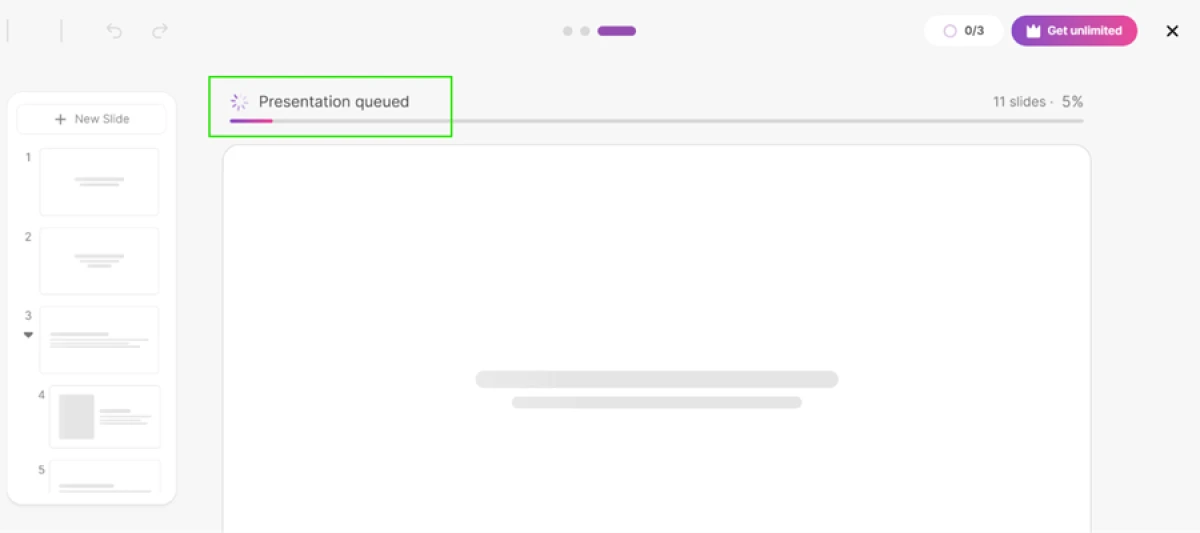
The deck it returned had 8 slides, not 11. The promised count and the delivered count did not match.
Where the text broke
The layout looked clean, but the writing did not survive a close read.
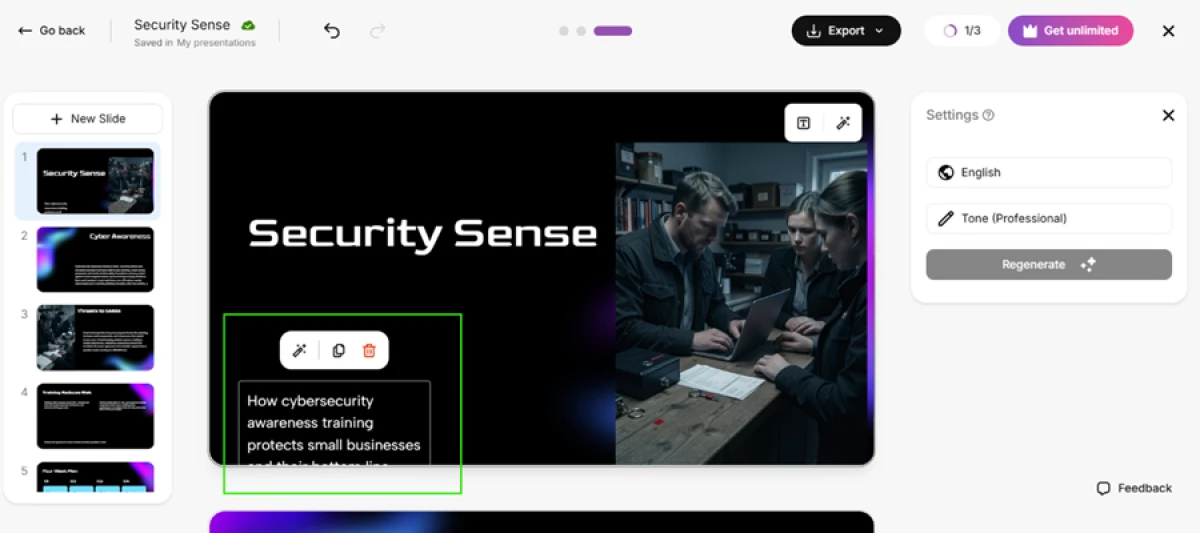
On the opening slide, the subtitle ran past the bottom of its text box. The final line sat cropped out of view, so the sentence about protecting small businesses never finished on screen.
The second slide was worse.

Numbers with no sources
The deck built an Impact Metrics slide full of confident figures. It said phishing clicks fell from about 30 percent to under 10 percent, put the drop in security incidents at 65 percent, and claimed a return of roughly 30 times on a 1,000 dollar training budget.

None of those figures carried a citation. From this same screen, the export menu offered PowerPoint and Google Slides, both available on the free plan.
The downloaded file
I exported to PowerPoint and opened the file on my desktop. Every element came through fully editable, with text boxes and images staying live, and no watermark appeared anywhere across the slides, which I did not expect on a free export.

The cost showed up on the last page. The tool added a ninth slide of credits that asks you to keep it for attribution, with placeholder contact details left in.
What free actually gives you
The usage panel listed the limits plainly. My plan allowed 3 presentation generations and 3 image regenerations for the month, and one generation was already gone on this single test.

Slidesgo pricing
Figures taken from the official Slidesgo pricing page. The annual rate is billed yearly.
| Plan | Price | What's included |
|---|---|---|
| Free | $0 | 3 AI presentations/month · 3 template downloads/month · online editor · export to PowerPoint & Google Slides · attribution credits slide required · ads shown |
| Premium Popular | $3.00 /mo | $5.99 monthly, or $3.00/mo billed yearly ($35.99, save 50%) · unlimited AI & downloads (capped at 150/month each) · full 30,000+ template library · Slidesclass · early AI access · team invites · ad-free · no attribution |
| Education | Custom | Special pricing for schools, districts and universities through a tailored offer |
| Teams | from $3 /seat/mo | Add up to 1,000 users (150 decks & 150 downloads per seat) · bigger discounts from 3 people |

Pricing is accurate as of 3 November 2026 and was captured from the official Slidesgo website. Plans, prices and limits change often, so check the official Slidesgo pricing page for the current figures before you subscribe.
Pros & cons
Specific patterns from real user reviews, not generic filler.
✅ Pros
- Huge library of well-designed, ready-to-use templates
- Free decks you can download and use straight away
- Templates sorted by topic, style and industry for fast picking
- Fresh templates added on a regular update schedule
- Realistic, professional themes that suit company and product decks
⛔ Cons
- Free templates are widely used, so decks look common and recognisable
- Template organisation and content quality are uneven across the library
- Some templates are outdated and miss current trending styles
- Reviewers report occasional bugs in the platform
Synthesized from real user reviews on G2 · paraphrased, not quoted
Slidesgo alternatives
| SlidesgoReviewed | Gamma AI | Pitch AI | Slides AI | Presentations AI | |
|---|---|---|---|---|---|
| Our Score | 6.9/10 | 6.4/10 | 7.0/10 | 6.5/10 | 5.3/10 |
| Entry paid plan | $3.00 / mo, billed yearly | $9 / mo, billed yearly | $10 / mo, billed yearly | $7 / mo, billed yearly | $20 / mo, billed yearly |
| Free tier | 3 decks + 3 downloads/mo | 400 one-time credits | 100 one-time credits | 200 credits/mo | 100 credits, up to 20 slides |
| Free export | PPTX & Google Slides, no watermark | PDF, PPTX, PNG (branded) | PDF (Pitch-branded) | PPTX, PDF, Google Slides | None, paid plan only |
| Core method | Prompt or template, 30,000+ library | Prompt to deck in a card editor | Prompt to deck, pick the AI model | Outline then slides in Slides & PowerPoint | Prompt, doc or URL into template-locked decks |
| Best for | Teachers, students, template-led decks | Sharing decks as live links, fast | Teams building and sharing by link | A quick first draft in Slides or PowerPoint | Fast rough drafts with limited design control |
| Standout strength | Huge free library plus clean exports | Very fast drafts from an audience-aware agent | Six AI models, plus pitch rooms and analytics | Turns raw numbers into interactive charts | Generates a full draft in about a minute |
Who Should Use Slidesgo, and Who Should Avoid It?
Slidesgo is strong at templates and clean exports, but its AI accuracy, free-plan limits and billing reputation make it a poor fit for some users.
Who Should Use Slidesgo?
Best suited for these workflows
Teachers and Students
A huge library of education themes, plus Slidesclass lessons, quizzes and lesson-plan tools built into the same account.
Anyone Who Needs a Deck Fast
Start from a template or a one-line prompt and have an editable draft in minutes, not hours.
People Who Edit in PowerPoint or Slides
Exports come through fully editable, with no watermark even on the free plan, so you finish the deck in your own tool.
Budget-Conscious Users
Premium is one of the cheapest in its class at $3 a month billed yearly, well under most AI deck rivals.
Who Should Avoid Slidesgo?
Consider an alternative if you need
Accurate Content Out of the Box
The AI invents figures with no sources and left text bugs on the first two slides, so every deck needs a fact and proof pass.
Brand-Critical or Client Work
Free templates are widely used, so your deck can end up looking like everyone else's unless you rework it heavily.
Heavy AI Use on Free
Three generations a month runs out fast, and every re-run of the output eats the same small allowance.
A Worry-Free Subscription
Reviewers report hidden cancellation paths and charges after cancelling, so the exit is where most complaints start.
Our Recommendation
Slidesgo is a strong pick for teachers, students and anyone who wants a presentable deck from a big template library without paying much. Treat the AI generator as a rough first draft, not a finished deck: check every number, fix the text, and expect to edit in PowerPoint or Google Slides. Before you subscribe, set a reminder to cancel before the renewal date, since the exit is where most complaints start.
Slidesgo scorecard
Rated against what an AI presentation and template platform is actually built to do.
| Dimension | Verdict | Score |
|---|---|---|
| Template library breadth Range and variety of designs | Excellent |
9.0
|
| Export freedom & fidelity Editable, unwatermarked output | Excellent |
8.5
|
| Google Slides & PowerPoint fit Native formats, clean handoff | Good |
8.0
|
| Design & theme quality Polish and visual consistency | Good |
7.5
|
| Editor & ease of use Prompt, themes, online editor | Good |
7.5
|
| Value for money Premium cost versus rivals | Good |
7.0
|
| Team & classroom features Seats, Slidesclass, quiz tools | Average |
6.5
|
| Free plan usability Limits, attribution, ads | Average |
6.0
|
| AI generation quality Text, layout, slide count | Weak |
4.5
|
| Data accuracy & sourcing Figures and citations | Weak |
4.5
|
| Scrutool Score Equal-weight average of all 10 dimensions |
6.9
|
A template powerhouse with a free export most rivals cannot match, and an AI layer you cannot trust yet
Slidesgo gets the fundamentals right. The template library is enormous, the online editor is simple, and the free export is the rarest thing in this category: a clean PowerPoint or Google Slides file with no watermark, fully editable, that most paid rivals still will not give you. For teachers, students and anyone who wants a presentable deck without paying much, that alone is worth the signup. The AI Presentation Maker is where it slips. In testing it promised 11 slides and delivered 8, clipped text off the first slide, left a stray generation glitch on the second, and filled an Impact Metrics slide with confident numbers that carried no sources. And the loudest thing users say online is about billing: hidden cancellation paths and charges after cancelling fill its Trustpilot page. Use Slidesgo as a fast first draft and a template source, check every figure, and plan to edit in PowerPoint or Google Slides. People who need accurate, client-ready content out of the box, or who want a design nobody else is using, should look at Gamma or Pitch instead.
Discussion
Join the discussion and share your perspective.