SeaArt AI vs Leonardo AI (2026): I Tested Both to Find a Winner
SeaArt AI vs Leonardo AI (2026): Compare image quality, anime styles, features, pricing, and free plans to find the best AI image generator for your needs.
Two names kept showing up every time I searched for an AI image generator. SeaArt and Leonardo. One promised a massive library of community models. The other promised studio-grade control with Canva money behind it.
So I stopped reading marketing pages and signed up for both.
For two weeks I ran the same tasks through each tool on its free plan and generated the same prompts, watching where each one impressed me and where it made me sigh. This article is that experience written down, including the exact prompts I used so you can repeat the test yourself in about ten minutes.
The quick verdict
Short on time? Here is the summary.
SeaArt AI is the better choice for anime and stylized art, especially if you want a huge model library at the lowest entry price. Leonardo AI wins for precise control and consistent characters, and it gives you a cleaner route from rough idea to client-ready asset. Both have a usable free tier, which is where I did all my testing. The best pick depends on the kind of images you make, and the sections below show exactly why.
Before the deep dive, here is the shape of the matchup.
SeaArt AI
Leonardo AI
Best for
Anime and stylized art
Pro and game-asset work
Standout strength
Huge community model library
Control and character consistency
Image styles
Strongest at anime and illustration
Strongest at photoreal and design
Video
Yes, credit-based
Yes, via Motion and hosted models
Free plan
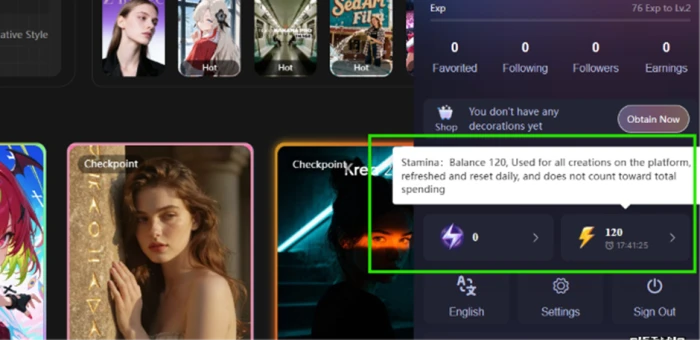
Daily stamina allowance
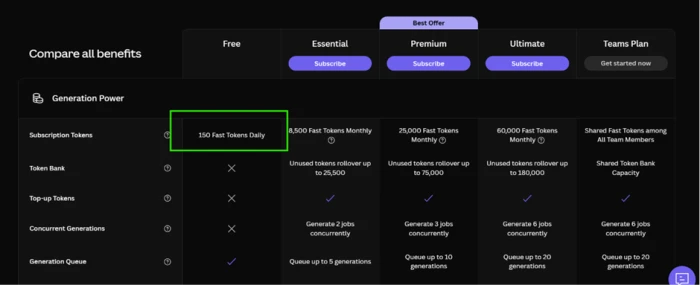
150 tokens per day, no card
Cheapest paid plan
$5.99 / month
$12 / month
Owned by
SeaArt (China)
Canva (Australia)
Meet the first contender: SeaArt AI
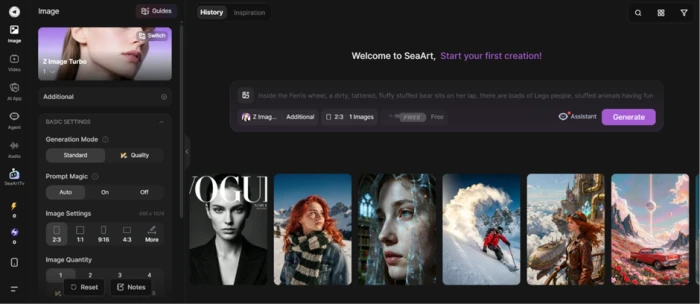
SeaArt AI does not describe itself as a plain image generator. It calls itself a creativity community, and the label fits once you log in.
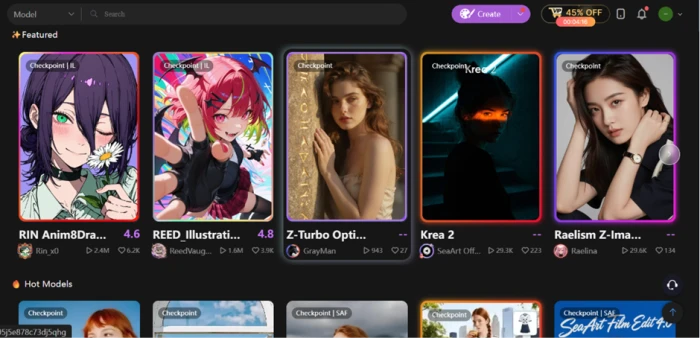
One account covers text-to-image, image-to-image, video generation, and a character-chat area called Cyberpub. The star of the show is the model library. It holds hundreds of thousands of community-trained models spanning anime, digital painting, photoreal looks, and 3D.
The platform has an Eastern aesthetic backbone. Scroll the community feed and anime dominates, which foreshadows where its best output lives. I will put that reputation to the test shortly.
Meet the second contender: Leonardo AI
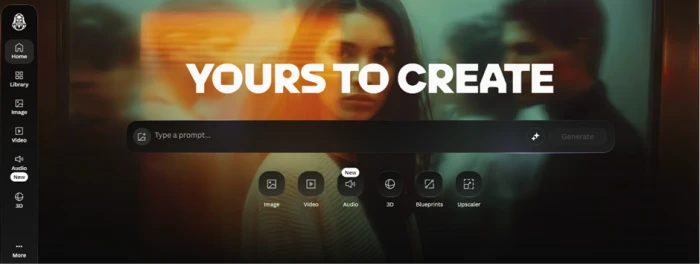
Leonardo AI grew up in a different neighborhood. Canva bought it in 2024, and it now runs as a professional creative workstation with real company resources behind it.
It ships its own model families, Lucid and Phoenix, and layers on hosted access to frontier models from other labs, so you can switch engines to suit the job. The interface centers on production tools like a real-time canvas and custom model training, plus texture generation for 3D pipelines.
SeaArt feels like an art fair. Leonardo feels like a studio. That contrast runs through everything that follows.
The face-off: one prompt, two tools, free plan only
Feature lists put me to sleep, so I judged these tools the way you use them day to day. I gave each one the same prompt on its free plan and compared the results. I ran two prompts on purpose. One tested photoreal skin and light. The other tested anime, since that is SeaArt's home turf.
Test 1: photoreal portrait
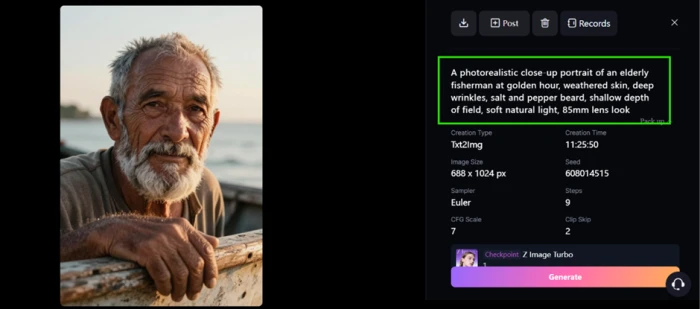
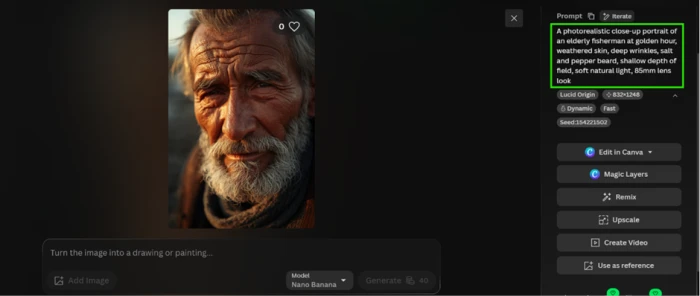
I pasted this exact prompt into the text-to-image box on both platforms:
A photorealistic close-up portrait of an elderly fisherman at golden hour, weathered skin, deep wrinkles, salt and pepper beard, shallow depth of field, soft natural light, 85mm lens look
Seaart AI Result Image
Leonardo AI result image
Leonardo's photoreal model held onto fine detail. Skin texture looked believable and the light behaved like real sunset light. The eyes stayed sharp too. SeaArt got close and produced a pleasant image, though its realistic models leaned a touch softer and more illustrative on the skin.
Winner of this round: Leonardo, by a small margin.
Test 2: anime scene
Second prompt, same drill:
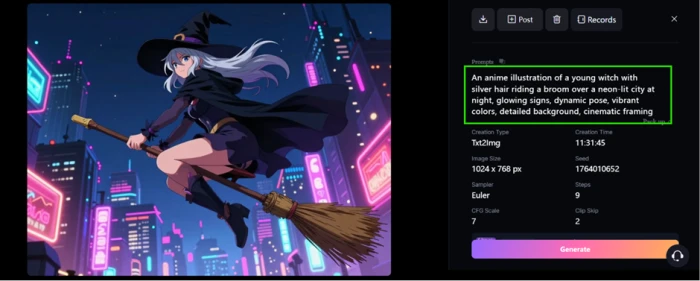
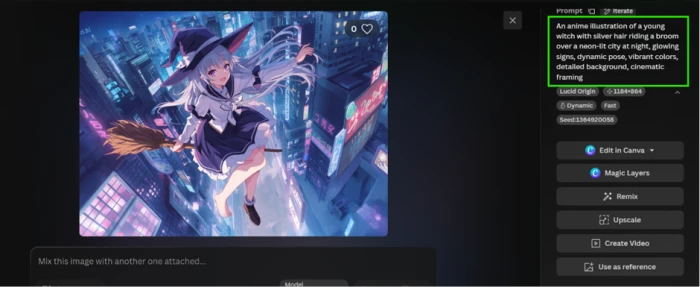
An anime illustration of a young witch with silver hair riding a broom over a neon-lit city at night, glowing signs, dynamic pose, vibrant colors, detailed background, cinematic framing
Seart AI result for the anime prompt
Leonardo AI result for the Anime prompt
Here the tables turned. SeaArt's anime models produced cleaner line work and bolder color, with a stronger sense of style. Leonardo's anime output was solid, but SeaArt gave me several distinct looks to choose from thanks to its community models, and the best of them looked closer to something a manga studio would publish.
Winner of this round: SeaArt, clearly.
A quick note on speed, since it shaped the experience. On the free tier both tools queued my jobs at busy times, and a single image landed anywhere from a few seconds to a minute or two. Fine for iterating, though you will notice the wait if you are used to instant results.
Both followed my prompts closely on the obvious details. Leonardo stuck tighter to the lens and lighting cues in Test 1, while SeaArt read the anime brief with more flair in Test 2, sometimes adding flourishes I had not asked for.
The scoreboard after two rounds tells the whole story. Neither tool is better in the abstract. Leonardo leads on realism. SeaArt leads on stylized art. That single fact drives most of the decisions in the rest of this comparison, starting with how each one handles models.
Models and styles: quantity versus curation
The image tests hint at a deeper split, and it comes down to how each platform treats models.
SeaArt bets on volume. Hundreds of thousands of community-trained models sit in a searchable library. You can filter by style or remix another creator's setup in a single click. You can also train your own model on your own images. For niche aesthetics, and anime sub-styles in particular, this scale is hard to match. Underneath those community models sit open foundations like Stable Diffusion and Flux, which is part of why the style range runs so wide. The trade-off is consistency. Quality swings from one model to the next, so part of using SeaArt well is learning which community models you can trust.
Leonardo bets on curation. You get a tighter set of first-party models plus hosted frontier engines from other labs. Rather than scrolling past thousands of options, you choose a strong model and get to work. Fewer decisions, and a higher quality floor.
Neither approach is objectively right. If you love hunting for the perfect community model, SeaArt is a playground. If choice paralysis slows you down, Leonardo's shorter menu is a relief.
The price tag: what each plan costs
I pulled every number here from each company's official pricing page. Promotions come and go, so confirm before paying, but this was the monthly picture at the time of writing.
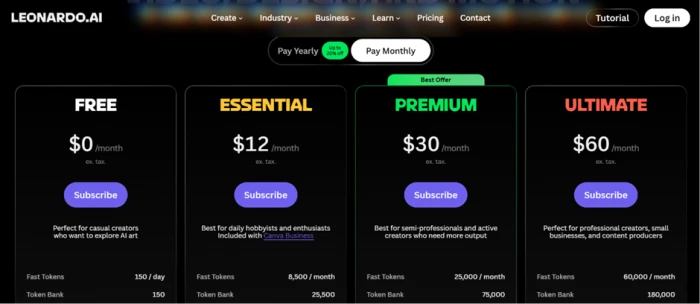
Leonardo runs on a token system it calls Fast Tokens. Each generation spends tokens based on how demanding the job is.
Leonardo AI, monthly pricing
Plan
Price
Fast Tokens
Free
$0
150 per day
Essential
$12
8,500 per month
Premium
$30
25,000 per month
Ultimate
$60
60,000 per month
SeaArt runs on daily Stamina, an allowance that refreshes every day, plus purchasable Credits for heavier work. Its paid cards were discounted at the time of writing, so I listed the promo price next to the original.
SeaArt AI, monthly pricing
Plan
Price
Daily Stamina
Approx. images / month
Beginner
$5.99
+300 per day
~1,500
Standard
$25.49 (was $29.99)
+1,800 per day
~9,000
Professional
$50.99 (was $59.99)
+4,000 per day
~20,000
Master
$127.49 (was $149.99)
+12,000 per day
~60,000
Two things jump out.
The entry price favors SeaArt. Its Beginner card at $5.99 undercuts Leonardo's $12 Essential plan. If you want the cheapest paid door into decent AI art, SeaArt opens it.
The Canva angle favors Leonardo. Its Essential plan is bundled with Canva Business, so if your team already pays for Canva, Leonardo Essential costs you nothing extra. That quietly makes Leonardo the cheaper option for many existing Canva users, which is easy to miss if you only compare sticker prices.
One caution covers both systems. Heavy settings drain your balance fast. A high-resolution image with extra steps can cost several times what a quick draft costs, so your real monthly output depends on how you generate, not the headline allowance.
If you commit for a year, both soften the blow. Leonardo takes up to 20 percent off annual plans, and SeaArt advertises up to 40 percent off its yearly cards. Monthly is the sensible way to trial either one first.
On paid plans, both grant commercial usage rights and strip out watermarks. You also keep the rights to what you create. For the free-tier testing in this article, that did not matter, but it will the moment you sell your work.
The free plans: how far can you get for nothing?
Since I did every test on the free tier, this section carries extra weight.
Leonardo's free plan gives you 150 Fast Tokens per day and asks for no credit card. That covers a handful of standard generations daily, plenty for trying prompts and learning the tool.
SeaArt's free plan hands you a daily Stamina allowance that also refreshes every 24 hours. In practice I got a similar volume of images per day, with one bonus: SeaArt's free tier still opens the door to its enormous model library.
Both free tiers apply some limits. Expect slower queues at busy times and a watermark on SeaArt's free output. For learning each tool and running the face-off prompts above, neither limit got in my way.
Ease of use: which one felt friendlier?
As I noted when introducing the two contenders, SeaArt behaves like a busy community hub and Leonardo behaves like a studio. That personality shows up the moment you start creating.
SeaArt offers an Easy Mode for beginners and a deeper node-based workflow for power users who want ComfyUI-style control. The ceiling is high, though the interface can feel crowded when you are new. Easy Mode collapses everything into a single prompt box, while the advanced mode exposes sampler settings and step counts for people who want them.
Leonardo's layout is calmer and more guided. Buttons sit where you expect, and the path from prompt to image is short.
Both run on mobile as well as the web. SeaArt leans harder into its phone app for quick social clips, though that app has taken knocks for stability, so I stayed in the browser for serious work.
For a complete beginner, I would hand someone Leonardo first. For a tinkerer who enjoys pulling levers, SeaArt rewards the curiosity.
Creative control: where Leonardo pulls ahead
The face-off measured raw output. Real projects need editing and consistency, and this is where Leonardo's studio DNA earns its keep.
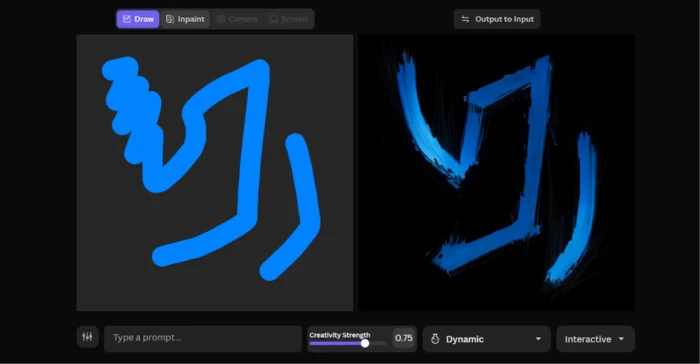
Leonardo's Realtime Canvas lets you paint and refine an image live, and its custom model training locks a character or brand style across many generations. For anyone producing a series of matching assets, like a game character in twenty poses or a mascot across a campaign, that consistency saves hours. Custom training sits behind the paid plans, so I could not push it hard on the free tier, though the feature is what lets a studio keep a mascot on-model across an entire project.
SeaArt is no slouch here. It supports ControlNet for pose control and LoRA training for custom styles. Face swap and partial repainting are here too, and the face swap in particular is fun to play with. The remix flow is a highlight: find an image you like in the feed and open its recipe, then generate your own spin after a quick tweak to the prompt.
The gap is polish, not presence. Both let you control your output. Leonardo's canvas and training pipeline feel built for repeatable professional work, while SeaArt's controls feel built for creative play.
Video and the extra toys
Both tools moved past still images, so a fair comparison has to look at motion and the side features.
Leonardo generates video through its Motion models and hosted video engines, aimed at short, controlled clips that fit a design or marketing workflow. Under the hood it can call on frontier video models from other labs, so the ceiling on quality is high if you spend the tokens.
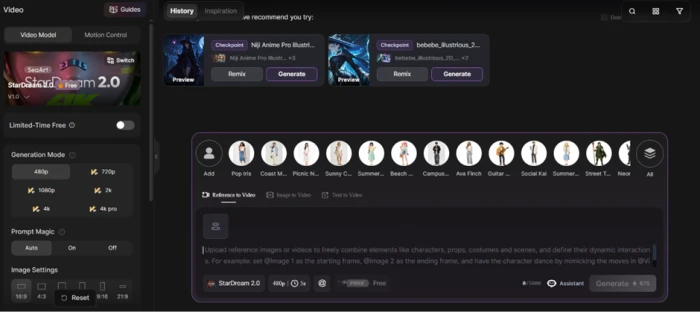
SeaArt goes wider on fun. It generates video too, charging roughly 30 to 90 credits per clip depending on length, and it piles on trending effect templates like AI dance and AI hug filters. Then there is Cyberpub, its character-chat corner where you talk to AI personas or build your own.
If your goal is polished, purposeful video, Leonardo stays focused on that. If you want a box of playful toys next to your generator, SeaArt has more to poke at.
Community and the trust question
Output and features aside, these platforms ask for different levels of trust, and that deserves an honest look before you commit real projects to either.
SeaArt is community-first by design. A model marketplace and one-click remixing keep the feed busy, and seasonal challenges give people a reason to return. You can share your own trained models with the crowd.
There is a flip side worth weighing. SeaArt is owned by a China-based company and processes everything in the cloud, which some businesses treat as a data consideration for sensitive or client work. The platform also tightened its content moderation in 2025, and a slice of users who relied on more permissive generation were frustrated enough to migrate elsewhere.
Leonardo carries the trust profile of a mainstream Western SaaS product, now under Canva's ownership. For teams with procurement rules or privacy requirements, that pedigree tends to clear approvals faster. Leonardo also exposes an API and team plans, which matters if you plan to wire generation into your own product or hand seats to a group.
Pick the side that matches your risk tolerance. A hobbyist making anime for fun has little to worry about on SeaArt. A studio handling client IP may sleep better on Leonardo.
So which one should you pick?
Two weeks of testing pointed to clear answers for different people. Find yourself below.
● You mostly make anime or stylized art. Go with SeaArt. Its community anime models beat Leonardo in my face-off, and the variety is addictive.
● You are an indie game developer. Choose Leonardo. Custom model training and the Realtime Canvas give you consistent characters that SeaArt cannot match as cleanly.
● You post social content on a tight budget. Start with SeaArt's free tier, then step up to the $5.99 Beginner card if you need more Stamina. It is the cheapest real path to volume.
● You do client or marketing work. Lean Leonardo. The control and polish shorten your revision cycles, which clients notice.
● You already pay for Canva Business. Open Leonardo first. Its Essential plan is bundled in, so you are effectively already paying for it.
● You handle sensitive or private data. Prefer Leonardo for the more conventional ownership setup discussed in the section above.
● You want one tool for images and video together. Either works, though SeaArt packs more creative extras into one place, while Leonardo keeps its video tighter and easier to control.
My final call
After fourteen days I stopped treating this as a contest and started using both for what each does best.
Leonardo stayed open whenever I planned to show work to someone who pays. The control and character consistency cut my revision time, and the output felt client-ready with less fuss.
SeaArt owned my late-night experiments. The anime models were more fun, and the model library kept surprising me. The free Stamina stretched further than I expected too.
Forced to keep only one, I would decide by what leaves my screen. Anime and high-volume experiments point to SeaArt. Precision and paid client work point to Leonardo.
So do what I did. Install the free version of the one that matches your style and run the two prompts from the face-off section. Then trust your own eyes over any comparison table, including mine.






Discussion
Join the discussion and share your perspective.