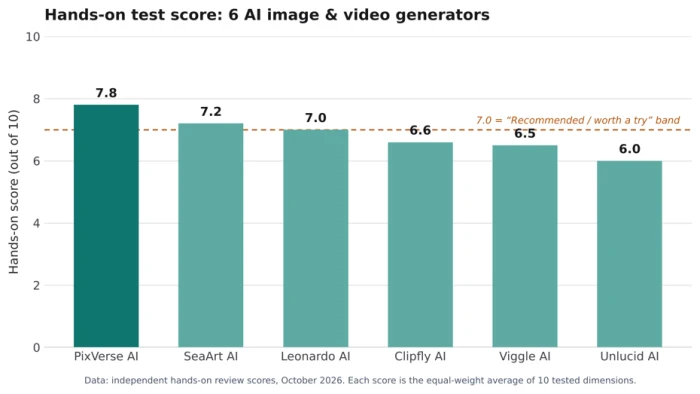
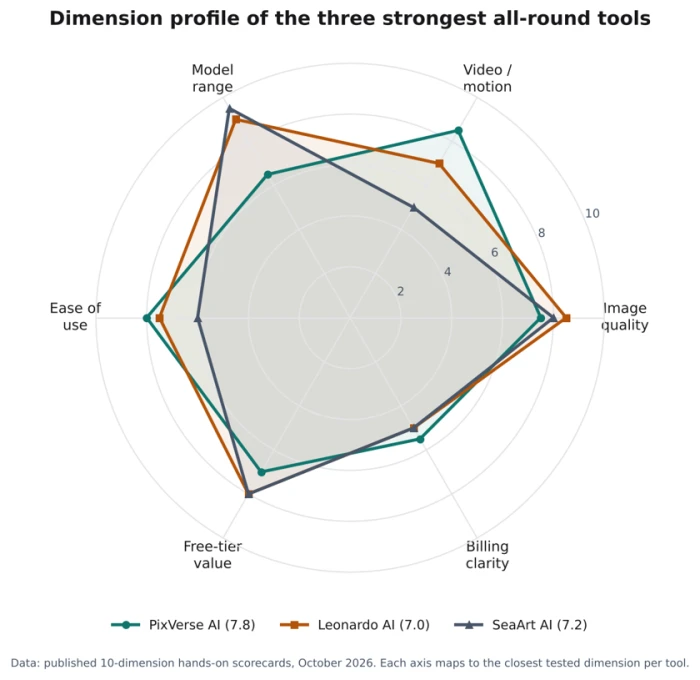
A fair question in 2026 is whether you still need separate tools for pictures and for video. The answer, after hands-on testing, is that a handful of platforms now handle both well enough that one subscription can cover a full workflow. Across the six tools tested here, PixVerse AI scored highest at 7.8/10 for turning a photo into a short clip, Leonardo AI is the strongest pick for doing images and video in one place, and Clipfly AI is the best free option because its exports carry no watermark.
Every score in this guide comes from independent, hands-on review scorecards, where each tool is rated 0 to 10 across ten dimensions and the headline figure is the equal-weight average. That matters because most “best AI video generator” lists rank tools they never opened. The next few sections show what the testing found, starting with how to read the scores.
The 6 best AI image and video generators at a glance
Here is the full lineup, with the score each tool earned and the single job it does best. Pricing reflects the entry paid tier at the time of testing.
Tool
Score
Best for
Images
Video
Image to video
Free tier
Entry price
PixVerse AI
7.8
Photo to short clip
–
Yes
Yes
60 credits/day
$8/mo (yearly)
SeaArt AI
7.2
Image variety & models
Yes
Yes
Yes
~130 stamina/day
$5.99/mo
Leonardo AI
7.0
Both, one workspace
Yes
Yes
Yes
150 tokens/day
$12/mo
Clipfly AI
6.6
Free, no watermark
Yes
Yes
Yes
17 one-time credits
$49.99/yr
Viggle AI
6.5
Character animation
Yes*
Yes
Yes
5 videos/day
$7.99/mo (yearly)
Unlucid AI
6.0
Unfiltered sandbox
Yes
Yes
Yes
Daily gems
$8.99 (120 gems)
How the scoring works, and how to read it
A score is only useful if you know what went into it. Each tool here was signed up for on both free and paid plans, run through the same kinds of real tasks a working creator would, then weighed against aggregated user sentiment from review sites like Trustpilot, Reddit, G2 and the app stores. Each tool is rated on ten dimensions scored 0 to 10, and the headline number is their straight average. No position is paid for.
The dimensions that decide a score
For an image or video generator, the dimensions that carry the most weight are the ones a creator feels every day:
● Output quality and realism – how believable the picture or motion looks before any cleanup
● Prompt adherence – whether the result matches what you actually asked for
● Identity and motion consistency – whether a face or object survives across frames
● Free-tier value and credit economics – what you get before paying, and the real cost per usable result after retries
● Billing transparency – how clearly the pricing, the real limits and the cancellation path are communicated
What this guide leaves out
Two categories were deliberately kept off the list. The first is pure stock-template editors that stitch clips together without generating anything new. The second is tools built mainly for adult content. One pick here, Unlucid AI, is included because it is a genuine general-purpose generator that happens to be unfiltered, and readers searching for an honest take on it deserve one. The rest of the picks are built for everyday creative work.
The 6 best AI image and video generators, reviewed
The tools are ordered by what they are best at rather than by score alone, so you can jump to the use case that fits your work. Each review covers what the tool does, how it performed under testing, what it costs, and who should pick it.
1. PixVerse AI: best for turning a photo into a short clip
PixVerse earned the top score in this group at 7.8/10, and it earned it on one job done unusually well. Feed it a single portrait and it returns a five-second clip in about 35 seconds, with the face still recognizable and native audio generated in the same pass. In testing, facial identity held across every image-to-video run against a fixed source photo, including a full head turn into profile and back with no melting at the edges.
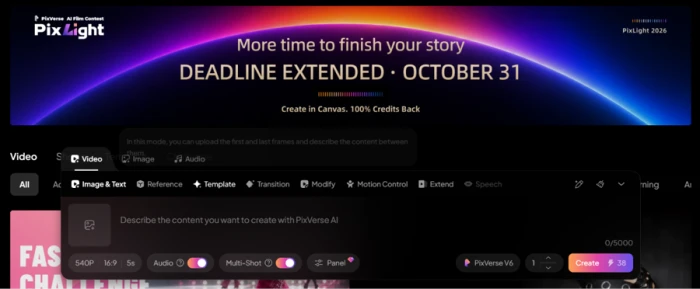
The catch is buried in the interface. The advertised 15-second maximum only exists at 360p; choose 1080p and the timeline stops at five seconds, and nothing on screen explains the trade. Audio and Multi-Shot also ship switched on, so the default setup is the expensive one.
Strengths: fastest usable short clips in the group, strong face consistency, live credit price shown before you commit.
Watch-outs: resolution and duration are silently linked, and Trustpilot carries repeated cancellation complaints.
Best for
Short-form creators animating photos for vertical feeds. Stay on the free tier's 60 daily credits until your volume justifies Pro.
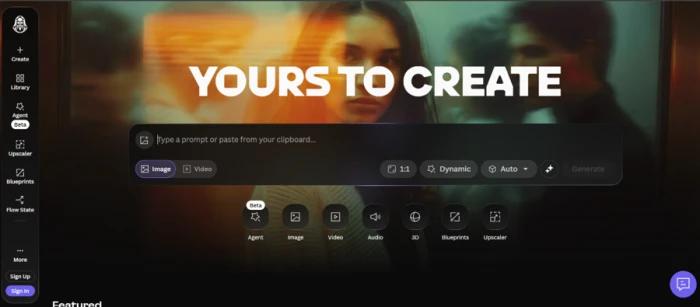
2. SeaArt AI: best for image variety and raw model choice
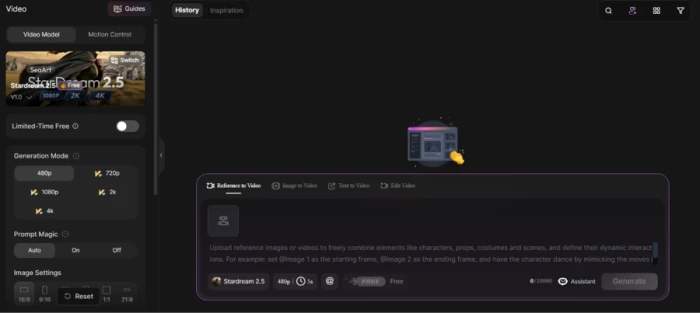
If your work lives in still images and you want range above all, SeaArt scored 7.2/10 and offers more of it than anything else here. It puts a Civitai-style library of community checkpoints, LoRA training, ControlNet and a full browser-based ComfyUI node editor in one tab, with no GPU to buy. The same prompt box also reaches commercial models like Veo, Kling 3.0, Seedance 2.0 and Seedream, so a frontier model sits one dropdown away from an anime fine-tune.
In testing, four portraits from a single run cost 20 stamina, roughly five each, and the free tier grants about 130 stamina a day with no card on file. Video is the weak spot: one clip of the same scene was quoted at 675 stamina, about 34 times the image run, and motion gets choppy past four seconds.
Strengths: the deepest model library in the category, a genuinely usable free daily grant, and editing tools built in.
Watch-outs: a confusing two-currency economy, balances that expire, and memberships that clause 8.8 of the terms makes non-refundable once locked.
Best for
Tinkerers, anime artists and model collectors who want maximum image control and will read the billing terms before subscribing.
3. Leonardo AI: best for doing images and video in one workspace
Leonardo is the pick for anyone who wants one tool to cover a full image-and-video workflow. It scored 7.0/10 and runs more than 80 models in a single web app, from its own Lucid Origin line to hosted names like Veo 3.1, Sora 2, Kling and Nano Banana. Owned by Canva since 2024, it funds hosting nearly every model worth trying, so you rarely leave for the model of the week.
Testing a cinematic portrait on Lucid Origin returned a clean, well-lit result with believable skin texture, and a text-to-video clip of a rotating wristwatch rendered cleanly into a shareable link. The real-time canvas renders as you type, roughly two seconds per stroke, which makes prompt tweaking feel interactive rather than a wait.
Strengths: the broadest model lineup under one login, strong photorealism, and 150 free tokens a day, enough for roughly 30 to 50 standard images.
Watch-outs: the token economy is priced by GPU load with no clear per-image cost, failed generations still burn tokens, and free outputs stay public with no IP ownership.
Best for
Designers, marketers, game teams and small studios who want frontier models and real-time iteration in one place and can budget in tokens.
4. Clipfly AI: best free option with no watermark
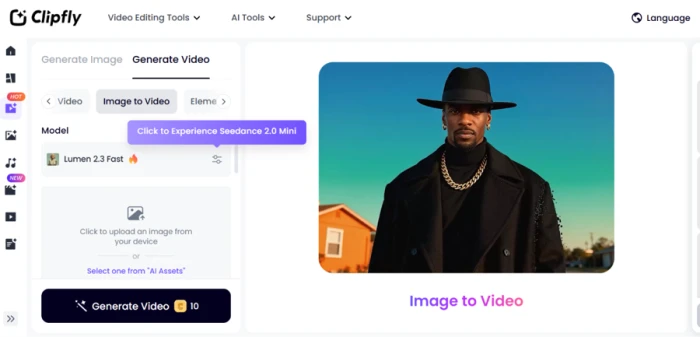
Clipfly scored 6.6/10 and stands out for one reason most rivals reserve for paying users: its free-tier exports download clean at 1080p with commercial rights attached, no watermark. It is a browser-based suite for generating images, videos and music, bolted onto a timeline editor where trimming, captions, audio and export all cost zero credits.
Stills are where it shines. A test coffee-shop prompt landed on the first 2-credit attempt, with correct light direction, wet-glass refraction and steam that held its shape. Video is shakier: a prompt for a running wolf came back as a trotting one with legs blurring together, and a five-second clip costs 10 credits, which empties the 17-credit free grant in a single video.
Strengths: watermark-free 1080p exports on the free tier, sharp still images at 2 credits each, and a model picker covering Veo 3.1, Kling 3.0 and Seedance 2.0.
Watch-outs: the free credit grant is one-time rather than daily, and AI Replace rewrote areas outside the mask it was given.
Best for
Social creators who mostly need stills and a free timeline for trimming, with the occasional short AI clip on top.
5. Viggle AI: best for character animation and motion transfer
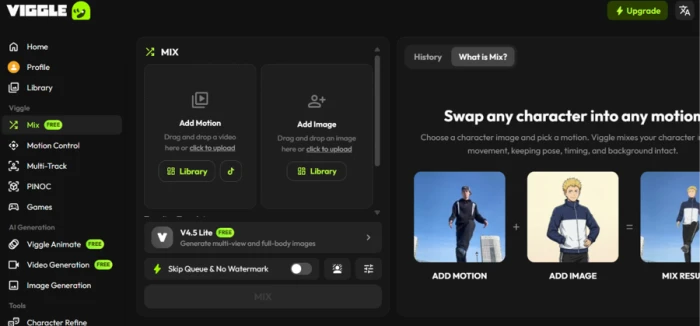
Viggle does something the others do not. Instead of inventing motion, it maps movement from a reference video onto a still character image, keeping the pose, the timing and the original background from the clip. It scored 6.5/10, and its core Mix tool is the strongest motion transfer in this price range. In testing, a suited character picked up a walking clip's stride with the arm swing matched and the jacket moving against the body rather than sliding over it.
The limits appear when you look closely. Faces soften into approximations once a clip is paused, and the real-time webcam swap invented a second hand the moment something moved toward the lens. Free renders also expire after seven days, so anything you want to keep has to be downloaded the same day.
Strengths: physics-aware motion that holds weight and fabric, a library of over 4,000 reference motions, and FBX export for Blender or Maya.
Watch-outs: uploaded images feed model training, faces drift on pause, and the data terms deserve a careful read before you upload anyone's likeness.
Best for
Short-form creators and meme makers who already have the motion they want and need a character dropped into it at playback size.
6. Unlucid AI: best for an unfiltered creative sandbox
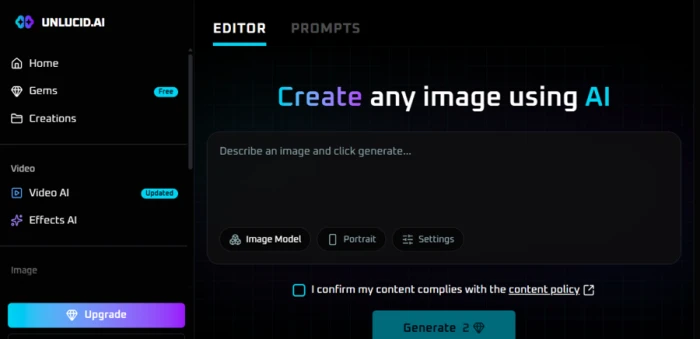
Unlucid sells one thing: the absence of a filter. It scored 6.0/10, and it is included here as an honest look at a tool many creators are curious about. Around a “Show Mature Content” switch sits a four-part suite covering text-to-image, an image editor, a preset Effects animator and general video, all run in the browser on a gem-credit system.
The Effects animator is the most reliable part. Preset motions like Dance and 360 turn a still into a smooth three-to-five-second social clip. Image quality is steadier on simple prompts and wobbles on crowded ones, where anatomy distorts. The structural problems matter more than the output: every creation is deleted after 24 hours, a usable image often takes several gem-costing retries, and the age gate is a single self-declared checkbox.
Strengths: genuinely unfiltered generation, a near-zero learning curve, and the gem price shown on the Generate button before you commit.
Watch-outs: 24-hour deletion, fast-draining gems, and independent scanners that flag low trust and anonymous ownership, so keep balances small.
Best for
Hobbyists and meme makers who want a disposable, uncensored playground and treat the output as throwaway.
Image generator, video generator, or both?
Picking from the six above is easier once you know which kind of tool you actually need. The three jobs overlap in marketing copy but behave quite differently in practice.
Text-to-image, text-to-video and image-to-video, in plain terms
● Text-to-image turns a written prompt into a still picture. This is what SeaArt and Leonardo's image models do.
● Text-to-video turns a prompt straight into a moving clip, with no source picture involved.
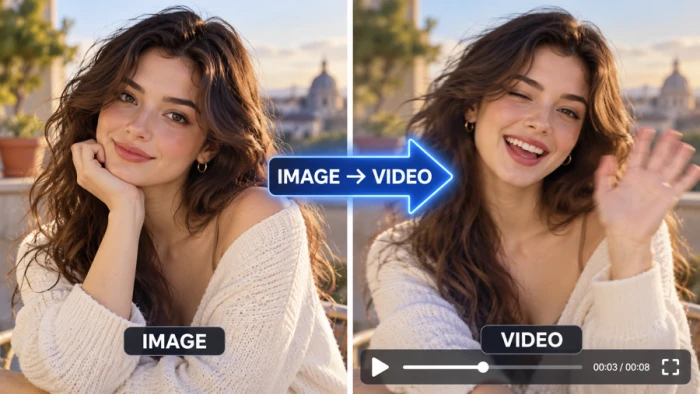
● Image-to-video starts from a picture you supply and adds motion. PixVerse and Viggle are built around this, and it is the fastest-growing request of the three.
When one tool that does both wins
A single platform covering images and video pays off when your work flows from one into the other: generate a product shot, then animate it into a three-second ad. That is the case for keeping Leonardo or SeaArt open rather than juggling two subscriptions. A specialist wins when one job is your whole job. If you only animate existing photos, PixVerse's focus beats a generalist. If you only need stills, SeaArt's depth does.
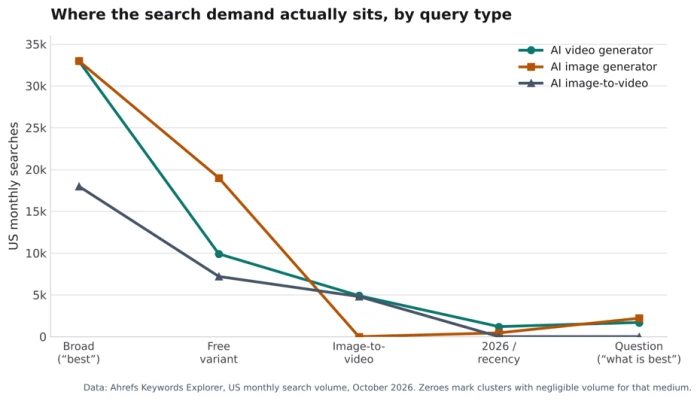
Search behavior backs this up. Demand is heaviest on the broad “best” terms and on free variants, while image-to-video has become a large cluster of its own. The chart below shows where the volume actually sits.
The pattern is clear. Interest collapses from the broad head terms toward specific phrasings, and the free variant holds more demand than any dated or question-based phrasing. For most people, “best free AI image generator” and “AI image to video generator free” describe the real search, which is why the free-tier quality of each tool above was weighted heavily.
How to choose the right tool for your work
Match the tool to the task rather than hunting for a single winner. The table pairs the most common goals with the pick that handled them best in testing.
Choosing by budget: what the free tiers actually get you
Free plans in this category are marketing funnels, so read the fine print. Leonardo's 150 daily tokens cover roughly 30 to 50 images and refresh every day. SeaArt's 130 daily stamina covers about 20 watermarked images. PixVerse renews 60 credits a day with no expiry. Clipfly is the outlier worth knowing about: its free grant is one-time, not daily, and buys a single video, but the file comes out clean with no watermark. Viggle gives five watermarked videos a day but deletes them after seven days.
Factors beyond raw quality
Two tools can produce similar output and still differ on the things that decide whether you keep using them:
● Commercial rights and watermarks – Clipfly allows commercial use on every plan; Leonardo keeps free outputs public with no IP ownership.
● Storage – Unlucid deletes after 24 hours and Viggle after seven days on free plans, so download the same day.
● Billing clarity – PixVerse, SeaArt, Leonardo and Viggle all lost points for pricing pages that hide their most important limit.
● Credit cost after retries – a good result often takes three to five attempts, so advertised image and video counts are best-case, not what you get.
How to turn an image into a video with AI
Image-to-video is the workflow most readers come here for, so here is the sequence that produced the cleanest results in testing. It works across PixVerse, Leonardo and the other picks above.
The four-step workflow
Step 1. Generate or choose a strong source image. Start with a clean, front-facing, evenly lit subject. A centered portrait with no background clutter is the easiest input any model will handle, and it sets the ceiling for everything that follows.
Step 2. Refine for consistency before animating. Fix the subject, the lighting and the framing while it is still a static image. Correcting a face at this stage is far cheaper than fighting drift once motion is added.
Step 3. Animate with specific motion instructions. Describe one or two clear actions and a single camera move. In testing, a prompt asking for four actions inside three seconds is where even the top tool slipped, delivering three claps when two were requested.
Step 4. Export and extend if needed. Download the clip, then use Upscale or Extend as follow-up actions rather than regenerating from scratch, which saves credits.
Tips to avoid identity drift and artifacts
Lock the subject with a reference or multi-image input where the tool supports it. Keep early clips short, since motion holds better at five seconds than fifteen. Avoid crowded scenes, which is where anatomy distorts and detail melts across every model tested.
The Final Verdict
Six tools, one clear pattern. The best scores did not go to the tools with the flashiest output. They went to the ones that were honest about what they are. PixVerse topped the group at 7.8 by doing a single job well rather than promising everything, and the tools that lost points lost them on billing pages and disappearing files, almost never on image quality.
That is the real finding. In 2026, output quality has largely stopped being the thing that separates these tools, because the same handful of frontier models sits underneath most of them. What separates them now is everything that happens around the generation: how fast your free credits vanish, whether the price on the screen is the price you pay, and whether your work is still there next week.
So the decision is simpler than a six-way comparison makes it look. Start by naming the one job you do most. If that job is animating photos, the fast, face-accurate specialist wins. If it is running images and video from one place, the broad all-in-one wins, with the token math as the thing to watch. If you are spending nothing, the tool that hands you a clean, unwatermarked file wins outright, whatever its video weaknesses.
The mistake is picking for the benchmark. A model that leads today will be mid-table by the next quarterly release, and switching tools every time the leaderboard reshuffles costs more in lost time than any subscription saves. Pick for the parts that do not change, the free-tier honesty and the billing and the ownership of what you make, and the tool will still be the right one long after this month’s top model is forgotten.



Discussion
Join the discussion and share your perspective.