
AutoDraft AI
AutoDraft is an India-built AI cartoon animation tool for YouTubers that turns prompts into consistent-style backgrounds, characters, voiceovers and video. It downloads stills with no watermark, but caps free video at 480p.

A no-watermark cartoon asset generator with genuinely strong stills and style consistency, undercut by weak animation, loose prompt adherence.
Should you use Autodraft?
Cartoon-story YouTubers who need consistent backgrounds, characters and stills in one place, and will download them clean with no watermark.
You want finished AI animation that just works . The motion output is rough, and building a full scene takes longer than it should.
Free is a test drive, not a workflow. Paid starts at Base, about $27/mo for 1,000 credits, and generations eat credits fast.
Free video is locked to 480p , the AI ignored my style and finger-count instructions, and 20 free credits lasted exactly three actions.
Key features & how they perform
Each feature rated from hands-on testing and aggregated review sentiment.
AI image generator
Plain-English prompts produce clean cartoon stills in seconds, and the tool saves the seed and settings so you can reproduce or tweak later.
Style & background consistency
100+ consistent art styles plus custom model training keep backgrounds and characters on-model across a series. Reviewers rate this its strongest area.
AI video generator
Turns a prompt into a short clip, but it drifted to realistic when I asked for cartoon and mangled the hands. Free output caps at 480p.
Background remover & editor
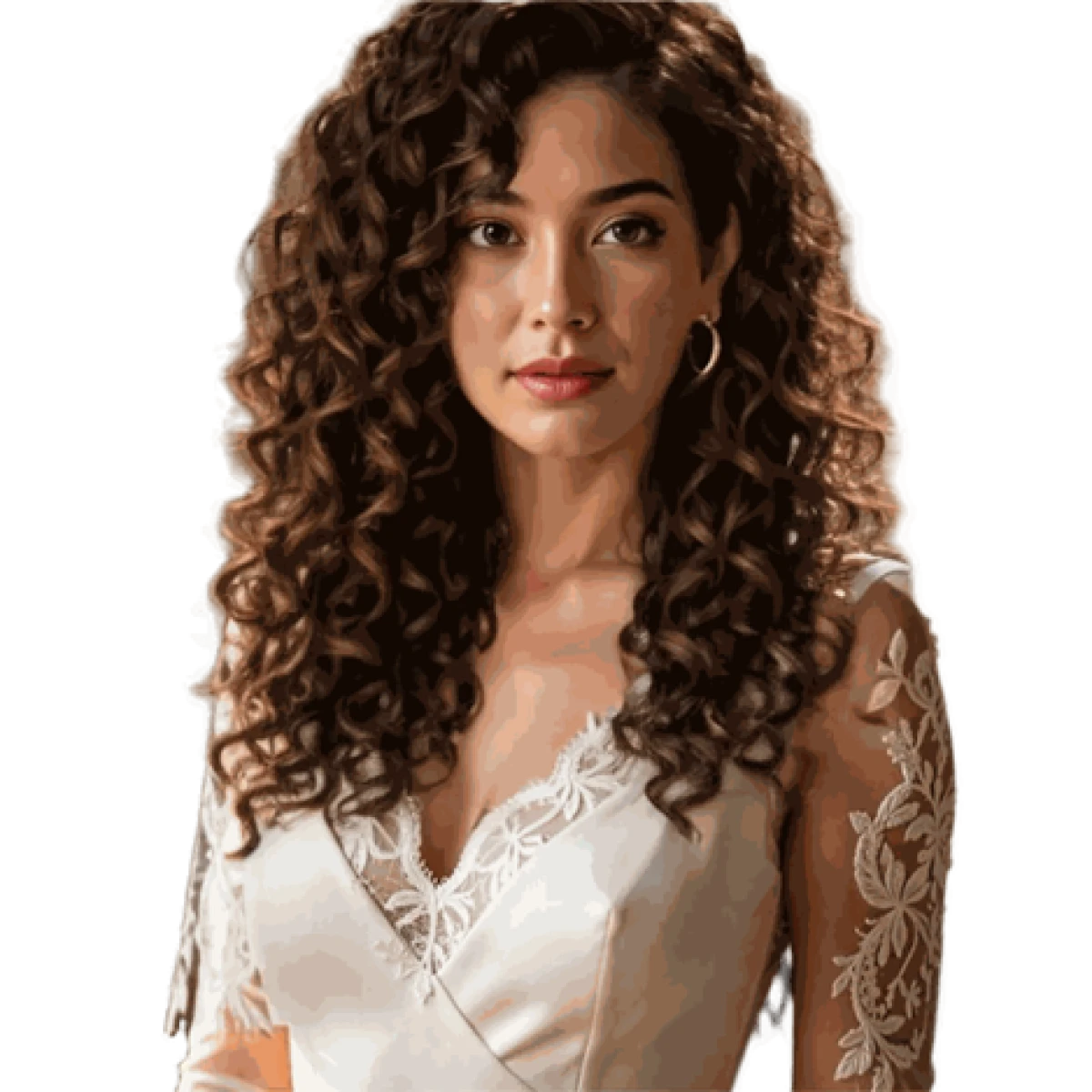
Separates body and face cleanly, but curly hair edges come out jagged. Fine for a draft, needs a manual pass for a polished thumbnail.
Voiceover & BGM
Hundreds of voice presets plus a copyright-free music library, built for the full story-to-channel pipeline. Lip-sync to audio is still default-only, not exact.
Animation studio
Action controls, expressions and a timeline editor aim at full 2D animation, but users call the process slower than a traditional workflow.
Feature ratings blended from Capterra, G2, Product Hunt & competitor hands-on reviews + testing.
What 20 free credits actually bought me in Autodraft
One image, one video and one background cutout, taken from prompt to downloaded file on a fresh free account.
Generating my first image
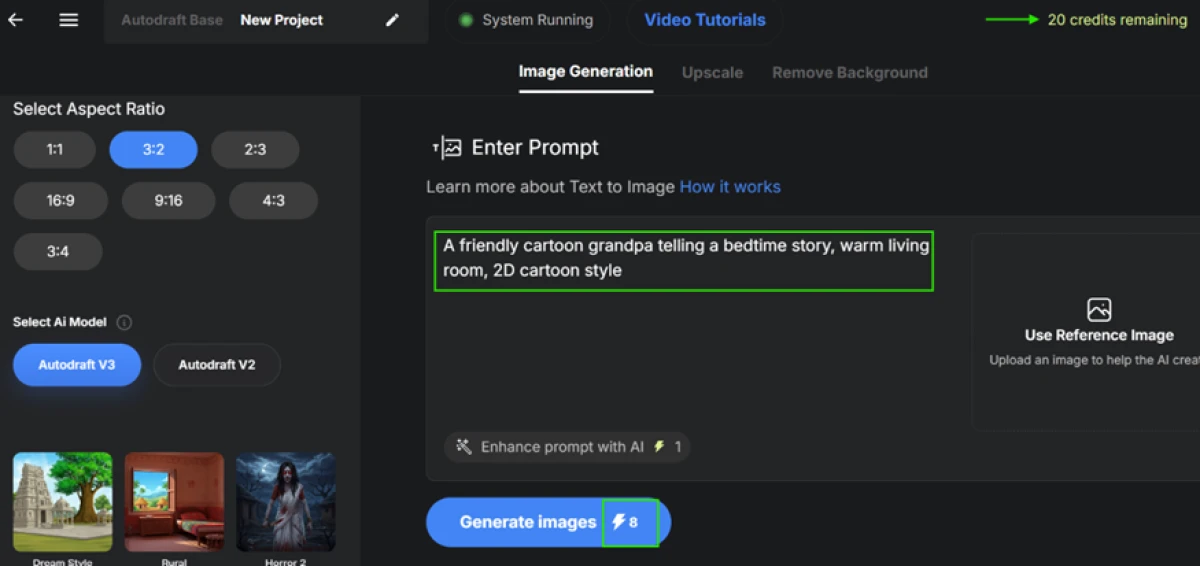
Autodraft runs on a credit system, and it tells you the cost before you commit. I started in the Image Generation tab, left the model on Autodraft V3, and picked a 3:2 ratio.
My balance read 20 credits on login, and the Generate button showed that one image would cost 8 of them upfront.
"A friendly cartoon grandpa telling a bedtime story, warm living room, 2D cartoon style."
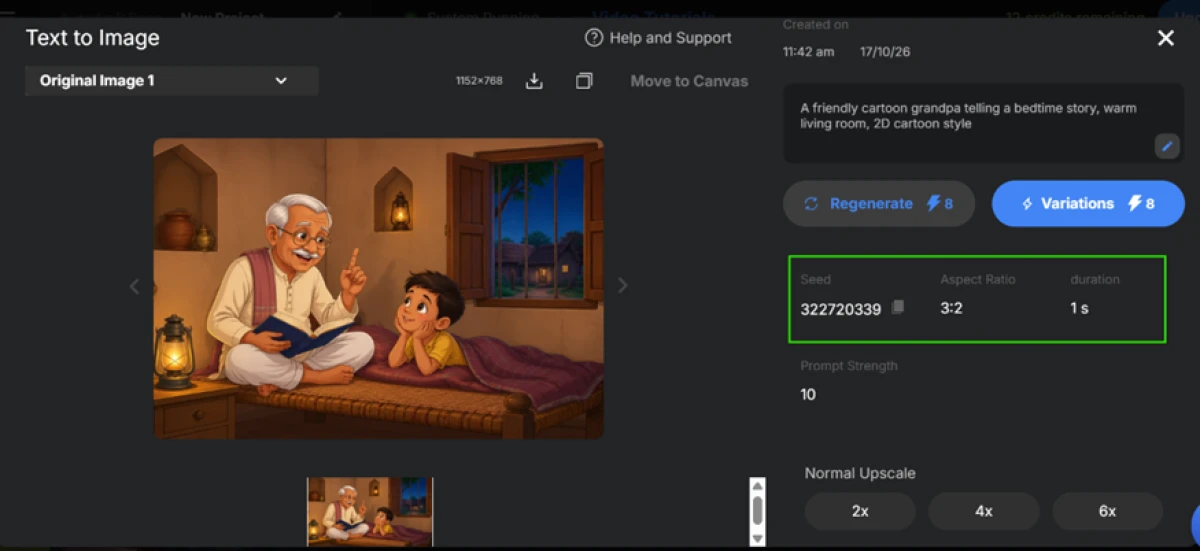
The result, and where its roots show
The image came back in a few seconds and it was good. A warm scene, a grandpa reading to a boy, lanterns in the room, clean line work, all from one sentence with no design skill on my end.
The tool also saved the seed (322720339), the aspect ratio and the prompt strength, so I can reproduce or adjust this later instead of starting from scratch.
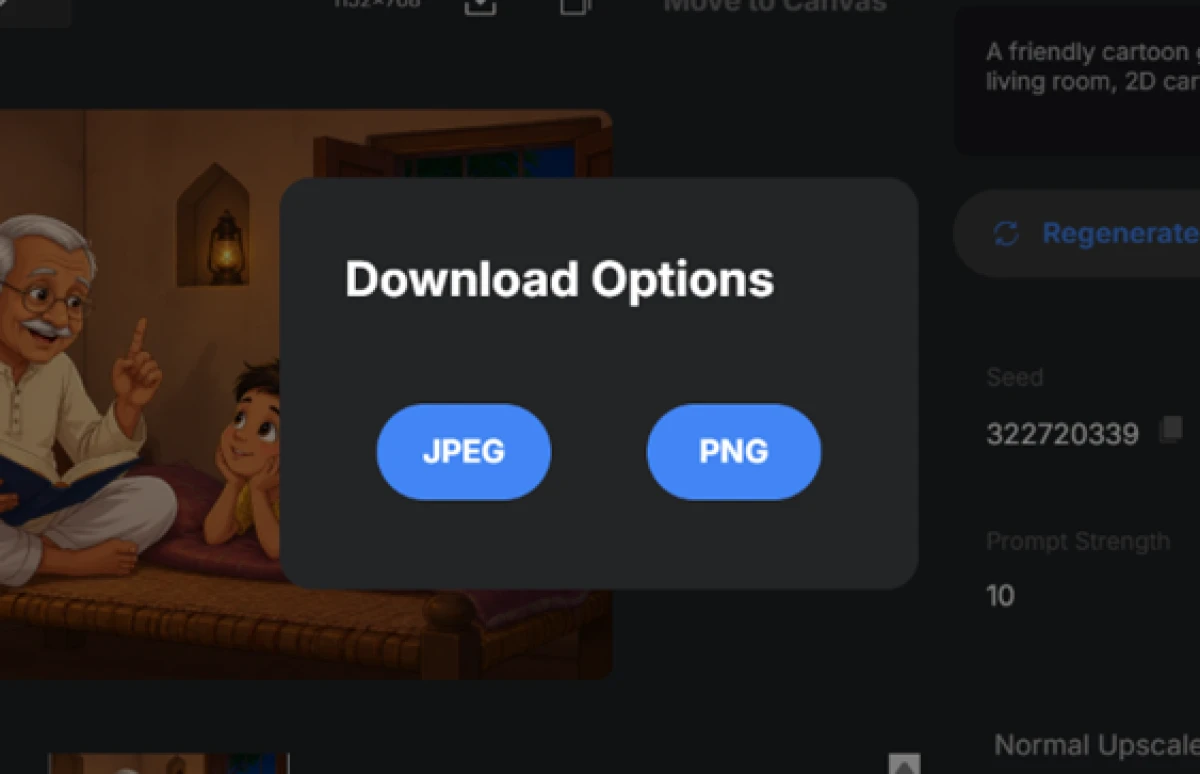
Downloading the image
Saving was painless. I hit download and got two format choices, JPEG and PNG. PNG is the one I care about, because it keeps a transparent background for thumbnails and overlays.
Both downloaded without a watermark on the free plan, which is more than a lot of free tools give you.
Stress-testing the video generator
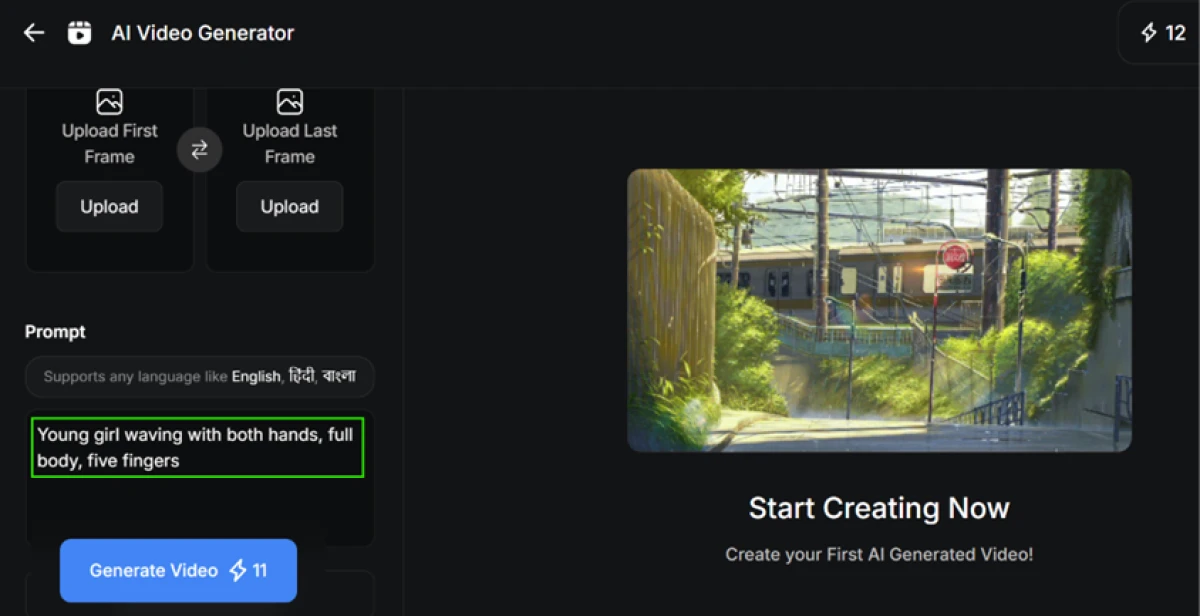
Next I opened the AI Video Generator and asked for something I knew AI struggles with. I spelled out "five fingers" on purpose to see whether it could hold that detail.
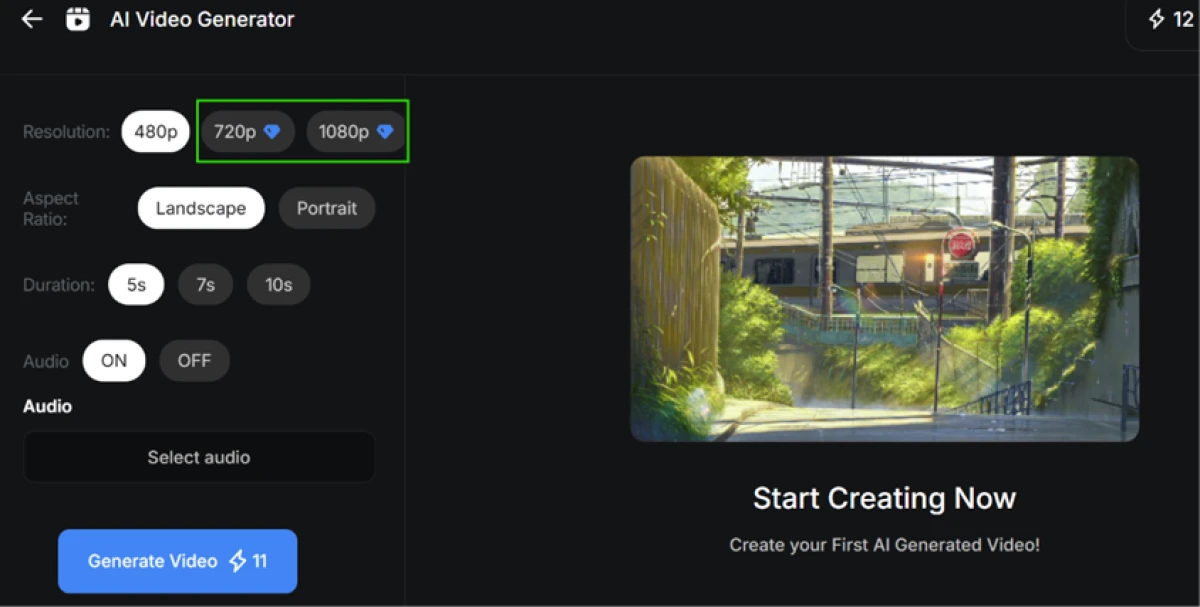
The cost jumped. A video was 11 credits, and I had already spent on the image, so my balance was thin.
"Young girl waving with both hands, full body, five fingers."
Before generating, I checked the settings. Only 480p was free. Both 720p and 1080p sat behind a paid lock, marked with a diamond.
The queue, and the credits running out
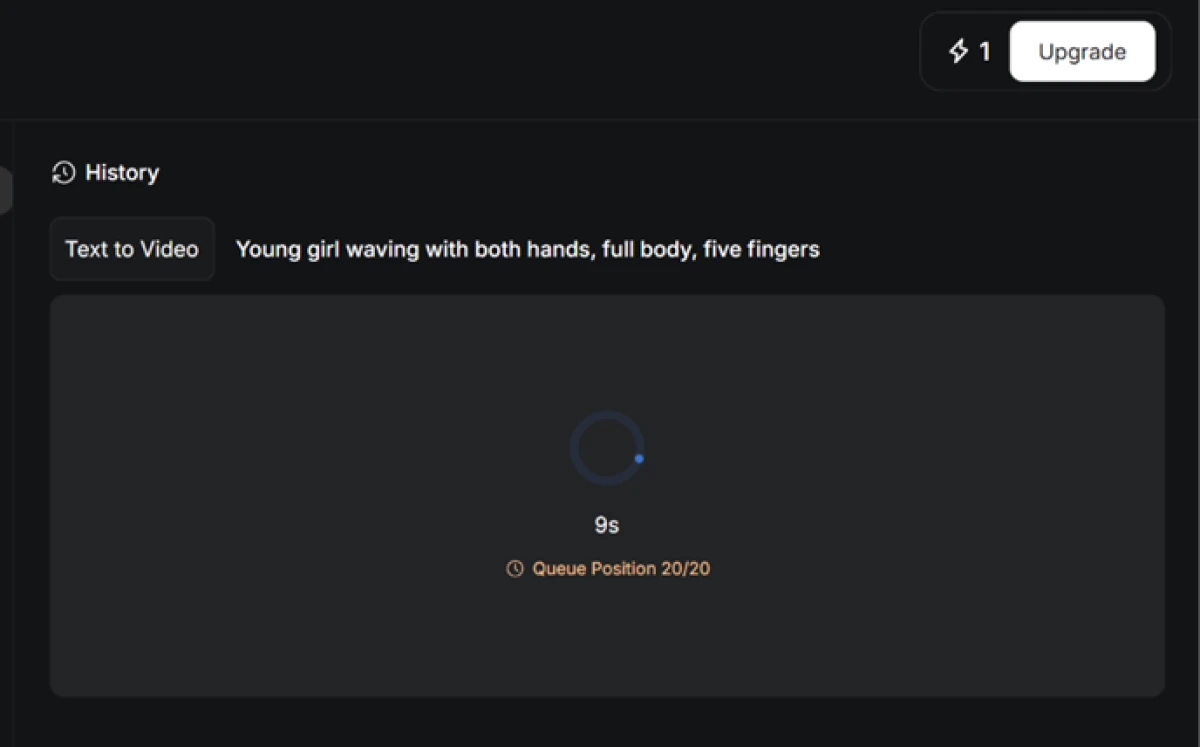
I submitted the job and landed at position 20 of 20 in the queue, with my credits now down to 1 and an Upgrade button sitting right there.
The free tier works, but it is not fast. For a one-off test this is fine. For someone pushing out videos on a schedule, that line is going to hurt.
The video it produced
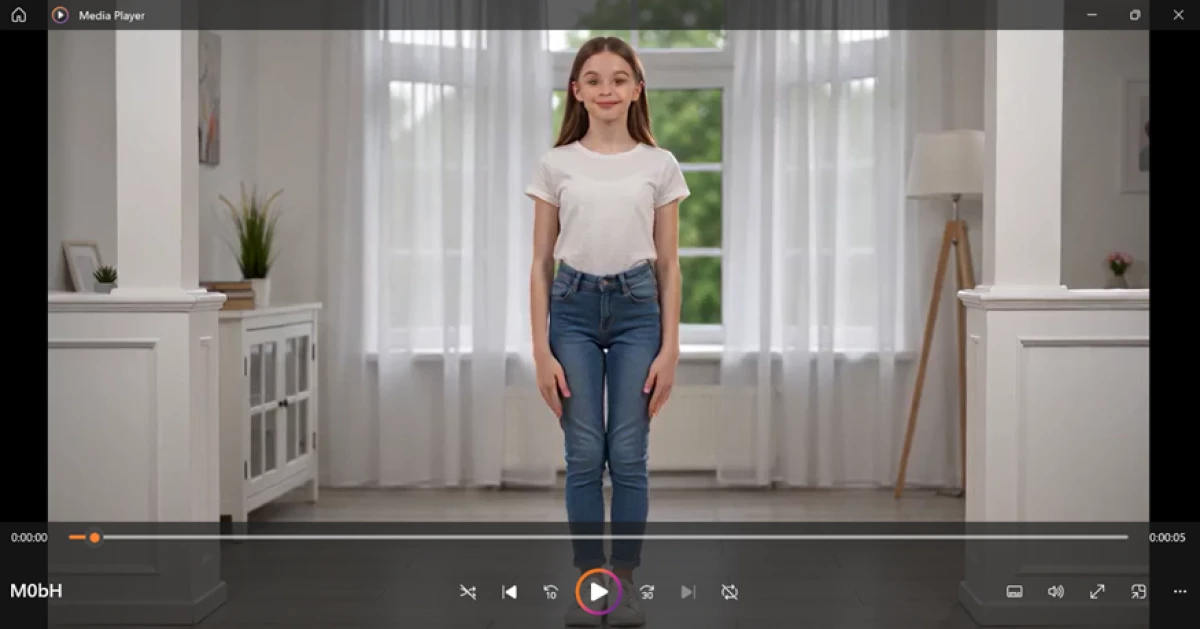
The video did generate, and it downloaded clean with no watermark. That is the good part.
Now the catch. I asked for a cartoon girl and got a realistic, live-action-style girl, which is odd for a tool that sells itself as a cartoon animation maker. Her palms are also oversized for her body, out of proportion with her arms, even though the prompt specifically asked for correct hands with five fingers.
Spending my last credit on background removal
With exactly 1 credit left, I tried the Remove Background tool on a portrait. The job cost that last credit, so this was my final action before the tank ran dry.
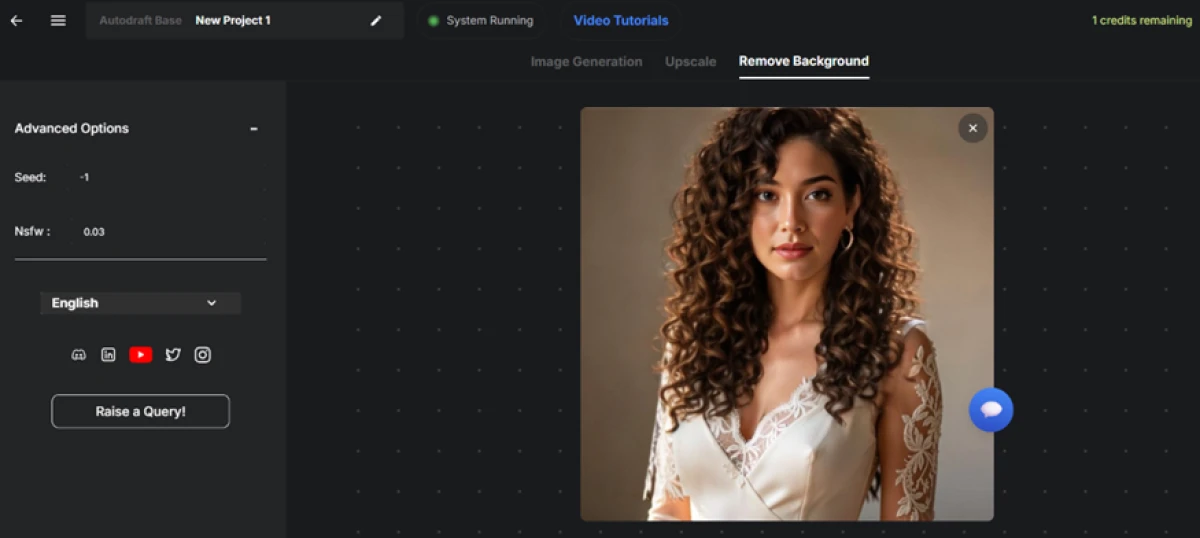
The cutout came back usable, but not clean. The body and face separated well. The hair is where it fell apart, with curly edges that look rough and jagged instead of soft, and hard pixel borders around individual strands.
The free claim that did not match my session
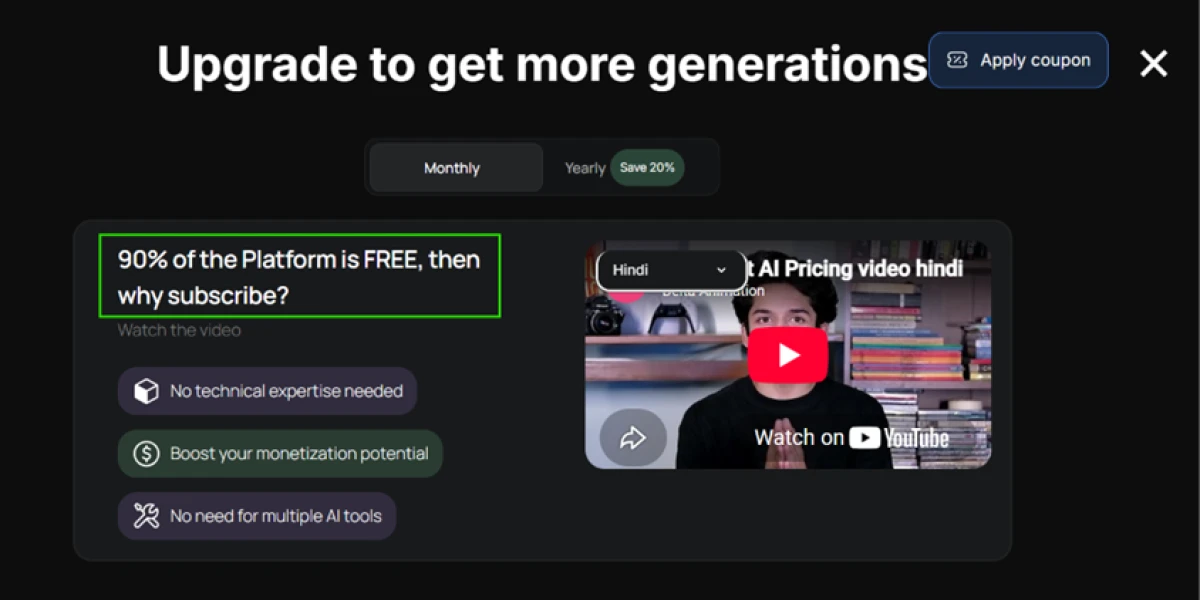
When my credits ran out, the upgrade popup appeared with a bold line: "90% of the Platform is FREE, then why subscribe?" My session told a different story. Every action spent credits.
The image cost 8, the video cost 11, the background removal cost 1, and even the Enhance prompt with AI button costs a credit. Add the big ones together and that is 20, my entire free balance, gone in three generations.
Autodraft pricing
Figures taken from the official Autodraft pricing page.
| Plan | Price | What's included |
|---|---|---|
| Free | $0 | 20 one-time credits · Animation, Cinema & Whiteboard Studio · AI image, video & voiceover · no-watermark JPEG/PNG · video capped at 480p |
| Base Popular | $27 /mo | 1,000 credits/mo · unlimited 4K cloud downloads · premium assets · AI voice cloning · sound effects · copyright-free BGM · thumbnail maker · editing tools |
| Pro | $105 /mo | 4,000 credits/mo · everything in Base · feedback on uploaded YouTube videos · priority generation for higher-volume channels |
| Enterprise | Let's talk | Custom-trained models on your own art style · higher quotas · demo and onboarding via the sales team |
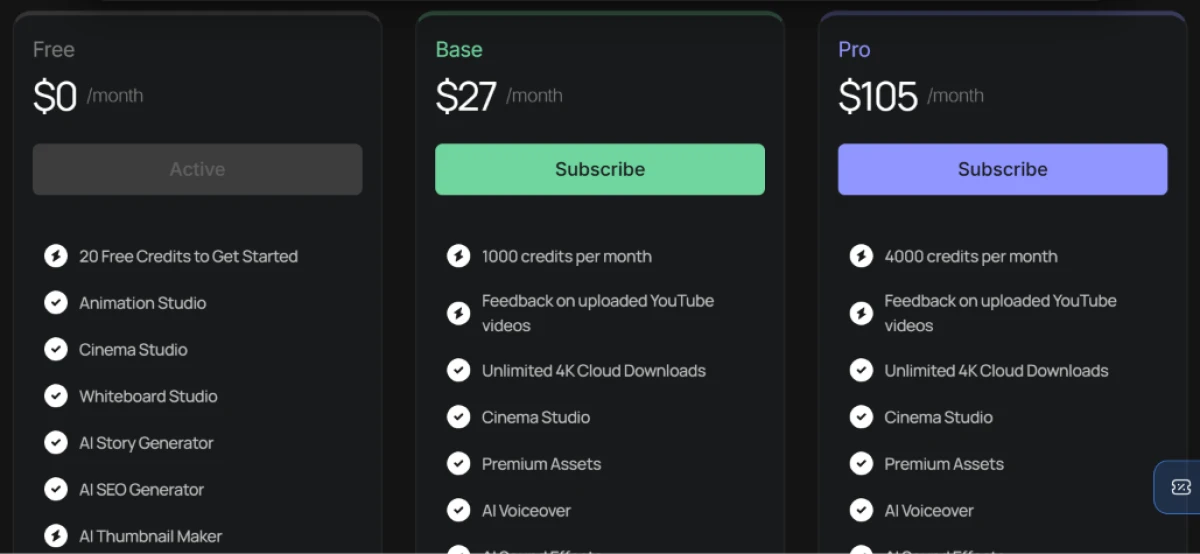
Pricing is accurate as of 17 October 2026 and was captured from the official Autodraft website. Plans, prices and credit limits change often, so check the official Autodraft pricing page for the current figures before you subscribe.
Pros & cons
Specific conclusions from real user reviews, not generic filler.
✅ Pros
- Rated the best tool reviewers found for backgrounds and webtoon panels
- Sketch-to-image turns a rough reference plus text into a finished scene
- Custom model training holds one art style across a whole series
- Saved prompts, seeds and past generations let you reuse and refine
- Built-in tutorials walk you through every feature on the platform
- Non-designers get production-level character art without hiring an artist
⛔ Cons
- Full animation takes longer than a traditional hand-animation workflow
- Reviewers say the finished animation quality still looks poor
- Building a full scene means learning many separate studio features
- Generation can stall with only a spinner, no real progress indicator
- Lip-sync uses default mouth sets, not exact sync to your audio
- No API and no Figma or third-party integrations to fit a pipeline
- Some visitors hit a broken plain-HTML version of the site on first load
Synthesized from real reviews on G2, Product Hunt & competitor hands-on reviews · paraphrased, not quoted
Autodraft alternatives
| Autodraft AIReviewed | Clipfly AI | Viggle AI | MagicLight AI | Fliki AI | |
|---|---|---|---|---|---|
| Our Score | 6.0/10 | 6.6/10 | 6.5/10 | 6.2/10 | 6.0/10 |
| Entry paid plan | $27 / mo | $3.33 / mo, billed yearly | $10 / mo | $12 / mo | $28 / mo |
| Free tier | 20 one-time credits | Free, limited AI credits | Free trial, 80 credits/mo | Free, 1-minute videos | 5 min of credits/mo |
| Free export | No watermark, 480p video | No watermark, 1080p | Watermarked on free | No watermark, 1080p | 720p, Fliki watermark |
| Core method | Prompt to cartoon assets, plus studio animation | Text or image to short clip, with editor | Maps motion from a clip onto a character image | Script to long-form animated story video | Script or blog to narrated video |
| Best for | Cartoon-story YouTube channels | Quick social clips with music | Animating a single character image | Faceless long-form story videos | Narrated explainers from a script |
| Standout strength | Consistent backgrounds plus custom model training | Watermark-free 1080p on the free plan | Physics-aware motion transfer | Videos up to 50 minutes long | 2,000+ AI voices in 80+ languages |
Who Should Use Autodraft AI, and Who Should Avoid It?
Autodraft is strong at generating consistent cartoon stills and assets, but weak animation, loose prompt adherence and a tiny free pool make it a poor fit for some creators.
Who Should Use Autodraft AI?
Best suited for these workflows
Cartoon-Story YouTube Channels
Generate backgrounds, characters and stills in one consistent style, then download them clean with no watermark on any plan.
Webtoon and Comic Creators
Reviewers rate its background and panel generation the best they found, and sketch-to-image turns a rough reference into a finished scene.
Series Makers Who Need Consistency
Custom model training keeps one art style locked across every episode, which is the hardest thing to hold when you generate at volume.
Non-Designers on a Budget
People with no animation skills can produce usable character art from a sentence, saving the cost of hiring an illustrator.
Who Should Avoid Autodraft AI?
Consider an alternative if you need
Finished Animation That Just Works
My video drifted to realistic when I asked for cartoon and botched the hands, and users say full animation takes longer than doing it by hand.
Tight Prompt Control
It ignored both the style and the finger count I spelled out, so plan on re-rolls and manual fixes rather than one clean pass.
High-Resolution Free Output
Free video is capped at 480p, and 20 one-time credits emptied in three generations, so the free tier is a demo, not a workflow.
A Pipeline-Ready Tool
There is no API and no Figma or third-party integration, so Autodraft cannot slot into an automated production chain.
Our Recommendation
Autodraft earns its keep as a cartoon asset and background generator, especially for creators who want consistent stills and clean, unbranded downloads. If your goal is finished animation in one pass, the motion output is not there yet, and the 20-credit free pool barely covers a proper test. Before you pay, run the free credits on your exact style and check whether the video quality clears your bar, because once they are gone you are drafting manually.
Autodraft scorecard
Rated against what an AI cartoon animation and asset tool is actually built to do.
| Dimension | Verdict | Score |
|---|---|---|
| Export freedom No-watermark, usable downloads on free | Excellent |
8.5
|
| Image generation quality Cartoon stills from a plain prompt | Good |
7.5
|
| Style & model control Consistent styles and custom training | Good |
7.5
|
| Ease of use Signup, prompting, first generation | Average |
6.5
|
| Background removal & editing Cutouts and clean-up tools | Average |
6.0
|
| Resolution & format range Export sizes and file types on free | Average |
5.5
|
| Value for credits Free pool and per-generation cost | Weak |
5.0
|
| Speed & performance Queue times, load speed, stability | Weak |
5.0
|
| Video & animation quality Motion output and anatomy accuracy | Weak |
4.0
|
| Prompt adherence Following style and detail instructions | Weak |
4.0
|
| Scrutool Score Equal-weight average of all 10 dimensions |
6.0
|
A sharp still-image maker wearing an animation tool's badge
Autodraft is better at the asset side than its marketing lets on. The image generator produced a clean cartoon scene from one sentence, saved the seed for reuse, and let me download it as a transparent PNG with no watermark, which is more than most free tools allow. Its style consistency and custom model training are genuinely useful for anyone running a cartoon series, and reviewers single out its backgrounds and webtoon panels as best-in-class. The trouble starts the moment you ask it to move. My video came out realistic instead of cartoon and got the hands wrong even after I spelled out five fingers, free video is stuck at 480p, and 20 credits vanished in three generations while a popup insisted the platform is 90% free. Creators who want a dependable engine for consistent stills and assets will get real value here, as long as they treat the animation as a work in progress. If you want finished cartoon video in one pass, this is not the tool yet, and a stronger video-first option will serve you better.
Discussion
Join the discussion and share your perspective.