
VidRush AI
VidRush turns a script or brief into a finished long-form documentary or Top 10 video in about an hour, with sourced footage, US voices and thumbnails. Horizontal only, paid plans from $99/mo.

A genuinely polished long-form video producer with honest cost and compliance controls, walled in by a format list that bans vertical video and a $99 floor with no free trial.
Should you use VidRush?
Faceless documentary and Top 10 channels that publish long horizontal videos at volume and want research, voice and editing handled in one pass.
You make anything vertical . Shorts, Reels, TikTok, screen recordings, reactions and tutorials are all on the unsupported list.
No free tier at all. The entry Starter plan is $99/mo for roughly eight videos, and bringing your own voiceover does not cut the credit cost.
The custom avatar reads Coming soon , and style transfer only runs on the pricier Pro model in experimental mode.
Key features & how they perform
Each feature rated from hands-on testing and aggregated review sentiment.
Cost shown before you spend
Every production model prints its exact credit-per-minute rate on screen before you generate, so you price the run before committing to it.
ElevenLabs voice library
A deep bench of US male and female voices with tone labels and per-voice previews. The catch: the voices are licensed, not owned.
Outlier-referenced thumbnails
Pulls high-CTR reference thumbnails from your topic, each tagged with a click multiplier, then generates an option beside them.
Risk-rated footage sourcing
Sorts clips by licensing risk, with commercial stock and Creative Commons in the safe band and web crawling flagged as your liability.
Editor & style transfer
A real timeline plus chat edits, and the agent can read an editing style off a reference video, though only in gated experimental mode.
Format range
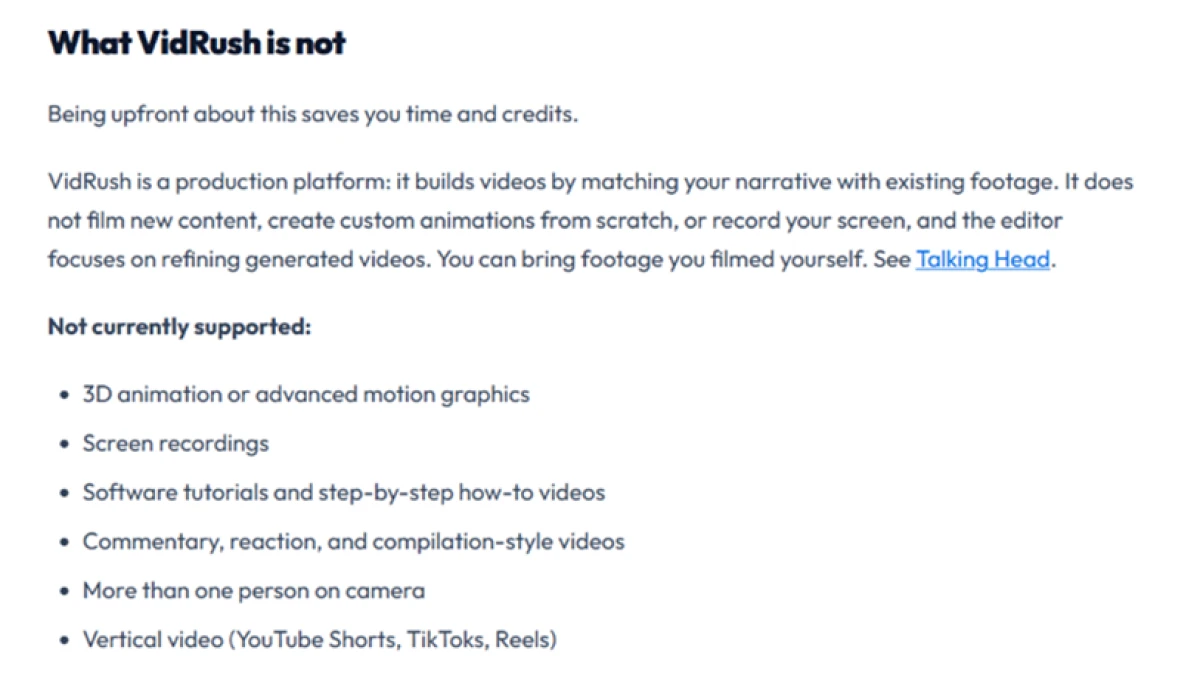
Documentary and Top 10 in horizontal only. No vertical, no screen recordings, no reactions, compilations or software tutorials.
Feature ratings blended from Trustpilot, Product Hunt & competitor hands-on reviews + testing.
Taking one script from brand profile to a finished VidRush file
Every screen from channel setup to the format wall, tested on a real production run with my own script.
Setting up a brand profile
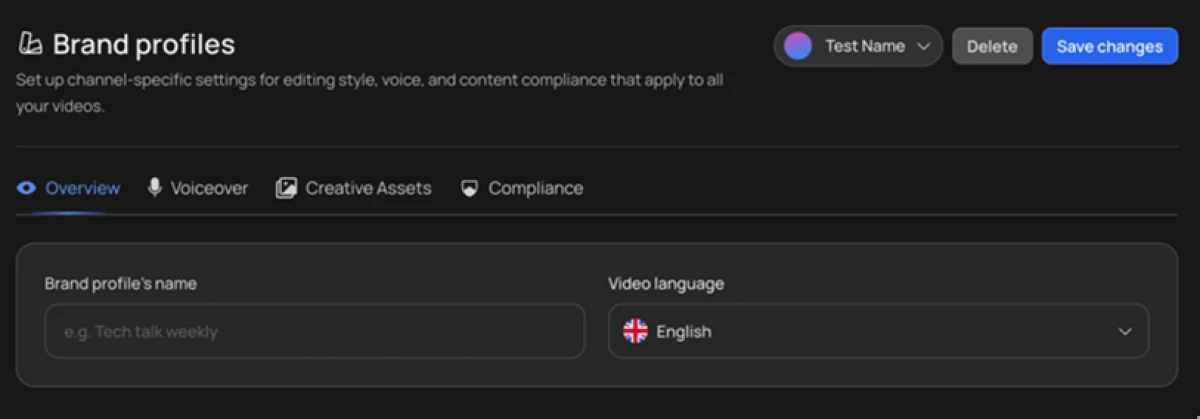
VidRush opens on a brand profile that locks your channel identity into every video you produce. You set it once and it carries into every render after that.
I set the video language to English and found the voice and compliance controls sitting in the same panel. The logic is sound for anyone running a single channel at volume.
Picking a production model, with the cost shown first
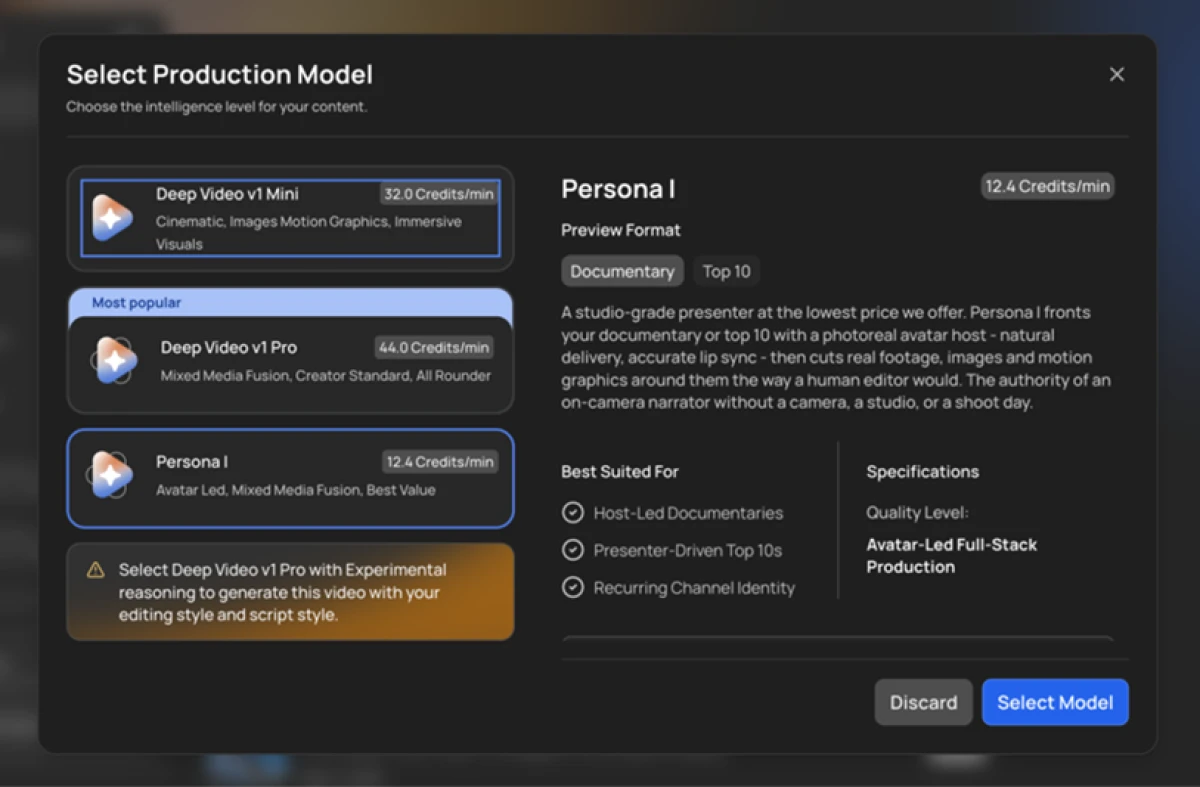
Before generation starts, VidRush asks which model runs the job and prints the exact credit cost per minute for each one. That upfront number is unusual for this category.
Deep Video v1 Mini ran 32 credits a minute, the Pro tier cost 44, and the avatar-led Persona I came in lowest at 12.4. A warning in the same panel noted that a saved editing style only applies on the Pro model with experimental reasoning, so the cheaper paths cannot use a style you set up.
Feeding my own script
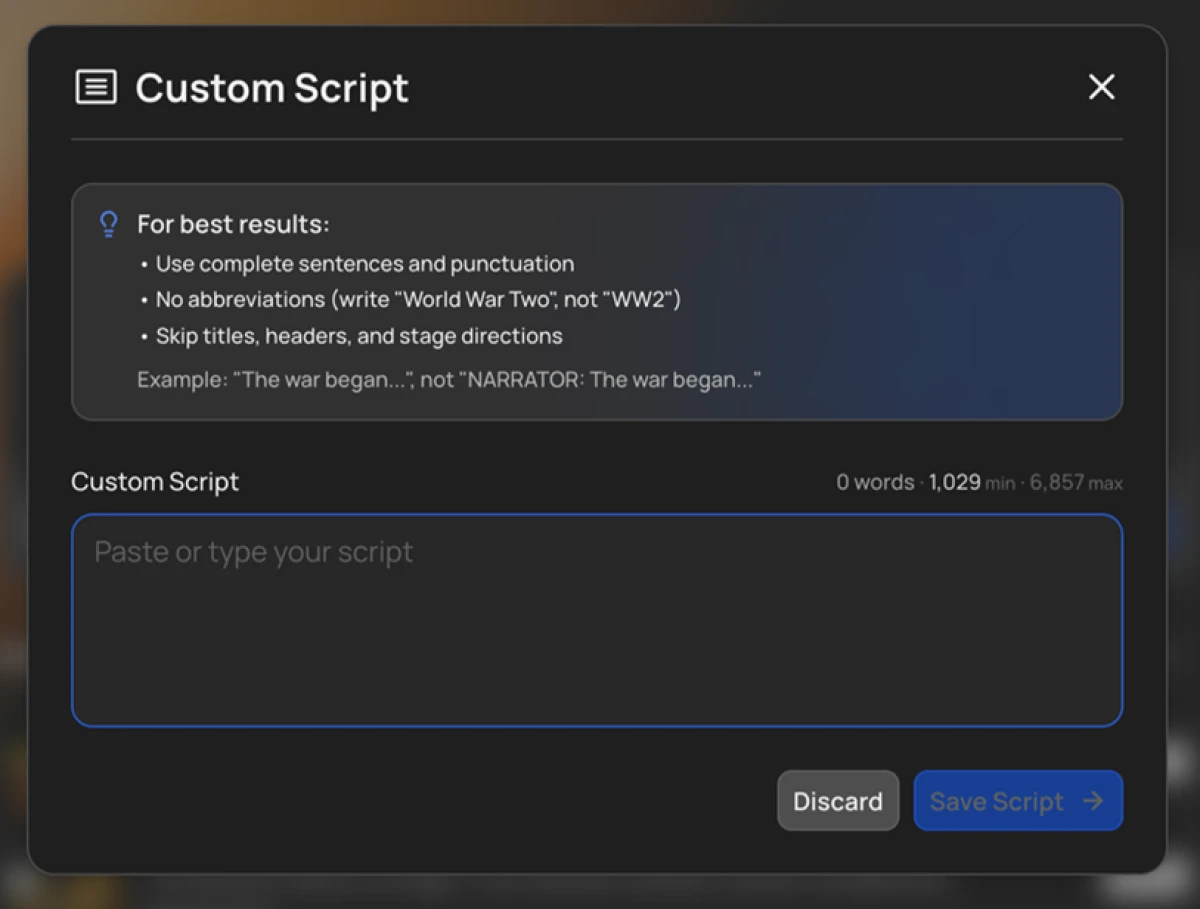
Rather than let the AI write one, I pasted a script of my own. The box accepted it with a live word count and a ceiling near 6,800 words, which maps to a long video.
The on-screen tips asked for full sentences and no stage directions. That second instruction matters more than it first appears, and I hit the reason for it later in the test.
Choosing a voice
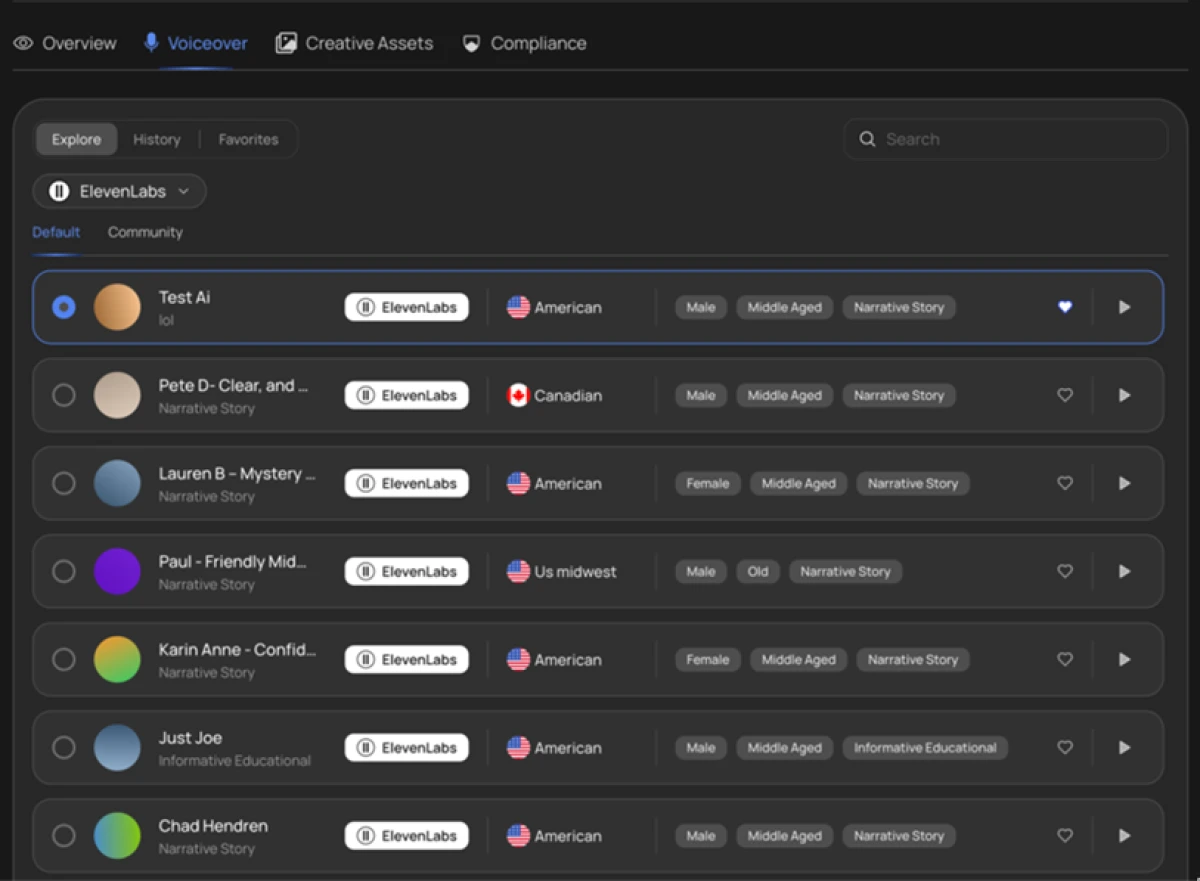
Voice selection was the strongest moment for a US audience. The library runs on ElevenLabs and carries a deep bench of American voices across male and female, with a US Midwest option and a Canadian voice adding range.
Every entry showed a tone label such as narrative or educational, plus a play button for a preview before locking one in. One caveat sits under the polish: these voices belong to ElevenLabs, not VidRush, so a voice you build a channel around can disappear when its licensing changes.
The AI avatar
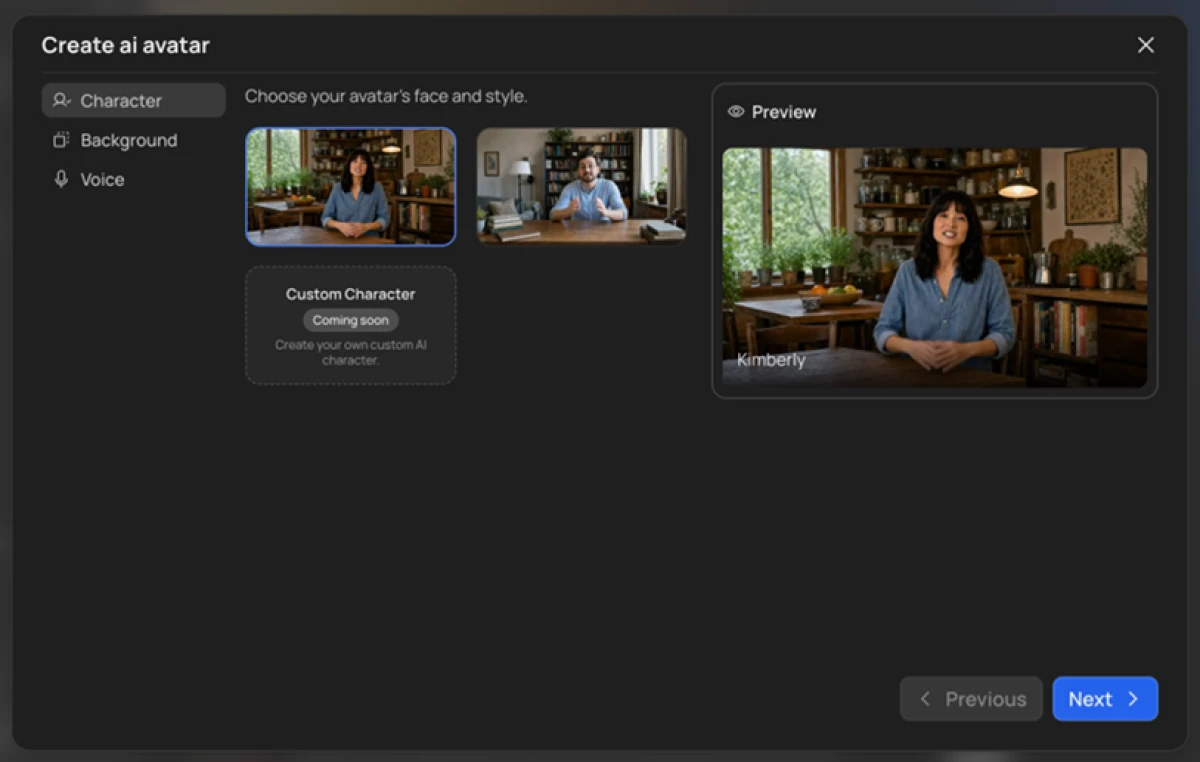
The avatar builder puts a presenter on screen without a camera. I opened it expecting to upload my own face and found that exact option, Custom Character, marked Coming soon.
For now you choose from the two preset hosts it ships with. The feature functions, but the headline promise of a custom avatar is not live yet.
Footage sourcing and the risk toggle
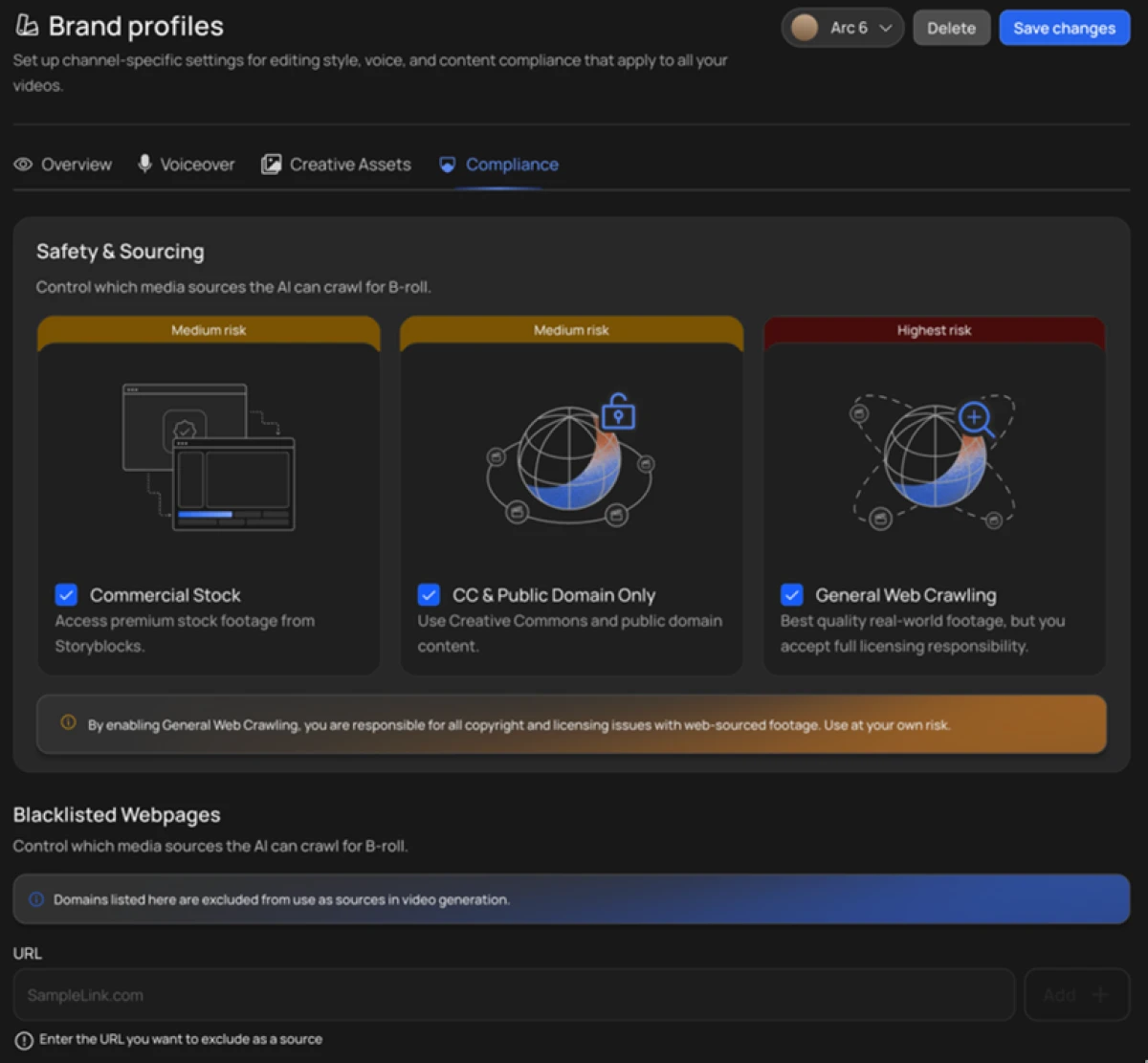
The compliance tab was more honest than I expected. It sorts footage sources by risk level, with commercial stock from Storyblocks and Creative Commons material both sitting in the safer band.
A separate switch for General Web Crawling is flagged highest risk, and VidRush states plainly that turning it on puts every copyright and licensing question on you. For anyone monetizing in the US, that one toggle decides whether your footage is clean or a liability.
Thumbnails built from proven outliers
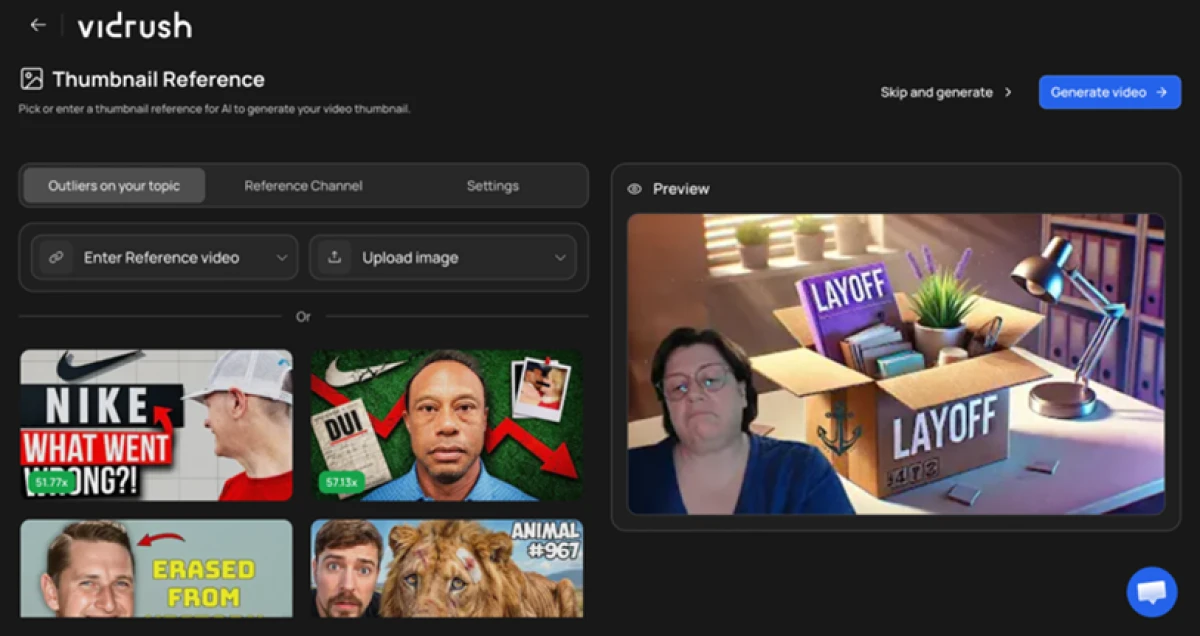
Most AI video tools forget the thumbnail. VidRush does not. Its thumbnail screen pulled high-performing reference thumbnails from my topic, each tagged with a click multiplier, and showed a generated option on the right before I hit create.
Copying an editing style from a reference video
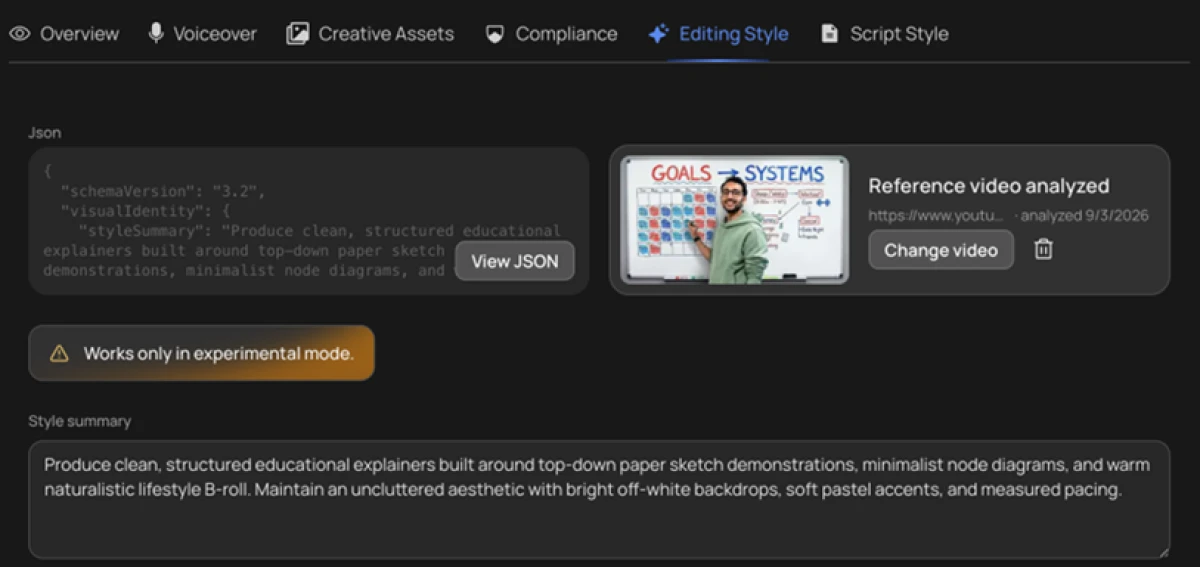
I handed VidRush a reference video and it read the editing style back to me as structured data, down to a written summary of pacing and visual identity. Impressive on paper.
The orange note set the limit: it works only in experimental mode, which ties it to the pricier model path. The capability is real and the door to it is narrow.
Where VidRush pushes back
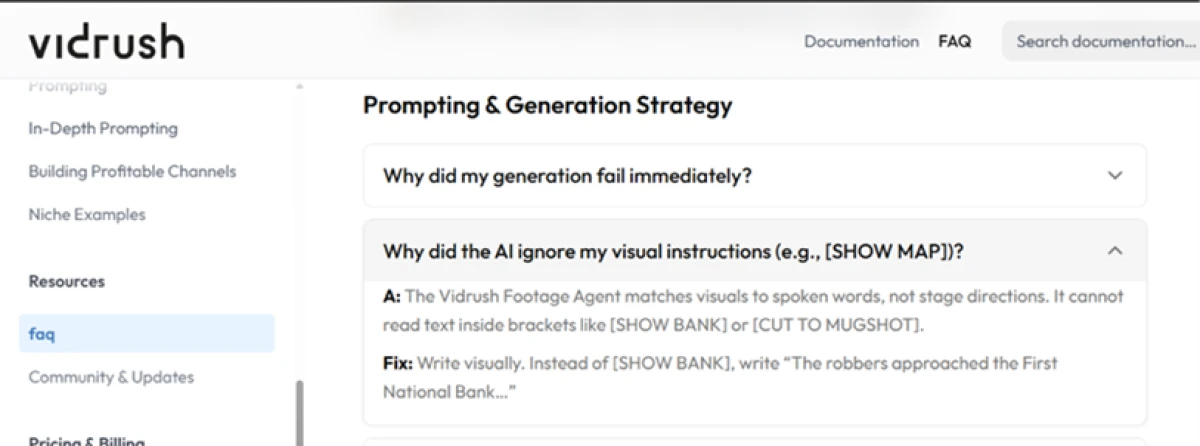
Two findings cooled my enthusiasm. The footage agent matches visuals to the words it hears, so a bracketed direction such as [SHOW MAP] gets ignored. You write the picture into the narration or you do not get it, which is exactly why the script tips warned against stage directions.
The second finding is bigger. VidRush publishes a plain list of what it will not do, and it runs long: no vertical video of any kind, no screen recordings, no reaction or compilation videos, no software tutorials.
VidRush pricing
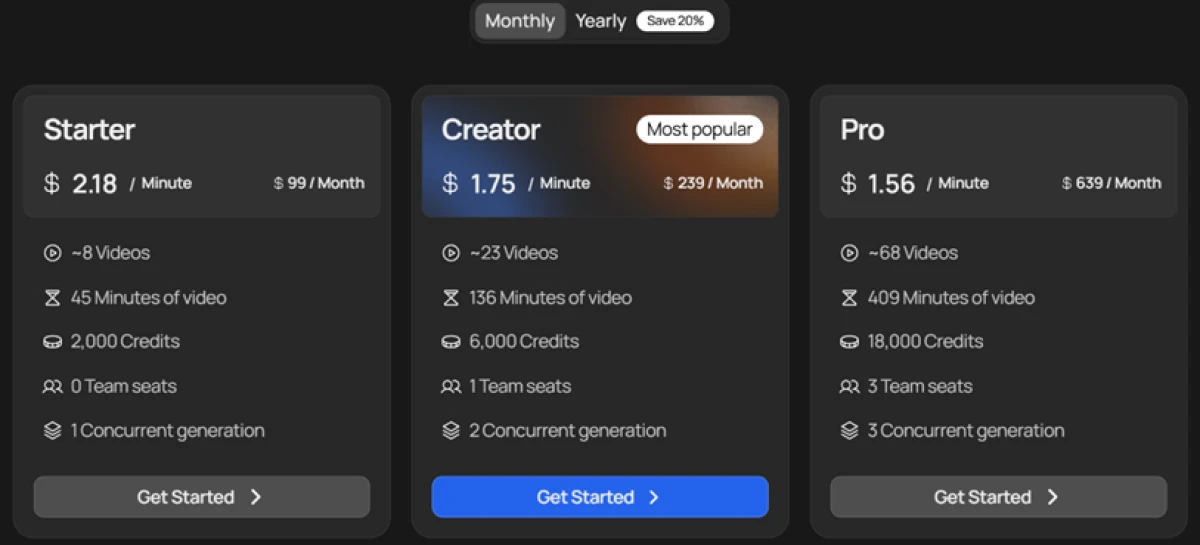
Figures taken from the official VidRush pricing page, monthly rates shown with the yearly saving noted.
| Plan | Price | What's included |
|---|---|---|
| Starter | $99 /mo | 2,000 credits · ~8 videos · 45 minutes of video · $2.18 per minute · 0 team seats · 1 concurrent generation |
| Creator Popular | $239 /mo | 6,000 credits · ~23 videos · 136 minutes of video · $1.75 per minute · 1 team seat · 2 concurrent generations |
| Pro | $639 /mo | 18,000 credits · ~68 videos · 409 minutes of video · $1.56 per minute · 3 team seats · 3 concurrent generations |
| Enterprise (Atlas) | Let's talk | Coming soon · SOC 2 · tenant-isolated workspaces · connects to your own footage archive · for newsrooms and broadcasters |
Pricing is accurate as of 19 October 2026 and was captured from the official VidRush website. Plans, prices and credit limits change often, so check the official VidRush pricing page for the current figures before you subscribe.
Pros & cons
Specific conclusions from real user reviews, not generic filler.
✅ Pros
- Documentary creators report finished long-form videos in one to two hours
- Reviewers say VidRush uploads went viral more often than editor-made ones
- Support staff named personally, with replies often inside a few hours
- Real humans on live chat, not just a ticket queue
- Output praised as professional enough to replace a paid editing team
⛔ Cons
- Stock footage often barely relates to the script it illustrates
- Short scripts come back with three to four CTAs stuffed in
- Audio can turn to robotic screeching or distorted noise on some renders
- Export crashes that burn credits without producing a file
- Editor buffers so badly that editing becomes close to impossible
- Output locked to documentary or Top 10, with few style options
- No separate voice and music tracks in the timeline
Synthesized from real user reviews on Trustpilot & Product Hunt · paraphrased, not quoted
VidRush alternatives
| VidRush AIReviewed | MagicLight AI | Fliki AI | Akool AI | Hypernatural AI | |
|---|---|---|---|---|---|
| Our Score | 6.3/10 | 6.2/10 | 6.0/10 | 5.9/10 | 5.0/10 |
| Entry paid plan | $99 / mo, billed yearly | $7.50 / mo, billed yearly | $21 / mo, billed yearly | $12 / seat / mo, billed yearly | $12 / mo, billed yearly |
| Free tier | None, no free trial | Limited free credits | 3 credits/mo, 5-min exports | 720p, 10-min avatar video | Free, short clips only |
| Max video length | 6 to 60 minutes | Up to 50 minutes | Up to 40 minutes (Premium) | Up to 60 minutes (Business) | Short-form, up to ~5 minutes |
| Core method | Script or brief to long-form, real footage sourced | Story or script to animated video, consistent characters | Script, blog or slides to narrated video | Avatar plus AI voice, translation and face swap | Prompt or script to short-form social video |
| Best for | Faceless documentary and Top 10 channels | Long animated stories with recurring characters | Fast narrated videos from existing text | Avatar videos and 155-language translation | Quick social clips, not long-form |
Who Should Use VidRush AI, and Who Should Avoid It?
VidRush produces polished long-form horizontal video with honest cost and compliance controls, but its format bans, paid-only floor and reliability gaps rule out whole categories of creator.
Who Should Use VidRush AI?
Best suited for these workflows
Faceless Documentary Channels
If you publish long history, true crime or finance videos, VidRush researches, narrates and edits a full horizontal cut in about an hour.
Top 10 and Listicle Creators
The tool is tuned for ranked roundups with technical b-roll and on-screen stats, the two formats it openly specializes in.
Creators Who Care About the Thumbnail
Outlier-referenced thumbnail generation means you leave with cover art, not just a video, which most rivals ignore entirely.
Monetizing US Creators Worried About Licensing
The risk-rated footage sourcing lets you keep every clip to safe commercial stock and Creative Commons, away from copyright trouble.
Who Should Avoid VidRush AI?
Consider an alternative if you need
Anyone Making Vertical Video
Shorts, Reels and TikTok are flatly unsupported, along with screen recordings, reactions, compilations and software tutorials.
Creators on a Tight Budget
There is no free tier and no trial, and the entry plan is $99 a month, which is steep next to rivals that start under $15.
Editors Who Want Fine Control
Users report the editor buffering badly and offering no separate voice and music tracks, so heavy manual editing is painful.
People Who Need Reliable Audio
Reviewers describe renders where audio degraded into distorted noise and exports crashed, burning credits in the process.
Our Recommendation
VidRush is a strong buy for faceless documentary and Top 10 channels that live on long horizontal video and want the whole pipeline handled in one pass. Short-form creators and anyone cost-sensitive should look elsewhere, since the format bans and $99 floor are deal-breakers rather than quirks. Before committing, confirm the custom avatar has shipped if you need it, test footage relevance on your own topic, and check whether the current credit math works for your publishing cadence.
VidRush scorecard
Rated against what a long-form AI video producer is actually built to do.
| Dimension | Verdict | Score |
|---|---|---|
| Cost transparency Per-minute price shown before you generate | Good |
8.0
|
| Output & design quality Polish and visual consistency of the cut | Good |
7.5
|
| Voice quality ElevenLabs US bench and previews | Good |
7.5
|
| Thumbnail & CTR tooling Outlier-referenced cover art | Good |
7.5
|
| Footage sourcing & compliance Risk-rated clip sources | Good |
7.5
|
| Editing & style transfer Timeline, chat edits, reference-video style | Average |
6.0
|
| Performance & reliability Render stability and editor speed | Average |
5.5
|
| Value for money Price floor, credits and no free trial | Weak |
5.0
|
| Avatar capability Presenter options and custom face | Weak |
5.0
|
| Format flexibility Orientation and supported video types | Weak |
3.5
|
| Scrutool Score Equal-weight average of all 10 dimensions |
6.3
|
A sharp long-form producer that locks out half the creators who would want it
VidRush nails the hard part of faceless video. It researches, scripts, narrates and edits a long horizontal documentary or Top 10 in about an hour, shows you the per-minute cost before you spend a credit, and does something rivals skip by generating a thumbnail from real outliers in your niche. The ElevenLabs voices sound right for a US channel, and the compliance tab is the most honest footage-sourcing screen I have tested. Then the walls go up. There is no free tier and no trial, so the cheapest way to try it is $99 a month, and bringing your own voiceover does not lower the credit burn. The custom avatar still reads Coming soon, style transfer is gated to the pricier experimental model, and users report footage that barely matches the script, audio that degrades into noise, and an editor that buffers to a standstill. Above all, the unsupported list is long: no vertical video, no Shorts, no Reels, no screen recordings, no tutorials. Faceless documentary and Top 10 channels that publish long horizontal video at volume will get real value here and should price in the Creator plan from the start. Short-form creators, budget-conscious beginners and anyone who needs vertical output should spend their money elsewhere.
Discussion
Join the discussion and share your perspective.